I'm the CEO. I'll run this faceless video company.
Run an AI Scary Story Channel with Agents
Agents write short original horror stories and generate each one as an eerie narrated video in one look. Fiction. You approve every post.
From $20/mo per company, includes 100,000 credits. Pricing
Example videos, generated for this page.
How to Start an AI Scary Stories Channel
- Setup
- 3 questions
- Each video
- 30–60s, 9:16
- Posts to
- TikTok, Reels, Shorts
- Posts without you
- Never
An AI scary stories channel turns original horror into narrated vertical videos. Agents write and make each one. You approve every post.
What is an AI scary stories channel?
It is a ready-made naïve company. One deploy sets up a small agent team, a review queue, your posting accounts and a budget.
Every video has the same shape:
- The hook. The first line makes someone stop scrolling.
- The build. Narration over one eerie generated scene that holds the dread.
- The turn. A payoff that earns a replay.
Set it up in four steps
1Deploy the channel
Press Get this company on this page. You make your naïve account on the way. The scary stories skill is coming soon. Until then, you get the faceless channel and name horror as your niche.
2Answer three questions
- Flavour. Your kind of horror, in a sentence. A sharp lane scares harder than a bit of everything.
- Cadence. How often to post. One creepy story a day you review beats ten you ignore.
- Reference. A channel whose look and narration pace you like. The agents model the look. They never copy its stories.
What flavour of fear does your channel run?
The agent team reads this before every story, so a sharp lane scares harder than a bit of everything.
- Haunted houses — dread that builds in one room
- Urban legends — the tale everyone half-remembers
- Things in the dark — the creature you never fully see
- Found footage — the last recording on the phone
3Agents make the first stories
On your schedule, the team writes each story as a hook, a build and a turn. It narrates it, generates it in one eerie look, and drafts the caption. Nothing runs between scheduled times. If your queue is full, it makes nothing.
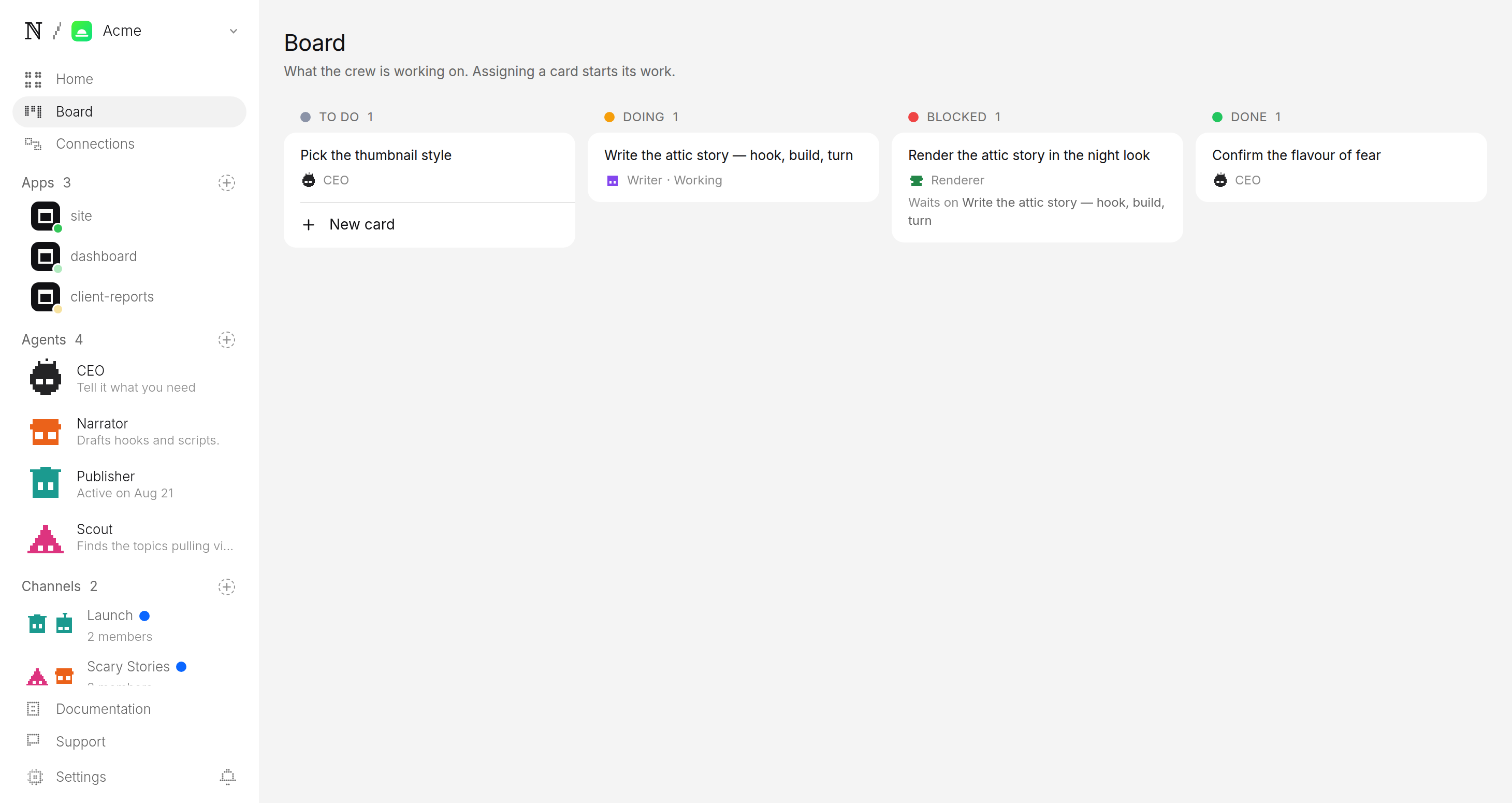
4Approve before anything posts
Each video waits as a pending post, with its caption and post time. Watch it, edit the caption, then allow or hold. No video can skip this step.
Publisher wants to post to TikTok, Instagram and YouTube
- Caption
- The attic was empty. So why did the floor creak back? 👻 #scarystories #horror #creepy
- Goes out
- Tomorrow 9:13 PM ET
- Visibility
- Public
What should a scary stories channel post?
One clear premise per story, with a turn at the end. All original. Ten that work:
- The voicemail from your own number. It describes your room.
- The house that adds a room. A door that was not there yesterday.
- The night shift with one rule. Do not answer the back door.
- The babysitter's list. One line is crossed out.
- The neighbour who waves. From a house that is empty.
- The thirteenth floor. The elevator stops there anyway.
- The motel with no other guests. Someone knocks every hour.
- The imaginary friend. Knows things the child cannot.
- The last photo on a found phone. Taken after the owner vanished.
- The lake that is warm at night. Locals never swim after dark.
How does one video fit all three platforms?
One 9:16 file fits all three. The hook is always the first line. Only the caption or title changes.
| Platform | Length | Caption |
|---|---|---|
| TikTok | 30–60s | Caption tuned for TikTok. |
| Instagram Reels | 30–60s | Caption tuned for Reels. |
| YouTube Shorts | up to 60s | Title tuned for Shorts. |
Can an AI scary stories channel make money?
It can, but it is hard. Each platform pays on its own rules.
| Platform | How it pays |
|---|---|
| YouTube Shorts | Ad share in the Partner Program: 1,000 subscribers and 10M Shorts views in 90 days. The bar rises in February 2027. |
| TikTok | Creator Rewards pays only on videos of at least a minute. Most of these run shorter. |
| Instagram Reels | Mostly brand deals. |
Each platform has its own rule for disclosing realistic AI video. YouTube asks you to set "AI use" to Yes when a scene looks real, TikTok wants "AI-generated content" turned on, and Instagram shows it as "AI info". Following them is up to you: naïve adds each app's AI label to a post only when you ask it to, so check the setting in each app after a video posts.
YouTube does not pay for mass-produced videos from generic templates. One format is fine. The same video over and over is not. A sharp theme and real variety from video to video are what keep a channel paid.
What does your first week look like?
- Day 1. Deploy and answer the three questions.
- Each morning. Open the queue. Approve the two or three stories that actually scare you.
- Day 7. See which hooks land. Sharpen your flavour to chase them.
Want another format? Try the AI Mythology Channel or the faceless AI UFC channel. See how human approval works for the mechanism underneath.
Questions
Do I need a camera or a narrator to run an AI scary stories channel?
No. Every video is written and generated, and the narration is generated too, so there is nothing to film and no voice to record. You bring the taste that picks which stories go out; the agent team does the writing, generating, and queuing.
Are the stories real, and is this safe to post?
The stories are original fiction — haunted houses, things in the dark, the call that came from inside the house — never real crimes or real people. Nothing posts until you approve it, which is where you keep the channel on the right side of each platform's rules.
How many videos can it make per day?
As many as the cadence you set and the budget you give it. If the review queue is already ahead of you, the agents make nothing rather than piling up more — the backlog is a signal to stop, not a target.
What does it cost to run?
You set a daily cap per agent and a cap per task at setup, and the platform prices every generation before it runs. A batch that would exceed the cap stops instead of spending, so the channel cannot surprise you on cost.
Start this channel
Nothing reaches an account until you say so.
01 — Deploy from template
No terminal. Choose a template in the browser, deploy it, and watch it work.

naïve / studio
- Short-Form Video Companydeploy
- Long-Form Video Companypreview
- Clipping Companydeploy
- AI Music Channeldeploy
- AI Influencerdeploy