Run an AI Music Channel with Agents
Agents write an original song, make a cover, and queue the post. You approve every song.
From $20/mo per company, includes $20 of credits. Pricing


Example videos, generated for this page.
How to Start an AI Music Channel
- Status
- Coming soon
- Each post
- One 30s song, one cover
- Posts to
- TikTok, Reels, Shorts
- Posts without you
- Never
An AI music channel posts original songs from one guideline. Agents write the song and the cover. You approve every post.
What is an AI music channel?
It is a ready-made naïve company, coming soon. One deploy sets up an agent team, a review queue, your posting accounts and a budget. The team already knows the post is the cover and the song as one short video.
Each post is built from two parts:
- The song. Written from the channel note, 30 seconds long.
- The cover. One square picture, no text, no logo and no real face, in the same mood.
The two become one 1080x1920 video: the cover centred over a blurred, darker copy of itself, with the song as the sound, as long as the song. Short-video apps take no audio-only post, so the video is what goes out.
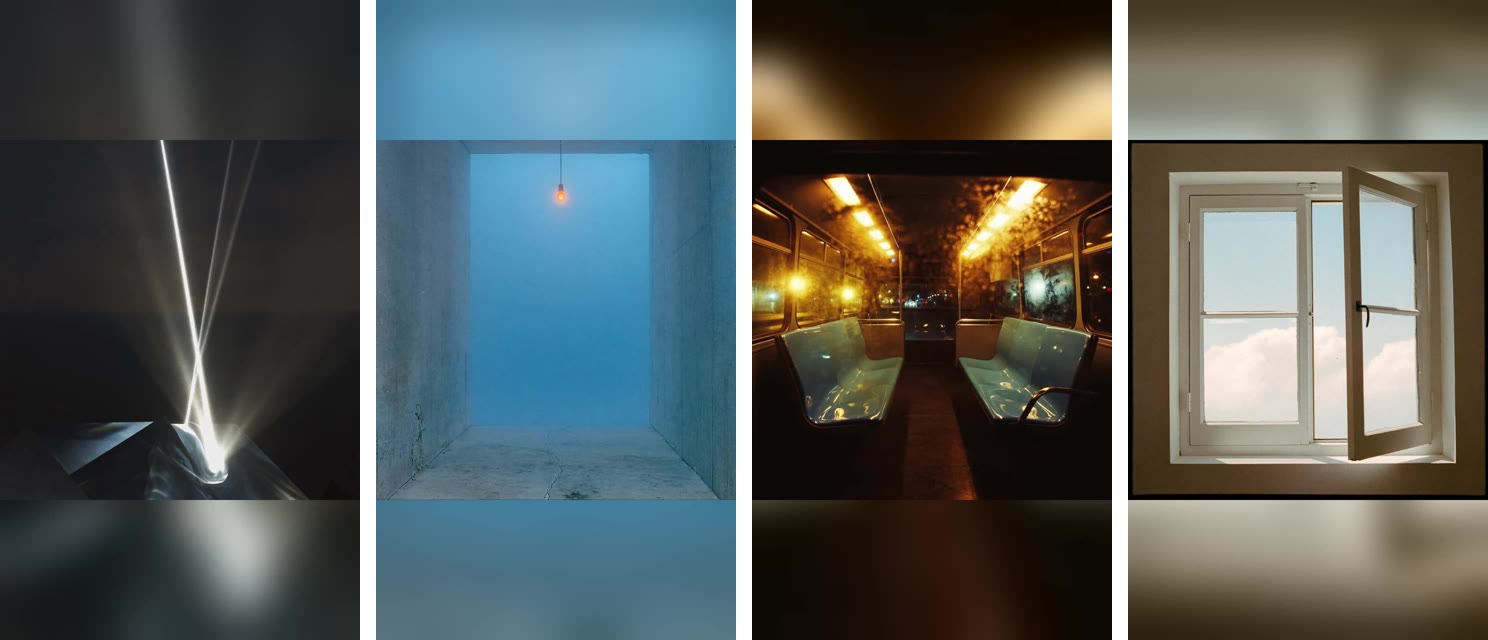
Pick a genre if you want the guideline written for you: Hardstyle, Techno, Rap or Pop. Each page plays a song made from that seed.
The team has four seats:
- Channel manager. Writes the channel note on day one, checks each caption, and files every post for your approval.
- Composer. Writes one song at a time from the channel note.
- Cover-artist. Makes the square cover and turns cover and song into the video.
- Analyst. Records each post's numbers every morning and writes a weekly report.
Set it up in four steps
1Deploy the template
Tap Deploy on this page when it ships. You make your naïve account on the way, and the team arrives knowing the post is the cover and the song as one short video.
2Answer three questions
A genre template already answered the first two. On the plain music channel:
- Genre. Pick one or type your own. The channel manager turns it into the channel's sound on day one.
- Reference. Optional. A song or channel whose sound to aim for, described in musical words and never copied.
- Cadence. Daily, three times a week, or weekly.
What genre should this music channel play?
The channel manager turns your answer into the channel note, and every song starts from it.
- Hardstyle
- Techno
- Rap
- Pop
- Lo-fi hip hop
- Synthwave
3Agents make the first song
Day one is set-up. The channel manager writes the channel note: a context seed with the tempo, drums, bass, lead, whether there are vocals, and what the songs must never be, then one line of cover direction. The cover-artist writes its cover brief and checks the machine the videos are made on.
Then the composer starts the prompt with the seed, word for word, and adds one sentence about this song. It calls the music tool once, for a 30-second song. The cover-artist makes one square cover, looks at it, and retries once if text, a logo or a face slipped in. It builds the video and checks it: one picture at 1080x1920, one sound track, and the song's length. The composer drafts a caption and the channel manager checks it. If your queue is already full, they make nothing.
4Approve before anything posts
The post is the cover and the song as one short video. It waits with its caption and post time as one pending post. Listen, edit the caption, then allow or hold. No song can skip this step.
Channel manager wants to post to TikTok, Instagram and YouTube
- Video
- Cover and song, 9:16, 30 seconds
- Caption
- First warm day. Every window open. #newmusic #pop
- Goes out
- Today 5:00 PM ET
- YouTube
- Unlisted
The first post takes 5:00 PM channel time on day one if that is an hour or more away. After that, posts go out at 5:00 PM on your cadence's days, at least a day after they are filed. On YouTube a new post goes out unlisted, so you can check it live before anyone finds it.
What should an AI music channel post?
One sound, one song at a time, all original. A channel that works picks a lane and stays in it:
- Hardstyle. 155 BPM, a distorted kick, a reverse bass, a drop in the first eight seconds, no vocals.
- Techno. 132 BPM, a rumbling kick and a slow acid loop. No festival drop.
- Rap. 90 BPM, dry drums, an 808, and original lyrics with no real names.
- Pop. 110 BPM, a bright hook you can hum, radio-clean.
- Your own. Lo-fi hip hop, synthwave, or a genre you name. The channel manager writes the seed in the same shape.
Inside the lane, only the one sentence about each song changes: a place, a time of day, a small moment. The sound stays. A new sound is a new channel.
What are the specs for each platform?
One 1080x1920 video fits all three. Only the caption changes.
| Platform | Length | Caption |
|---|---|---|
| TikTok | 30s | The mood in plain words, optional hashtags. |
| Instagram Reels | 30s | Same file. |
| YouTube Shorts | 30s | The caption's first line is the title. Goes out unlisted. |
No caption names a real artist. None carries an AI label unless you ask for one.
Can an AI music channel make money?
It can, but it is hard. Each platform pays on its own rules.
| Platform | How it pays |
|---|---|
| YouTube Shorts | Ad share in the Partner Program: 1,000 subscribers and 10M Shorts views in 90 days. The bar rises in February 2027. |
| TikTok | Creator Rewards pays only on videos of at least a minute. These run 30 seconds. |
| Instagram Reels | Mostly brand deals. |
Read each app's current rules for music before you count on a payout. YouTube does not pay for mass-produced videos from generic templates. One format is fine. The same song on a loop is not.
Each platform has its own rule for disclosing AI-generated content, music included. YouTube asks you to set "AI use" to Yes, TikTok has "AI-generated content", and Instagram shows it as "AI info". Following them is up to you: naïve adds each app's AI label to a post only when you ask it to, so check the setting in each app after a song posts.
What does your first week look like?
- Day 1. Deploy, or open a genre page and listen to the seed. Read the channel note when it lands.
- Each morning. Open the queue. Approve the song you would save.
- Day 7. The team reports which songs were saved, by subject and by mood. Keep the seed; change only what this week's songs are about.
Want video instead of songs? See the AI Media Channel.
The target
1
avg. songs a day · 20 new channels
A target, not a measured result: this template has no benchmark yet.
Questions
Can I deploy an AI music channel today?
Not yet. The template is coming soon, and the Deploy button on this page says so until it ships. The genre pages show a song made from each guideline.
Is the post a video?
Yes, a short vertical one. The post is the square cover held over the original song, one 1080x1920 video as long as the song. Nothing else moves in it.
Why not post the song on its own?
TikTok, Reels and Shorts take no audio-only post. So the cover-artist turns the cover and the song into one mp4, and that video is the only file the channel manager ever posts. The mp3 stays in your Files.
How does a genre template change the music?
Hardstyle, techno, rap and pop each ship a context seed. On day one the team copies that seed into the channel note, and every song prompt starts with it.
Can I point it at a song I like?
Yes, on the plain channel. The setup takes an optional reference: a song or channel link. The composer opens the link once and puts its sound in musical words, tempo, drums, bass, lead and mood. It never names or imitates the artist.
What does it cost to run?
You set a daily cap per agent and a cap per task at setup, and the platform prices every song before it runs. A song that would exceed the cap stops instead of spending.
Start this channel
Nothing reaches an account until you say so.
01 — Deploy from template
No terminal. Choose a template in the browser, deploy it, and watch it work.

naïve / studio
- AI Music Channelpreview
- Naive Short Form v1deploy
- Naive Long Form v1preview
- Naive Clipping v1deploy
- AI Influencerdeploy