TL;DR
- A mobile sandbox is a disposable cloud phone: an Android 13, 14 or 15 phone on demand, ready in about a minute.
- You drive it the way a person does: take a screenshot, read the UI tree, tap by point or by an element's text, id or label, type, press a key, scroll, or open a URL or deep link.
- It is the third member of the computer suite, beside the Linux sandbox and the managed browser. It is live today from the API, SDK, CLI and dashboard, where a person can watch the screen, and agents pick one up with a built-in tool.
- There is no pause and no creation fee. A device ends when you delete it, when it sits idle, or when it reaches its maximum lifetime, and it is billed in whole minutes on one ledger line.
- A device is ended automatically if the organization's balance runs out or its plan lapses, so a forgotten phone cannot drain a budget.
Some work only happens on a phone
A growing share of agent work ends at a screen that is not a browser. A mobile build needs a smoke test before it ships. A supplier's app has no web version, so the only way to check an order is to open the app. A crash report says "Android 13" and nobody on the team has one. Each of these needs a phone, and a phone on a desk does not scale, does not sit behind an API, and cannot be thrown away when the job is done.
Today we are launching the mobile sandbox: a disposable cloud phone that Naive Managed Agents boots on request and your code drives the way a person does, by looking at the screen and touching it. It is the third member of the computer suite, beside the Linux sandbox and the managed browser. The Mobile sandbox primitive page summarizes the surface; the mobile reference has every field.
One object
A mobile sandbox is a single resource, a mobile device on the wire (/v1/mobile_devices, ids prefixed mob_). It needs no Linux sandbox and has no shell. It is a screen, touch input and an app lifecycle.
| What runs | A virtual Android phone in the cloud, on demand |
| Versions | Android 13, 14 or 15 |
| Apps at create | Package names from the platform's curated app catalogue |
| Screenshot | JPEG, half the phone's resolution |
An Android phone reaches ready in about a minute, so an agent or a test run can treat a fresh phone as something it creates per task rather than a shared machine it has to book and clean up after.
Look, then touch
Every interaction is one of seven actions sent to the device's act route. They are the same whether a script, a person in the dashboard, or an agent is doing the driving.
| Action | What it does |
|---|---|
screenshot | Returns the screen as an image |
element_tree | Returns the UI hierarchy, so a tap can name an element instead of a point |
tap | Taps a point, or an element by its text, id or accessibility label |
type | Types text into the focused field |
press_key | Presses a key such as Home, Back or Enter |
scroll | Scrolls the screen |
open_url | Opens a URL or a deep link |
Screenshot pixels map one to one onto tap coordinates, so "look at the picture, tap where the button is" works without any scaling math. When a point is too brittle, tap by selector instead: { "text": "Sign in" } finds the element the way a person reads the screen. Take the next screenshot to see what an action did.
Watch it live
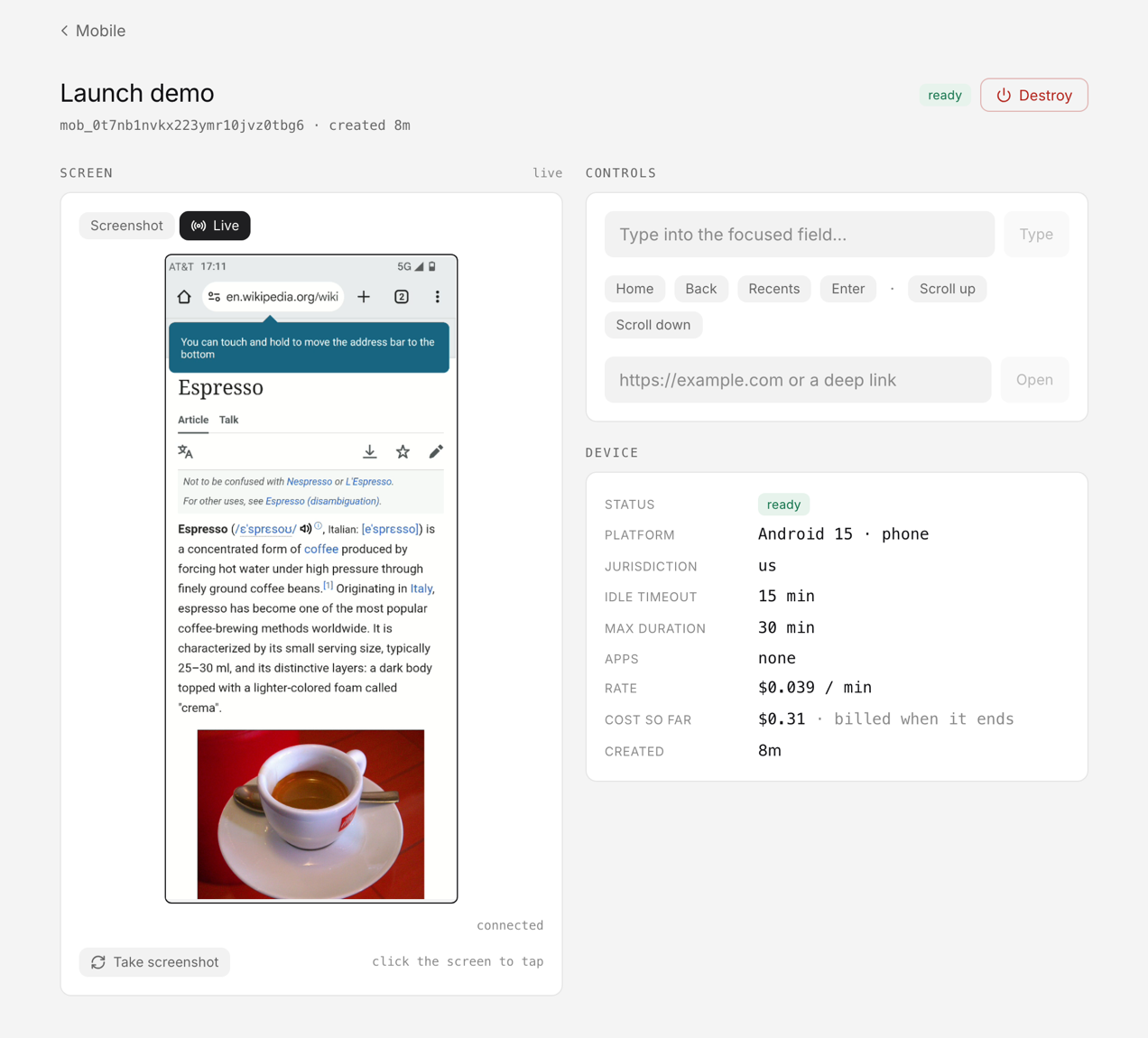
In the dashboard, under Computers → Mobile, every device has a workspace: the screen, which you click to tap; the hardware keys (Home, Back, Recents and Enter); controls to type, scroll and open a URL; and a Live toggle that swaps the screenshot for a realtime stream of the screen, in the same place and at the same size. That makes a mobile sandbox as useful for a person reviewing an agent's work as for the agent doing it. You can watch a test flow run, step in to dismiss an unexpected dialog, and hand control back.
Timers, not pause
A mobile device has no pause. It lives until you delete it or one of two timers fires, both set at create:
| Timer | Default | Range |
|---|---|---|
idle_timeout_minutes: nobody acts on it for this long | 10 minutes | 1 to 180 |
max_duration_minutes: a hard ceiling on its life | 120 minutes (60 for a phone an agent opens) | 1 to 1440 |
Two failsafes sit on top of the timers. Creating a device needs a funded balance, and a device is ended automatically if the organization's balance runs out or its plan lapses. There is no fixed number of phones per account: phones run as long as the account has credit to pay for them. A phone someone forgot about on Friday is not still running on Monday.
Driving one from the SDK and the CLI
The SDK is one method per route.
const { mobileDevices } = vetta;
let phone = await mobileDevices.create({ name: "pixel", os_version: "15" });
while (phone.status === "creating") {
  await new Promise((r) => setTimeout(r, 3000)); // about a minute to boot
  phone = await mobileDevices.get(phone.id);
}

// look.image is the screen as a base64 image
const look = await mobileDevices.act(phone.id, { type: "screenshot" });
await mobileDevices.act(phone.id, { type: "tap", x: 81, y: 1087 });
await mobileDevices.act(phone.id, { type: "tap", selector: { text: "Sign in" } });

await mobileDevices.delete(phone.id);
The CLI covers the same lifecycle, which makes it easy to script a smoke test in CI.
vetta mobile create --name pixel --os-version 15
vetta mobile screenshot mob_… --out shot.jpg
vetta mobile act mob_… --type tap --text "Sign in"
vetta mobile delete mob_…
The REST routes are the same shape, and they are also published in the platform's MCP catalogue. Details: API, SDK, CLI.
What it costs
There is no creation fee. A device costs $0.039 per device-minute ($2.34 per device-hour), billed in whole minutes from create to end, with a one-minute minimum. It appears as a single mobile line item on the organization ledger, drawn from the same prepaid balance as everything else. Phone minutes bill that balance directly: they are not held against a session's or an agent's budget cap. Because a device ends itself when idle, the bill tracks the minutes a phone is actually in use, not the minutes someone forgot to clean up.
What it is, and what it is not
Being honest about the edges:
- Agents pick up phones themselves. Beside the API, SDK, CLI and dashboard, an agent on the default harness has a built-in
mobiletool. It opens a phone on first use, sees the screenshots it takes, and saves them as files, the way it already reaches its computer. It asks before its first call, and you can watch the phone live while it works. - A phone is not bound by a browser's allowed domains.
open_urlopens any URL or deep link, so keep the tool on approval for an agent whose web reach you have narrowed. - Apps install by package name, at create. They come from the platform's curated app catalogue (there is no upload route), and there is no install on a device that is already running.
- Android, virtual, phones only. Virtual phones cover builds, flows and version-specific bugs, not a particular handset's hardware. No iPhones, tablets or watches yet.
Get started
Create a device from the dashboard's Computers → Mobile page, or with vetta mobile create. The full surface is in the mobile reference, and the computer launch post covers the Linux sandbox and browser that a mobile sandbox now sits beside.
Three ways to get started with Managed Agents
Paste one prompt into Claude Code, Codex, or Cursor and it sets Managed Agents up in your project.
Create agents, run sessions, stream events, and see cost from the terminal.
FAQ
- What is a mobile sandbox in Naive Managed Agents?
- A disposable cloud phone that Managed Agents boots on request and your code drives through screenshots, a UI tree and touch actions. It needs no Linux sandbox and has no shell; it is a screen, touch input and an app lifecycle.
- Are these real physical devices?
- Android phones are virtual phones in the cloud. That covers testing a build, driving an app with no web version, and reproducing a bug on a specific Android version, but not hardware-specific behavior like a particular handset's camera or radio.
- How do I get my app onto the device?
- Name them by package in apps at create time, for example com.example.shop, from the platform's curated app catalogue. There is no upload route, so you cannot bring your own build yet. Installing on a device that is already running is not supported yet.
- Can an agent use a phone inside a session today?
- Yes, on the default harness. An agent there has a built-in mobile tool: it opens a phone on first use, sees the screenshots it takes, and asks for approval before its first call. You can watch the phone live while it works.
- What happens if I forget to delete a device?
- It ends itself. Every device has an idle timeout (10 minutes by default) and a hard maximum lifetime (120 minutes by default, 60 for a phone an agent opens), and it is also ended if the organization's balance runs out or its plan lapses.