TL;DR
- An AI recruiting agency turns a role brief into a sourced, screened, scored shortlist.
- It is a ready-made template that runs on naïve: an agent team does the search, and you approve what goes out.
- Outreach is drafted per candidate, but nothing is sent until you approve it.
- To start, sign up for a naïve account, then deploy the Recruiting Agency template.
An AI recruiting agency turns each role brief into a scored shortlist, and it runs as a ready-made naïve template.
You sign up for naïve, deploy the template, and an agent team sources, screens, and scores candidates against the brief.
No outreach is sent and nothing reaches a client until you approve it.
What is an AI recruiting agency?
It is one ready-made template you deploy, not a stack of sourcing tools you stitch together. When you deploy the Recruiting Agency, naïve sets up a small team of AI agents, a dashboard that holds your roles and the candidate pipeline, and the budgets the agents run under.
The team divides the work the way a good desk does — described by what each part does, not by names you have to memorise:
- Sourcing searches public profiles for the candidates who match the brief.
- Outreach drafts and sequences a message per candidate, and never sends without your approval.
- Screening runs the screen and summarises the evidence for every requirement.
- Account management keeps the role brief current and reports the pipeline to the client.
How does the flow work, end to end?
The whole agency runs off one artifact: the role brief. Everything downstream is scored against it. That score — the fit-to-brief score — is simply how well a candidate meets the brief, graded one requirement at a time with the evidence attached, not a black-box ranking.
01
Sign up for naïve
Create your naïve account at app.usenaive.ai, then deploy the Recruiting Agency template.
02
Brief the role
Write the requirements the way you would for a client. This is the single source of truth every agent reads first.
03
Source against it
The team searches public profiles and matches candidates to the brief, requirement by requirement.
04
Draft outreach
A message is drafted and sequenced per candidate — and held in approval until you send it.
05
Screen and score
Screens are summarised with evidence per requirement, and a shortlist is scored on fit to the brief.
1. Sign up and deploy the template
Create your account at app.usenaive.ai, then deploy the Recruiting Agency template. The agents, the pipeline, and your approval queue all run on naïve.
2. Write the role brief
Describe the role as a list of requirements, not a paragraph. "5+ years in distributed systems," "has shipped a public API," "based in a GMT±3 timezone" — each line becomes something the team can source for and score against. The brief is editable; tighten it in week two and the next batch follows the new version.
What kind of roles will your agency recruit for?
The agent team reads this before every search, so a focused desk beats a broad one.
- Engineering — backend, infra, and platform roles
- Go-to-market — sales, marketing, and success
- Executive search — VP and C-level placements
- Generalist — whatever the client briefs this week
3. Let the team source and screen
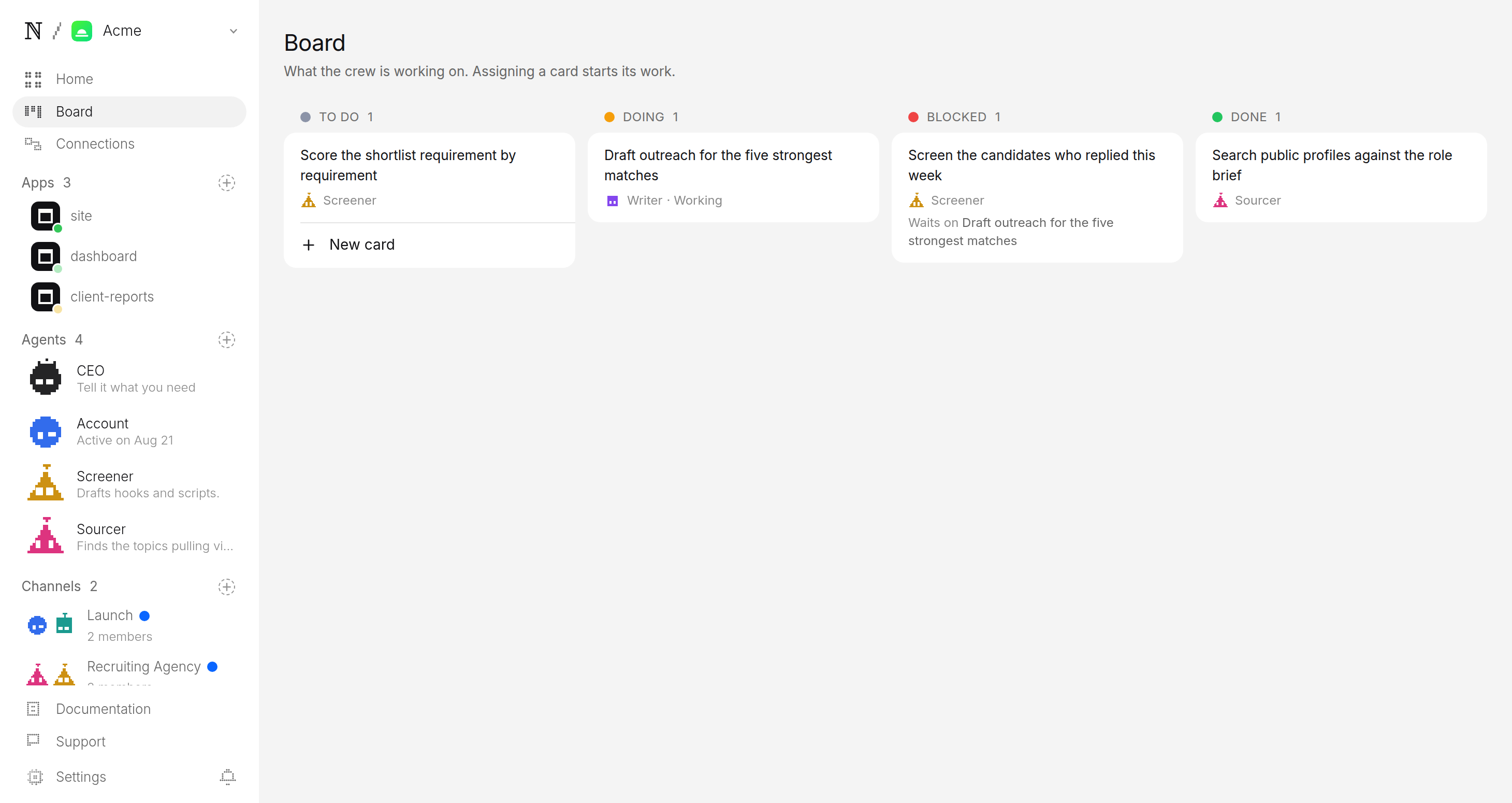
On the schedule you set, the timers fire and the team goes to work. Between runs nothing is running or billing compute — there is no loop burning money while you sleep. When a run fires, the team:
- Sources candidates from public profiles that match the brief.
- Drafts outreach per person, sequenced, and files each one as pending.
- Screens the candidates who respond, summarising the evidence for each requirement.
4. Approve the shortlist
This is the step that matters most. Each shortlist lands in a review queue scored requirement by requirement, with the evidence for every score attached:
- The fit score — how the candidate maps to the brief, line by line.
- The evidence — what backs each requirement, so you can defend the name.
- The outreach state — what has been drafted, and what is waiting on your approval to send.
You read it, adjust, and approve. Nothing reaches the client until you do.
What do you get vs. doing it by hand?
| AI recruiting agency | Sourcing by hand | |
|---|---|---|
| Candidates | Sourced against the brief, scored req-by-req | Sourced ad hoc, scored in your head |
| Outreach | Drafted per person, approved before sending | Written one at a time |
| Evidence | Attached to every requirement | Reconstructed from memory |
| Roles at once | More, without cutting the screen short | As many as your hours allow |
What keeps it in your control?
Two guarantees sit under everything the agents do, and both are enforced by the platform rather than by a model behaving well:
- A queue it cannot skip. Every outward action — each outreach message, each shortlist — parks in approval. The queue is the only door out, and a person opens it every time.
- A budget it cannot raise. You set a daily cap per agent and a cap per task. Work that would exceed the cap stops instead of spending, so a heavy sourcing week never surprises you on cost.
Account wants to send the Staff Backend Engineer shortlist to Northwind
Priya N. — Staff Backend Engineer · 92% fit to brief
8 years in distributed systems, shipped a public API at scale, GMT+1 — evidence attached for every requirement.
- Client
- Northwind
- Role
- Staff Backend Engineer
- Shortlist
- 5 candidates · 87% avg fit
Sign up for naïve, deploy the template, write one real brief, and let the first run build a pipeline on the schedule you set. When it lands, you are reviewing a scored shortlist with evidence — not starting a search from zero.
If you are building an agency on naïve, the same approval-and-budget system runs the AI automation agency and the SEO & GEO agency — the control rules in this guide are identical across all of them. For the full playbooks, see how to start an AI automation agency and how to start an SEO and GEO agency.
FAQ
- Where do the candidates come from?
- The team searches public profiles and matches them against the requirements in your role brief. Every candidate on a shortlist carries the evidence for how they meet each requirement, so you are reviewing a scored list, not a pile of raw profiles.
- Will it message candidates without me?
- No. Outreach is drafted and sequenced per candidate, but nothing is sent until you approve it. The draft, the recipient, and the sequence all wait in an approval queue, which is the only way a message leaves the account.
- How does the shortlist get scored?
- Each candidate is scored against the brief one requirement at a time, with the evidence for that requirement attached. The score is a fit-to-brief number you can audit line by line, not a black-box ranking, so you can defend every name to the client.
- What does it cost to run?
- You set a daily cap per agent and a cap per task at setup. Work that would exceed the cap stops instead of spending, so a busy sourcing week cannot surprise you on cost.