TL;DR
- An AI paid ads agency handles creative, testing, and daily budget moves for each ad account.
- It is a ready-made template that runs on naïve: an agent team does the work and you approve every spend change.
- You set a daily spend cap per agent and an account ceiling the agents can never raise.
- To start, sign up for a naïve account, then deploy the Paid Ads Agency template.
An AI paid ads agency is a ready-made naïve template: an agent team per ad account tests creative and rebalances spend.
The agents run on naïve on a schedule, under a daily cap they cannot raise. Every launch and budget move waits for your approval.
Step one is a naïve account. Then you deploy the template and connect an ad account.
What is an AI paid ads agency?
It is one ready-made template you deploy, not a stack of tools you wire together. When you deploy it, naïve sets up a small team of AI agents per account, a dashboard for the creative library and spend, and the budgets those agents run under. The team works on a schedule — between runs nothing is running or billing compute.
Each account's team covers the full loop:
- Strategy — reads the account, picks the angles worth testing, and sets the test plan.
- Creative — produces and versions the creative for every angle in the plan.
- Spend — launches campaigns, pauses losers, and proposes moving budget toward what returns.
- Reporting — files the daily ROAS report per account and names what won.
The spend side can draft and propose, but it cannot execute a launch or a budget move on its own. That is the whole safety model, and it is covered below.
What do you need before you start?
You do not need much, but three things make the first week go better:
- An account to point it at. A live ad account with enough history that there is something to read.
- A spend ceiling you are comfortable with. A daily cap per agent, plus an account ceiling, that you would be fine seeing spent in full.
- A view on what to test first. The team will find angles, but a steer — a product, a hook, an audience — focuses the first batch.
How do you set it up in five moves?
Setup is a short interview, not a configuration screen. Here is the whole shape before you touch it:
01
Sign up for naïve
Create your naïve account at app.usenaive.ai. The template runs there.
02
Deploy the template
Deploy the Paid Ads Agency template. Each account you add gets its own team of AI agents, dashboard, and budget.
03
Connect and cap
Connect the ad account and store, then set a daily spend cap per agent and a per-task cap.
04
Team tests
On your schedule, the team picks angles, versions creative, launches tests, and pauses losers.
05
You approve spend
Every launch and rebalance waits in a queue with the numbers. Approving is the only way money moves.
The interview is a handful of questions like this one — the answers steer every run, so the team tests toward the goal that actually matters for the account:
What's the primary objective for this account?
The agent team reads this before every run, so it optimizes toward the goal that matters instead of guessing.
- Purchases — optimize for ROAS on checkout
- Leads — fill the pipeline at a target cost per lead
- Add to cart — warm the funnel for retargeting
- Awareness — cheap reach to build the audience
1. Sign up for a naïve account
Create your account at app.usenaive.ai. The template deploys and runs on naïve.
2. Open the Paid Ads Agency
Start from the company page and deploy the template. You are not configuring a dozen tools — you are standing up one ready-made company that runs a team of AI agents for every account you add.
3. Connect an account and set the cap
Connect the ad account and the store behind it, then set your budget: a daily cap per agent (and an account ceiling) plus a cap per task. These are the ceiling the whole team works under. The agents can propose any spend inside it, but they can never raise it — only you can.
The ad channels are the client's own connected accounts — each account's team works only against that client's connected Meta, Google, and store, never a shared pool.
4. Let the team test and rebalance
On the schedule you set, the timers fire and each account's team goes to work:
- Researches the account and the market, then picks the angles worth testing instead of guessing.
- Produces and versions the creative for each angle, so every test ships with its own treatment.
- Launches the tests, watches them, pauses the losers, and drafts budget moves toward what returns.
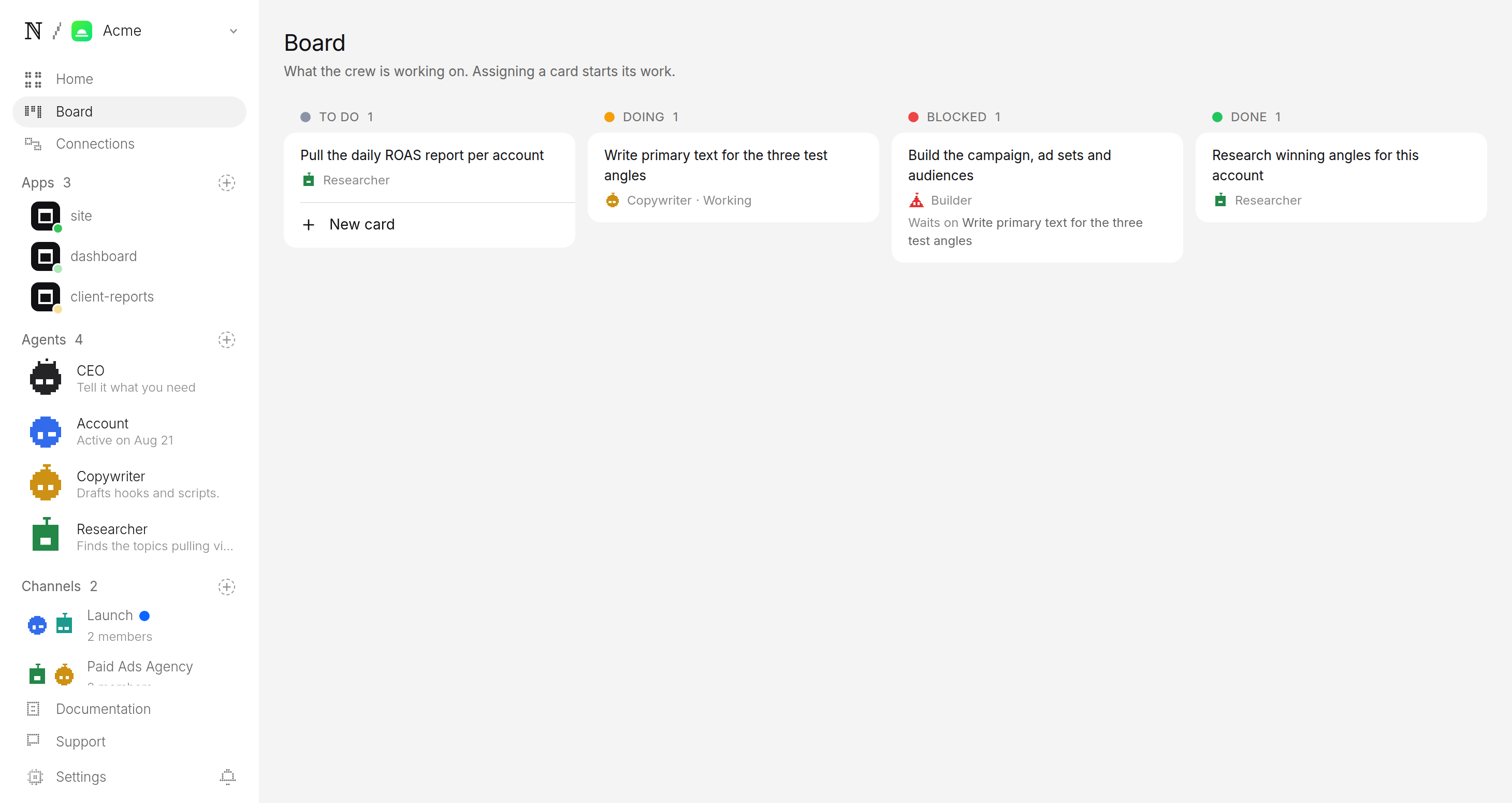
Between runs nothing is on. The team is not sitting on your account burning compute while you sleep.
5. Approve every spend change
This is the step that matters most, because this is money. Every launch and every budget move is filed as a pending change, not a live one. It lands in an approval queue with the numbers attached — the spend, the account, the expected effect.
You read it and approve or hold. Approving is the only path to a change on a live campaign; there is no setting that lets the team move budget without you.
What do you get vs. doing it by hand?
| By hand, per account | AI paid ads agency | |
|---|---|---|
| Creative | You brief and wait | Produced and versioned per angle |
| Testing | Manual launches | Angles picked, tests launched for you |
| Rebalancing | You check in all day | Losers paused, budget moved daily |
| Reporting | You assemble it | Daily ROAS report per account |
| Spend safety | Discipline | A hard cap the agents cannot raise |
The point is not that the agents are smarter than a good buyer. It is that they do the daily grind for every account at once, under a ceiling you control, so you can run more accounts without cutting the attention each one gets.
What keeps you in control?
Two guarantees sit under everything the team does, and both are enforced by the platform rather than by the model's good behaviour:
- A cap it cannot raise. You set a daily cap per agent (and an account ceiling) plus a per-task cap. Every launch and rebalance is priced first, and anything over the cap stops instead of spending.
- A queue it cannot skip. Every spend change parks in approval. The account's budget is yours; the queue is the only door out.
Every launch lands here as a pending change with the creative and the numbers attached — you read it and tap Allow, or you hold it:
Account wants to launch the Spring Sale test across Meta + Google
Spring Sale — 30% off ends Sunday
Free shipping on every order this weekend. Shop the styles everyone's adding to cart before they sell out.
- Client
- Northwind Apparel
- Channel
- Meta + Google
- Daily budget
- $180 / day
- Goes out
- Tomorrow 9:00 AM ET
What does your first week look like?
Sign up for naïve, deploy the template, connect one account, and set a cap you are comfortable with. Let the first batch of tests build. Each morning, open the queue, read the proposed launches and moves, and approve the ones that make sense. Read the daily ROAS report, see which angles won, and let the team press into them. By the end of the week you will have a feel for the accounts worth adding next.
If you want to run the same ready-made-template model on different work, the AI automation agency builds and runs internal automations for clients, and the SEO and GEO agency researches, drafts, and ships content under the same approval and budget rules you see here.
FAQ
- How does an AI paid ads agency keep spend from running away?
- You set a daily cap per agent (and an account ceiling) plus a per-task cap at setup, and every launch and rebalance is priced against that ceiling before it runs. A change that would exceed the cap stops instead of spending. The agents can propose moves inside the cap but can never raise it — only you can.
- Does the agent team move budget on its own?
- No. The team can research, produce creative, and draft launches and rebalances all day, but every spend change parks in an approval queue first. Approval is a person, every time, and it is the only way budget actually changes on a live account.
- What does it report, and how often?
- It files a ROAS report per account every day, with the winning angles named and the losers it paused. Blended ROAS is the headline metric, so you can see at a glance which accounts and angles are carrying the spend.
- How many accounts can one person run this way?
- As many as you can review. The daily grind — producing creative, launching tests, pausing losers, rebalancing — is handled per account by its own agent team, so your job narrows to approving spend changes and reading the daily reports.