TL;DR
- An AI newsletter reads your beat daily and drafts each issue in your voice, with sources.
- It is a ready-made template that runs on naïve: an agent team writes and grows it, and you approve every send.
- It also sets up a public site with a landing page, archive, and subscribe form.
- To start, sign up for a naïve account, then deploy the Newsletter template.
An AI newsletter is a ready-made template that runs on naïve: an agent team reads your beat, drafts each issue, and grows the list.
You stay the editor. Every claim is sourced, and nothing sends until you approve it.
Step one is a naïve account. Then you deploy the template and describe your beat.
What is an AI newsletter, really?
It is one ready-made company template you deploy, not a stack of tools you glue together. Deploying it sets up, in a single step, a small team of AI agents, a dashboard to manage the issue queue and subscribers, a public site with a landing page, archive, and subscribe form, and the budgets those agents run under.
The team splits the work of a real publication across a few roles:
- Reading the beat — the sources are read every day and the stories worth an issue are filed, so no week starts from a blank page.
- Drafting the issue — each issue is written in your voice from those sourced stories, with every claim linked back to where it came from.
- Growing the list — the landing page, referral asks, and social teasers run continuously, and subject lines and send times are tested issue over issue.
- Sending on your approval — once you approve an issue, it sends on the calendar you set, deliverability is watched, and what each issue did is filed back for the next one.
Nothing here runs on an always-on loop. The team works on the schedule you set; between runs there is nothing on and nothing billing compute.
What do you need before you start?
You do not need much, and that is the point. Three things make the first few issues go better:
- A clear beat. "AI for solo lawyers," "the restaurant supply chain," "mid-market devtools" — a sharp beat beats a broad one, and it tells the team exactly what to read.
- A voice to write in. A sentence or two on tone, plus a past issue or a writer you admire. The team models the voice; it does not copy anyone's words.
- A cadence you will actually edit at. One excellent issue a week you review beats three a week you rubber-stamp.
How do you set it up in five moves?
Setup is a short interview, not a configuration screen. Here is the whole shape before you touch it:
01
Sign up for naïve
Create a naïve account at app.usenaive.ai. The template and its agents run there.
02
Open the company
Deploy the ready-made template from the Newsletter company. One step sets up the agent team, the dashboard, the public site, and the budgets.
03
Describe and connect
Give the team your beat, voice, and cadence, then connect the email, site, and payment tools the publication runs on.
04
Agents read and draft
On your schedule, the team reads the beat, files stories, drafts each issue, and works the list to grow it.
05
You approve
Each issue waits in a queue with its subject line and send time. Approving is the only way it reaches the list.
1. How do you sign up?
The newsletter runs on naïve, so start by creating an account at app.usenaive.ai.
2. How do you open the company?
From your naïve account, start from the company page and deploy the template — one step sets up the agent team, the dashboard, the public site, and the budgets. The team arrives already knowing the shape of a publication — a beat, an issue, a list, a send — so you are not teaching it what a newsletter is. You are pointing it at yours.
3. How do you describe your beat and connect your tools?
The team asks you for the essentials before it sets anything up:
- Beat — what you cover, in a sentence.
- Voice — the tone each issue is written in.
- Cadence — how often an issue goes out.
What beat does your newsletter cover?
The agents read this before every run, so a sharp beat beats a broad one.
- AI for solo lawyers — tools, rulings, and practice tips
- The restaurant supply chain — prices, shortages, and deals
- Mid-market devtools — launches, funding, and migrations
- Everything in tech — a broad daily roundup
Then you connect the tools the publication runs on — the email that delivers each issue, the site that hosts the landing page and archive, and payments if you plan to charge. These answers are not thrown away after setup; they become the project context every agent reads at the start of every run, and you can edit them later. Change the beat in month two and the next issue follows the new one.
4. How does the team read, draft, and grow?
On the schedule you set, the timers — the clock the agents run on — fire and the team goes to work. When a run fires, it:
- Reads the beat and files the stories worth an issue, so each draft chases what is actually happening.
- Drafts the issue in your voice, every claim sourced, with a subject line proposed against it.
- Grows the list through the landing page, referral asks, and teasers — and tests subjects and send times so each issue learns from the last.
5. How do you approve before anything sends?
This is the step that matters most. Every drafted issue is filed as a pending send, not a live one. It lands in a review queue with everything attached:
- The issue, ready to read.
- The subject line, drafted and tested, and the proposed send time.
- Who it goes to — the segment or the whole list.
You read it, edit anything you want, and approve or hold.
What does the team do between issues?
A newsletter is more than the issue — it is the list and the loop around it. Here is how the week's work maps to what you see in the dashboard:
| Stage | What the team does | What stays yours | Where it shows up |
|---|---|---|---|
| Read the beat | Reads the sources daily and files the stories worth an issue | Which beat it reads | The story queue |
| Draft the issue | Writes it in your voice, every claim sourced | Every edit before it ships | The issue queue, pending your approval |
| Grow the list | Runs the landing page, referral asks, and teasers | — | Subscribers, up and to the right |
| Test and send | A/B tests subjects and send times, then sends once approved | The approval on every send | What each issue did |
Every row that touches the outside world — the send, most of all — still parks in approval first.
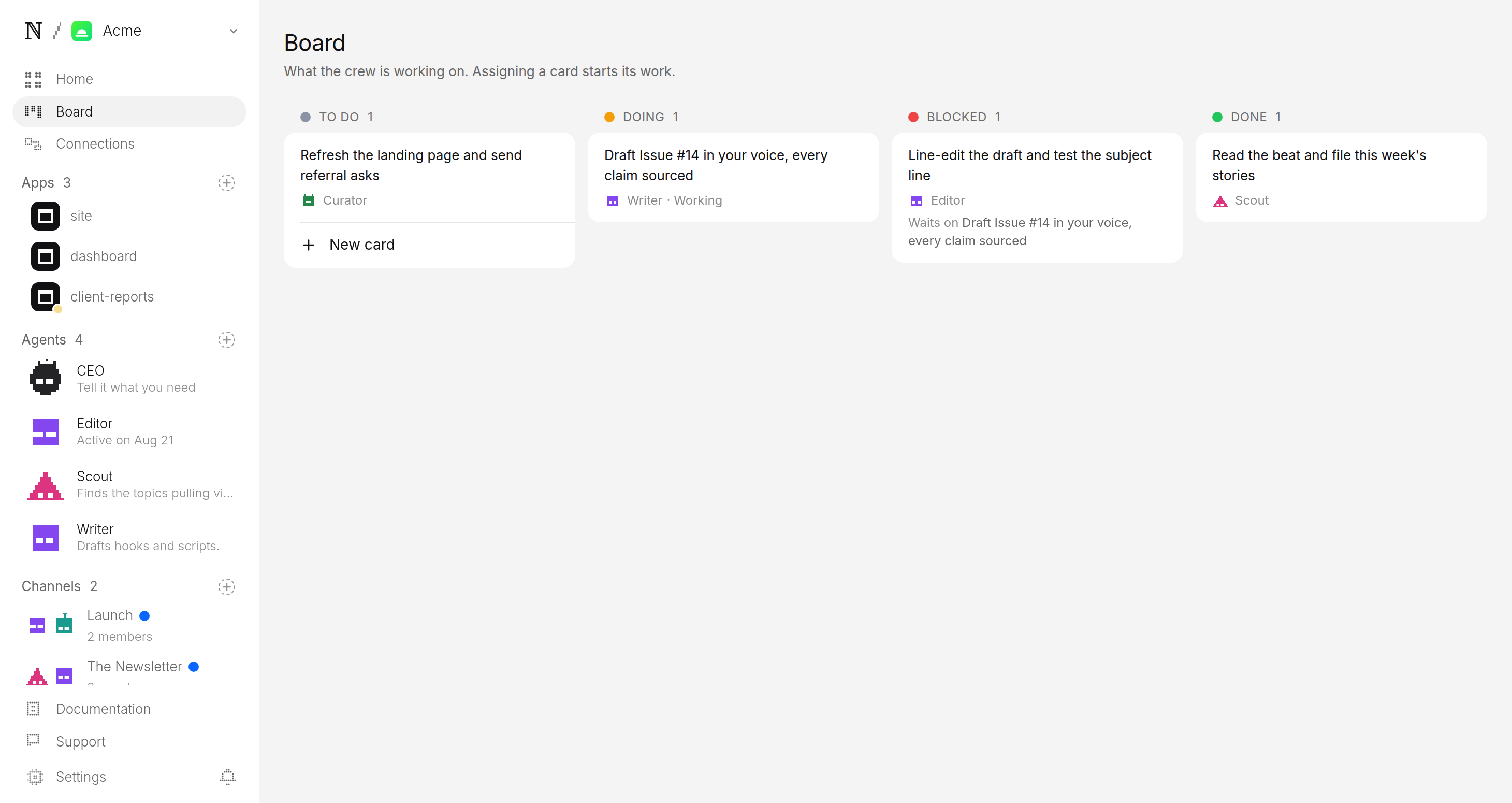
What keeps the list in your control?
Two guarantees sit under everything the agents do, and both are enforced by the platform rather than by the model's good behaviour:
- A budget it cannot raise. You set a daily cap per agent and a cap per task. Work is priced before it runs, and a run that would blow the cap stops instead of spending. The publication cannot surprise you on cost.
- A queue it cannot skip. The agents do the reading, drafting, testing, and scheduling — but the list is yours. The pending send is the only door out, and you are standing in it.
You set those caps when you deploy; the Newsletter company page lists what a run costs before you commit.
Editor wants to send Issue #14 to 4,120 readers
The model everyone's switching to this week — and the one they're quietly dropping
Three stories your inbox missed, each with the source, plus the one chart worth forwarding.
- Sends to
- 4,120 subscribers
- Goes out
- Tomorrow 7:00 AM
- From
- Your newsletter
What does your first month look like?
A realistic first month looks like this. Sign up for naïve, deploy the company, describe your beat, and connect your tools. Let the team read for a few days and draft the first issue. Open the queue, read it, tighten the lede, and approve. Watch the landing page start converting and the subject-line tests start reporting. By issue four you will see which angles land and which subject lines open, and you can tune the setup answers to chase them.
If you would rather run a service business than a publication, the AI automation agency turns the same deploy-a-ready-made-template model into client delivery, and the paid ads agency runs creative and spend under a cap. The approval and budget rules in this guide are identical across all of them — see how human approval works for the mechanism underneath.
FAQ
- Do I need to write the issues myself?
- No. The team reads your beat daily and drafts each issue from the stories it sources, in the voice you set at setup, with every claim linked back to where it came from. You stay the editor: you read the draft, tighten anything you want, and approve it. The writing happens without you at the keyboard.
- How does the newsletter grow its own list?
- A landing page and a public archive do the converting, and the team runs the growth loop around them — referral asks, social teasers, and subject-line and send-time tests that compound issue over issue. Every send still parks in approval first, so growth never comes at the cost of a message you did not read.
- Can an issue go out without me seeing it?
- No. Every issue is filed as a pending send, not a live one, and the approval queue is the only path to your list. There is no setting that lets an agent send on its own — the last step is always a person, enforced at the approval boundary rather than requested in a prompt.
- What does it cost to run?
- You set a daily cap per agent and a cap per task at setup, and the platform prices work before it runs. A run that would exceed the cap stops instead of spending, so the publication cannot surprise you on cost between issues.