TL;DR
- An AI mythology channel retells Greek, Norse, Egyptian, and folklore legends as short generated videos.
- It is a ready-made template that runs on naïve: an agent team does the work and you approve what goes out.
- Each legend is checked against the sources, and every video is labelled as AI.
- To start, sign up for a naïve account, then deploy the AI Mythology Channel template.
An AI mythology channel is a ready-made naïve template: an AI agent team, running on naïve, turns famous legends into short generated videos.
The agents check each myth against the sources, narrate it, and generate it at painterly scale. Every video waits for your approval before it posts.
Step one is a naïve account. Then you deploy the template.
What is an AI mythology channel?
It is one ready-made company template you deploy, not a pile of tools you wire together. Deploying the template sets up, in one step, a small team of AI agents, a channel dashboard to manage the queue, and the budgets those agents run under. The mythology version is a style of the faceless short-form channel — the same underlying setup, with a mythology skill pinned on every agent so it already knows the format.
Each video follows the same recognisable shape:
- One myth per video, drawn from Greek, Norse, Egyptian, or folklore traditions.
- The legend checked against the sources before a word is written, then narrated as a tight 30–60 second story.
- Generated at epic painterly scale in one consistent look, so every post is unmistakably yours.
A finished script is short — three or four beats, nothing more. A Norse episode on Ragnarök might run:
- Hook — "The gods knew exactly how the world would end. They fought anyway."
- Build — the omens stack up: the long winter, the wolf slipping its chain, the horn sounding.
- Clash — Odin, Thor, and the giants fall in a single day as the sky splits open.
- Turn — the world sinks under the sea, then rises green again. Ragnarök was the reset, not the end.
Before you start
You do not need much, and that is the point. Still, a few things make the first week go better:
- A set of traditions. "Norse only," "Greek heroes," "world folklore" — a channel with a lane beats one that retells everything.
- A reference channel. One account whose look you like. The agents model the style on it; they do not copy its videos.
- A cadence you will actually approve at. One a day you review is worth more than ten a day you ignore.
Set it up in five moves
Setup is a short interview, not a configuration screen. Here is the whole shape before you touch it:
01
Sign up for naïve
Create your naïve account at app.usenaive.ai. The template runs inside it.
02
Open the company
Start from the AI Mythology Channel. The mythology skill is already pinned, so the team knows the format on day zero.
03
Answer a few questions
The traditions you draw from, your cadence, and a reference channel to model the look on. That is the entire brief.
04
Agents produce
On your schedule, they pick a myth, check it against the sources, narrate it, and generate it at epic painterly scale.
05
You approve
Each finished video waits in a queue with its caption and AI label. Approving is the only way it posts.
1. Sign up for a naïve account
Create your naïve account. The template, its agents, and their budgets all run inside it.
2. Open the AI Mythology Channel
From your naïve account, start from the company page and deploy the template. Because mythology is a style of the faceless short-form channel, the agent team arrives already knowing the format — you are not teaching it what a legend video is, you are pointing it at your version of one.
3. Answer the setup questions
The team asks you a short interview before it sets anything up:
- Traditions — the legends your channel draws from, in a sentence.
- Cadence — how often you want to post.
- Reference — a channel or video whose look you want to model.
Which traditions does your mythology channel retell?
The agent team reads this before every run, so a tight pantheon beats retelling all of world myth.
- Greek & Roman — gods, heroes, and monsters
- Norse — Odin, Ragnarök, the nine realms
- Egyptian — the gods of the Nile and the afterlife
- World folklore — every tradition, no single lane
These answers are not thrown away after setup. They become the shared brief every agent reads at the start of every run, and you can edit them later. Narrow to Norse in week three and the next batch follows the new brief.
4. Let the team produce the first batch
On the schedule you set, timers fire and the agents go to work. Nothing runs in between: there is no AI loop grinding away in the background, burning money while you sleep. When a timer fires, the team:
- Picks a myth that fits your traditions, then checks it against the sources so the retelling is faithful, not half-remembered.
- Writes the narration as one tight story, with a caption drafted against it.
- Generates the video at epic painterly scale in one consistent look, so every post belongs to the same channel.
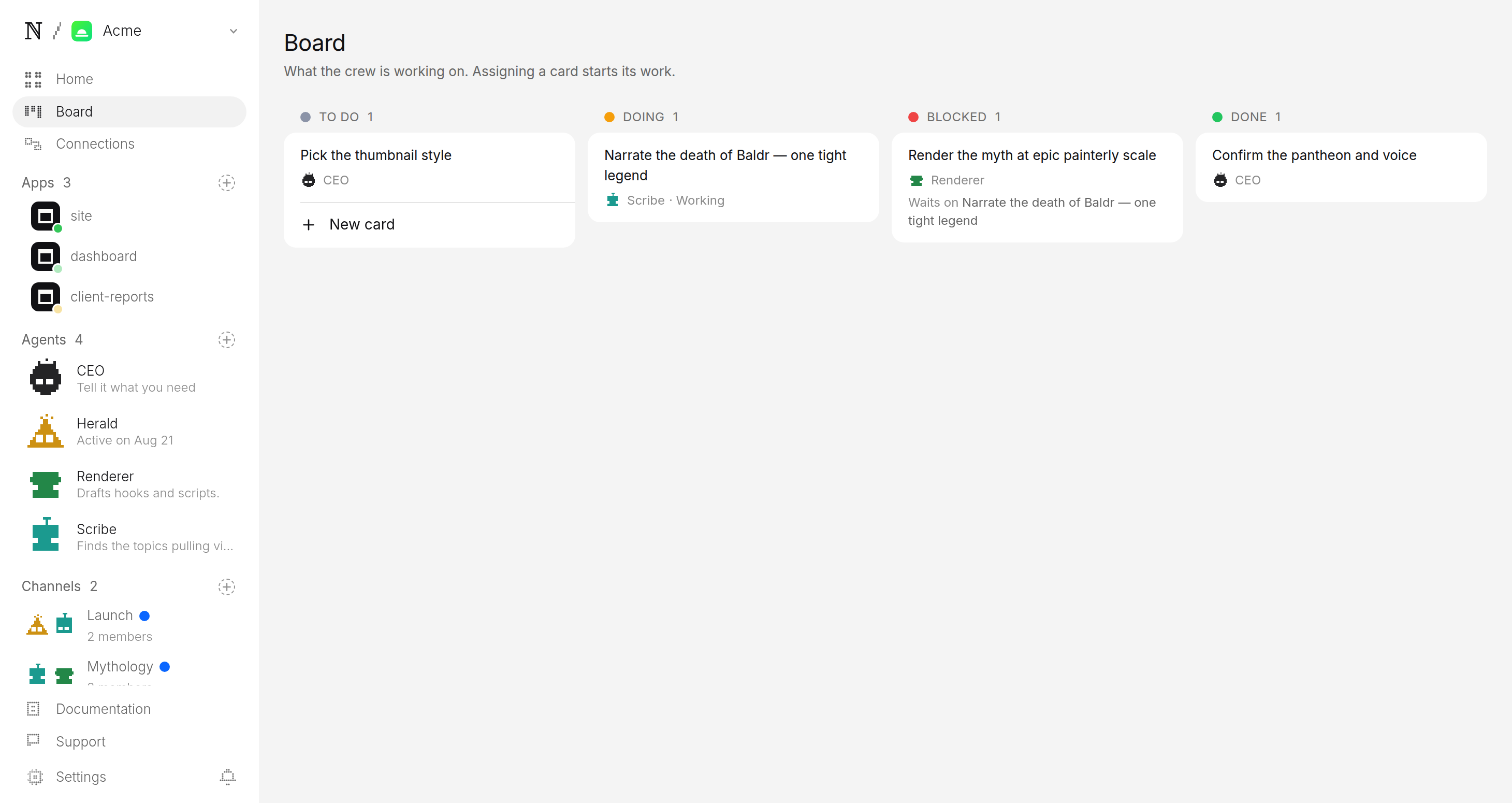
If the queue is already ahead of you, it makes nothing. The backlog is treated as a signal to stop, not a number to grow.
5. Approve before anything posts
This is the step that matters most, so it is worth being precise about. Every finished video is filed as a pending post, not a published one. It lands in a review queue with three things attached:
- The video, ready to play.
- The caption, drafted in your channel's voice.
- Where and when it is queued to go.
You watch it, edit the caption if you want, and approve or hold. Approving is the only path onto TikTok, Reels, or Shorts — there is no setting that lets a video skip you.
Herald wants to post to TikTok, Instagram and YouTube
- Caption
- Ragnarök was never the end — it was the reset. ⚡ #norsemythology #mythology #gods
- Goes out
- Tomorrow 4:22 PM ET
- Visibility
- Public
How does one video fit all three platforms?
The output is a single generated vertical file that fits every short-video surface, so you are not re-rendering for each app. The spec is the same everywhere; only the caption or title is tuned per destination:
| Destination | Aspect ratio | Length | Hook placement | What ships |
|---|---|---|---|---|
| TikTok — For You | 9:16 vertical | 30–60s | first line | generated video + caption, AI label |
| Instagram — Reels | 9:16 vertical | 30–60s | first line | same file, caption tuned for Reels |
| YouTube — Shorts | 9:16 vertical | up to 60s | first line | same file, title tuned for Shorts |
Post the same video to all three, or pick the ones your channel uses at setup. Either way, each post still parks in approval first.
What keeps the channel in your control?
Two guarantees sit under everything the agents do, and both are enforced by the platform rather than by the model's good behaviour:
- A budget it cannot raise. You set a daily cap per agent and a cap per task. Every generation is priced before it runs, and a batch that would blow the cap stops instead of spending. The channel cannot surprise you on cost.
- A queue it cannot skip. The agents work the week — research, scripts, renders, captions — but the account itself is yours. The pending queue is the only door out.
What does your first week look like?
A realistic first week looks like this. Sign up for naïve, deploy the template, and answer the setup questions. Let the first batch build on the next scheduled run. In the morning, open the queue, watch a handful of myths, and approve the two or three that are genuinely good. Repeat. By the end of the week you will have a feel for which traditions land, and you can tune the setup answers to chase them.
If you want to run a different generated format from the same kind of template, the AI Scary Story Channel writes original horror as eerie narrated videos, and the AI History Channel colorizes major events as if filmed today. The approval and budget rules in this guide are identical across all of them — see how human approval works for the mechanism underneath.
FAQ
- Do I need any footage or a camera to run an AI mythology channel?
- No. Every video is generated from a written narration and the reference look that comes with the template, so there is nothing to film and no footage to license. The imagery is original and painterly, not stock clips or archival art.
- How does it keep the myths accurate?
- Before it writes a word, the agent team checks each legend against the sources rather than retelling a half-remembered version. The script sticks to what the tradition actually says, and the video is labelled as AI so viewers always know the imagery is generated.
- How many videos can it make per day?
- As many as the cadence you set and the budget you give it. If the review queue is already ahead of you, the agents make nothing rather than piling up more — the backlog is a signal, not a target.
- What does it cost to run?
- You set a daily cap per agent and a cap per task at setup, and the platform prices every generation before it runs. As an illustration, a $20 daily cap per agent with each painterly video priced around $1–$3 keeps a steady channel well inside budget. A batch that would exceed the cap stops instead of spending, so the channel cannot surprise you on cost.