- ›
An agentic robo-advisor lets an AI agent trade inside each client's own brokerage account— which is impossible to ship safely without per-user OAuth isolation and a human gate on every order - ›Naïve's /trading primitive links a client's brokerage over OAuth (paper or live), so you never hold raw brokerage keys; account, positions, and quotes are read freely
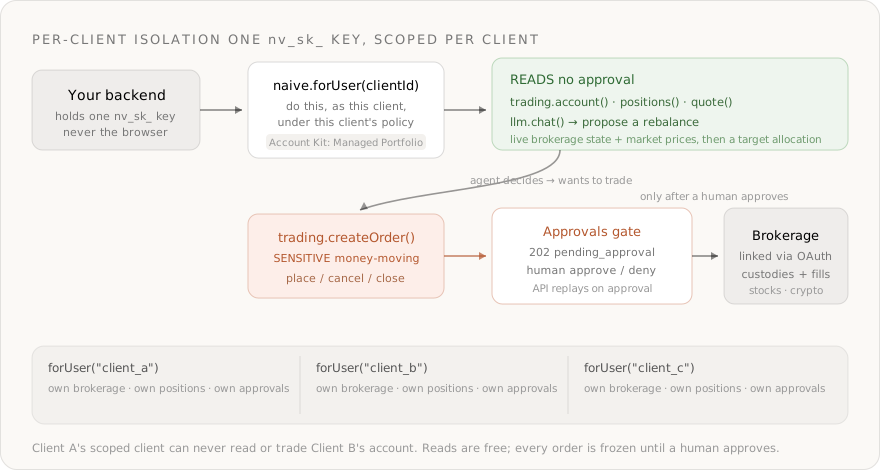
- ›Every client is an isolated tenant user; naive.forUser(clientId) scopes every call so Client A's agent can never read or trade Client B's account
- ›
The agent reasons over live positions and prices with naive.llm.chat()— a full OpenRouter wrapper over 300+ models (anthropic/claude-sonnet-4.6, openai/gpt-5.2), billed in credits - ›
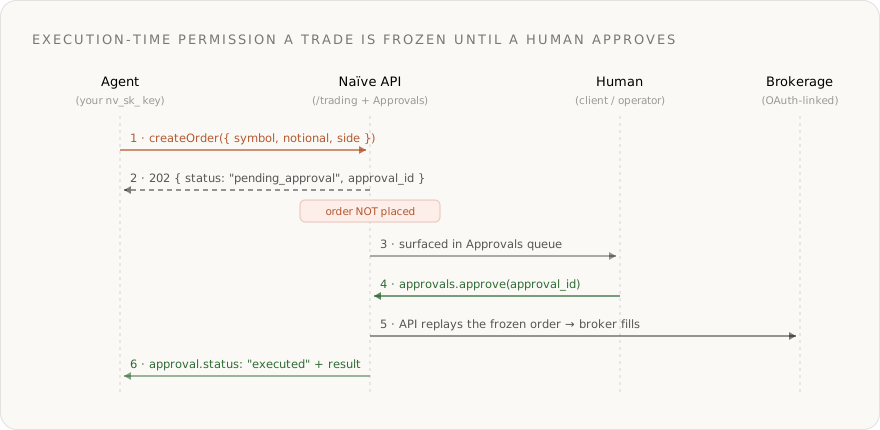
Placing, cancelling, and closing orders are approval-gated by default for tenant users: createOrder returns 202 pending_approval and only executes after a human approves— enforced server-side, not in your code - ›
The full arc— define the policy, provision a client, link a brokerage, read, decide, trade with approval, schedule a DCA loop — is ~150 lines against the current SDK
Most "AI investing agent" demos are one brokerage key, a prompt, and a hardcoded account. That's a personal script. The moment you try to run it for other people — a real robo-advisor — the model isn't the problem. Identity and authority over money are:
- The agent must trade inside each client's own brokerage account, not one shared pool.
- One client's agent must never read or trade another client's account.
- Every money-moving order needs a human in the loop, enforced the instant the order is placed — not as an afterthought you bolt on later.
Without a platform you end up building a per-client OAuth flow, encrypted token storage, a strict scoping layer, and a bespoke approval queue before you place a single share. That plumbing is the product — and it's exactly what Naïve ships as primitives.
This is a developer tutorial. Every code block runs against the current @usenaive-sdk/server, with signatures pulled straight from the docs. By the end you'll have a multi-tenant robo-advisor backend where each client gets an isolated, governed AI portfolio agent — with money-moving orders frozen for human approval by default.
Not investment advice. This tutorial shows how to wire portfolio tooling and approval gates on Naïve. It is not a recommendation to buy or sell any security, and you remain responsible for licensing, disclosures, and compliance in your jurisdiction.
What we're building
- A backend service that provisions an isolated AI portfolio agent per client.
- Each client links their own brokerage account through hosted OAuth (paper for this tutorial).
- The agent reads the client's account, positions, and live prices, then proposes a rebalance toward a target allocation with an OpenRouter model.
- The agent places the rebalancing orders — and every order freezes for approval before it executes.
- Everything is governed by one reusable Account Kit, so the policy is defined once and applied to every client.
The primitives in play, all from the docs:
| Primitive | Role in the robo-advisor | Docs |
|---|---|---|
| Users | One tenant user per client — the isolation boundary | naive.users |
| Account Kits | The client's policy: enabled primitives + approval rules | naive.accountKits |
| Trading | Per-client brokerage over OAuth: account, positions, quotes, orders | forUser(id).trading |
| LLM | OpenRouter-backed allocation decision across 300+ models | forUser(id).llm |
| Approvals | Human-in-the-loop on every money-moving order | forUser(id).approvals |
Step 0: Install and authenticate
You need a Naïve workspace key (nv_sk_...) from the dashboard → Settings → API keys. The SDK is server-only — keys are server secrets, never shipped to the browser.
npm install @usenaive-sdk/serverimport { Naive, isPendingApproval } from "@usenaive-sdk/server";
const naive = new Naive({ apiKey: process.env.NAIVE_API_KEY! });Two surfaces matter:
naive.*(the root client) acts on your default tenant user and exposes the control plane (naive.users,naive.accountKits).naive.forUser(id).*returns the same data-plane surface bound to a specific client.
That forUser scoping is the whole game. Read it as: "do this, as this client, under this client's policy."
Step 1: Define the portfolio policy once, with an Account Kit
An Account Kit is a reusable policy template. Define your "Managed Portfolio" tier a single time:
- Enable the primitives a portfolio agent needs:
tradingandllm. - Keep approval on for trading — every place/cancel/close goes through a human.
const portfolioKit = await naive.accountKits.create({
name: "Managed Portfolio",
primitives_config: {
trading: { enabled: true, requiresApproval: true }, // freeze every order
llm: { enabled: true }, // the agent's reasoning
},
});
// portfolioKit.id → reuse for every client you onboardtrading.requiresApproval: truekeeps every money-moving order behind a human, for every client on this kit.- Reads —
account,positions,quote— are never gated, so the agent can analyze freely. - Change the policy here and it moves for every client at once. It's policy, not per-user plumbing.
Per the Trading docs,
trading.order.create,trading.order.cancel, andtrading.position.closeare in the default approval set for tenant users. SettingrequiresApproval: truemakes that explicit and auditable in your code.
Step 2: Provision a client as a tenant user
A tenant user is one of your end-users. They never sign into Naïve — you manage them through the SDK. Create one per client from your own signup flow and assign the portfolio kit:
async function onboardClient(dbUser: { id: string; email: string; name: string }) {
const client = await naive.users.create({
external_id: dbUser.id, // your DB row id — stable, your source of truth
email: dbUser.email,
label: dbUser.name,
account_kit_id: portfolioKit.id, // governed by the Managed Portfolio policy
});
return client; // client.id → the handle you scope every future call with
}From here on, everything the client's agent does goes through their scoped client:
const client = naive.forUser(clientId);That single boundary is what makes the product multi-tenant-safe. naive.forUser("client_a") and naive.forUser("client_b") see entirely separate brokerage connections, positions, and approval queues. There is no shared account, no cross-tenant read path to get wrong.
Step 3: Link the client's own brokerage over OAuth
This is the step that's painful without the moat. The agent has to trade inside the client's real brokerage account. The Trading primitive handles the OAuth handshake, encrypted per-user token storage, and multi-tenant scoping — you never touch raw brokerage credentials, only your nv_sk_ key.
connect() returns an authorize_url (and a required disclosure to show the client first). They approve; the brokerage redirects back to Naïve's callback, which stores the token encrypted and marks the connection active.
const client = naive.forUser(clientId);
// Start the OAuth flow — paper for development, live for a funded account
const { authorize_url, disclosure } = await client.trading.connect({ env: "paper" });
// 1. Show `disclosure` to the client (the "Authorize naive" consent step)
// 2. Send them to `authorize_url`; they approve at the brokerage
// 3. The brokerage redirects to Naïve's callback, which stores the tokenConfirm the connection is live before you trade — this reads Naïve's stored state, so it's cheap:
const conns = await client.trading.connections();
// → [{ env: "paper", status: "active" }, ...]Connection statuses are pending → active (ready to trade) → expired/failed. OAuth access tokens are long-lived; if access is ever revoked, calls return unauthorized and you simply reconnect.
Naïve is the gateway, not the broker. It handles OAuth, encrypted token storage, multi-tenant isolation, the audit trail, and the approval gate. The connected brokerage custodies and fills the orders — Naïve never opens, funds, or KYCs an account.
Step 4: Read the account, positions, and live prices
None of this is gated — reads are free for the agent to build a picture before it decides anything.
const client = naive.forUser(clientId);
// The connected brokerage account (buying power, equity, crypto_status, ...)
const account = await client.trading.account({ env: "paper" });
// Current open positions
const positions = await client.trading.positions({ env: "paper" });
// Live quotes — crypto is the default class; pass us_equity for stocks
const cryptoQuotes = await client.trading.quote("BTC/USD,ETH/USD");
const stockQuotes = await client.trading.quote("AAPL,MSFT", { assetClass: "us_equity" });This is the agent's grounding: real holdings and real prices, scoped to this one client, pulled the same way for everyone but isolated per tenant.
Step 5: Decide the rebalance with an OpenRouter model
The LLM primitive is a full wrapper over OpenRouter — one OpenAI-compatible endpoint routing to 300+ models, billed in Naïve credits from the exact cost OpenRouter reports. You don't hold an OpenRouter key; Naïve injects it server-side. Request/response bodies are exactly OpenRouter's, so model ids carry the provider prefix and you get fallback chains and provider routing for free.
Feed the agent the live state and a target allocation, and have it return structured orders:
const client = naive.forUser(clientId);
const decision = await client.llm.chat({
model: "anthropic/claude-sonnet-4.6",
models: ["anthropic/claude-sonnet-4.6", "openai/gpt-5.2"], // fallback chain
provider: { sort: "throughput", data_collection: "deny" }, // OpenRouter routing
response_format: { type: "json_object" },
messages: [
{
role: "system",
content:
"You are a portfolio agent. Given the account, current positions, live " +
"quotes, and a target allocation, output the minimal set of orders to " +
'rebalance. Respond as JSON: { "orders": [{ "symbol", "side", "notional" }] }. ' +
"Never exceed available buying power. Keep each crypto order >= $10.",
},
{
role: "user",
content: JSON.stringify({
target: { "BTC/USD": 0.6, "ETH/USD": 0.4 },
account,
positions,
quotes: cryptoQuotes,
}),
},
],
});
const { orders } = JSON.parse(decision.choices[0].message.content);
console.log("credits used:", decision.credits_used);modeltakes a provider-prefixed id —anthropic/claude-sonnet-4.6,openai/gpt-5.2, etc. Browse them free withclient.llm.models("claude").- Because the call is scoped to the client and Account-Kit gated, per-client usage is metered and attributable.
- The model only proposes orders. It never executes anything — the next step does, behind the gate.
Step 6: Place the orders — and watch approval freeze them
Now the agent acts on the proposal. Because the Managed Portfolio kit set trading.requiresApproval: true, each createOrder is money-moving, so it doesn't execute — the API returns 202 pending_approval instead.
import { isPendingApproval } from "@usenaive-sdk/server";
const client = naive.forUser(clientId);
for (const order of orders) {
// The symbol decides the market; provide notional (dollars) or qty (units)
const res = await client.trading.createOrder({
symbol: order.symbol, // "BTC/USD"
notional: String(order.notional), // "150"
side: order.side, // "buy" | "sell"
type: "market",
time_in_force: "gtc", // crypto supports gtc / ioc
env: "paper",
});
if (isPendingApproval(res)) {
// The order was NOT placed. Surface this to the client / operator.
console.log("Pending:", res.approval_id, "—", res.title);
// A human approves (from your dashboard, or the operator key):
await client.approvals.approve(res.approval_id);
// The API replays the exact frozen order and records the fill
const resolved = await client.approvals.get(res.approval_id);
console.log(resolved.status); // "executed" → result holds the broker's order
}
}This is execution-time permission enforcement, and it matters that the API does it, not your code:
- The order is frozen server-side the instant the agent calls it — there's no window where a half-authorized order slips through to the broker.
- On approval, the API replays the exact frozen order. You never reconstruct the request or hold mutable state waiting for a human.
- It's policy, not plumbing: flip
requiresApprovalon the Account Kit and the gate moves for every client on that kit.
Prefer to block instead of webhooking? Poll until the human decides:
const outcome = await client.approvals.wait(res.approval_id); // resolves on approve/denyAnd the same gate covers the other money-moving actions — trimming an overweight position is just as frozen:
// Close 50% of a position — SENSITIVE, also returns pending_approval for tenant users
const trim = await client.trading.closePosition("BTCUSD", { percentage: 50, env: "paper" });
if (isPendingApproval(trim)) await client.approvals.wait(trim.approval_id);What's gated for trading, straight from the Trading docs:
| Action | action_type | Gated for tenant users |
|---|---|---|
| Place an order | trading.order.create | yes |
| Cancel an order | trading.order.cancel | yes |
| Close a position | trading.position.close | yes |
| Read account / positions / orders / quotes | — | no |
Calls on your own default user run un-gated; only agent calls on real tenant users are gated. That's why a robo-advisor — which acts for other people — is exactly the case the gate is built for.
Step 7: Deny is a first-class outcome
Approval isn't just a speed bump — a human can reject a bad order, and on denial the broker never receives it.
const res = await client.trading.createOrder({
symbol: "BTC/USD", notional: "5000", side: "buy", type: "market", time_in_force: "gtc", env: "paper",
});
if (isPendingApproval(res)) {
// Operator decides this is over-concentrated and denies it
await client.approvals.deny(res.approval_id, { reason: "Exceeds 60% BTC target" });
const resolved = await client.approvals.get(res.approval_id);
console.log(resolved.status); // "denied" → the order was never placed
}A pending approval resolves to exactly one terminal state: executed (with the broker's result), failed (with an error), or denied. You can list everything awaiting a decision across a client:
const { approvals } = await client.approvals.list({ status: "pending" });Or, with the CLI, run the operator side by hand while you build:
naive approvals list --status pending
naive approvals approve <approval-id>
naive approvals deny <approval-id> --reason "not authorized"Step 8: Put it together — onboard a client, run a rebalance
The whole backend, end to end:
import { Naive, isPendingApproval } from "@usenaive-sdk/server";

const naive = new Naive({ apiKey: process.env.NAIVE_API_KEY! });
// One-time: define the portfolio policy
const portfolioKit = await naive.accountKits.create({
name: "Managed Portfolio",
primitives_config: {
trading: { enabled: true, requiresApproval: true },
llm: { enabled: true },
},
});
// Per client: provision, govern, and start the brokerage OAuth flow
export async function onboardClient(dbUser: { id: string; email: string; name: string }) {
const user = await naive.users.create({
external_id: dbUser.id,
email: dbUser.email,
label: dbUser.name,
account_kit_id: portfolioKit.id,
});
const client = naive.forUser(user.id);
const { authorize_url, disclosure } = await client.trading.connect({ env: "paper" });
// Show `disclosure`, then redirect the client to `authorize_url`
return { clientId: user.id, authorize_url, disclosure };
}
// Per run: read → decide → place (gated) → resolve
export async function rebalance(clientId: string, target: Record<string, number>) {
const client = naive.forUser(clientId);
// 1. Read live state (ungated)
const [account, positions, quotes] = await Promise.all([
client.trading.account({ env: "paper" }),
client.trading.positions({ env: "paper" }),
client.trading.quote(Object.keys(target).join(",")),
]);
// 2. Decide with an OpenRouter model
const decision = await client.llm.chat({
model: "anthropic/claude-sonnet-4.6",
models: ["anthropic/claude-sonnet-4.6", "openai/gpt-5.2"],
response_format: { type: "json_object" },
messages: [
{
role: "system",
content:
"Portfolio agent. Output minimal rebalancing orders as JSON " +
'{ "orders": [{ "symbol", "side", "notional" }] }. Respect buying power; ' +
"crypto orders >= $10.",
},
{ role: "user", content: JSON.stringify({ target, account, positions, quotes }) },
],
});
const { orders } = JSON.parse(decision.choices[0].message.content);
// 3. Place each order — every one freezes for approval
const results = [];
for (const o of orders) {
const res = await client.trading.createOrder({
symbol: o.symbol,
notional: String(o.notional),
side: o.side,
type: "market",
time_in_force: "gtc",
env: "paper",
});
if (isPendingApproval(res)) {
const decisionOutcome = await client.approvals.wait(res.approval_id); // human decides
results.push({ symbol: o.symbol, status: decisionOutcome.status });
} else {
results.push({ symbol: o.symbol, status: "executed" });
}
}
return results;
}That's a complete multi-tenant robo-advisor backend: per-client brokerage OAuth, isolated reads, an OpenRouter decision, and a hard human gate on every order — with no per-user token store, encryption layer, or approval queue written by you.
Step 9: Run it on a schedule (DCA)
A robo-advisor isn't a one-shot — it runs on a cadence. Wrap the rebalance in a scheduled job; for a dollar-cost-averaging agent, just place a fixed notional buy on each tick. With the default Managed Portfolio kit, every order still freezes for approval — including scheduled ones. If you want unattended DCA for small, capped buys, create a separate Account Kit with trading.requiresApproval: false and strict notional limits in your own scheduler logic (and treat that as a deliberate policy choice, not the default).
import cron from "node-cron";

// Every weekday at 14:00 UTC, rebalance every managed client toward target
cron.schedule("0 14 * * 1-5", async () => {
  const { users } = await naive.users.list();
  for (const u of users) {
    if (u.is_default) continue;
    await rebalance(u.id, { "BTC/USD": 0.6, "ETH/USD": 0.4 });
  }
});
Crypto trades 24/7, so a crypto DCA agent can run on any cadence; equities follow market hours. Either way the per-client isolation and the approval gate ride along unchanged unless you opt a kit out of approval.
Why this needs the moat
A robo-advisor is the clearest case there is for agent-grade identity + accounts + execution-time permissions:
- Accounts, not keys. Each client links their own brokerage over OAuth. You never hold raw brokerage credentials, and you never become the broker.
- Isolation by construction.
naive.forUser(clientId)scopes reads and orders to one client's linked brokerage — there is no shared pool to leak across. - The gate is the product. An autonomous agent that moves real money is only shippable if a human can freeze and replay every order at execution time. That's not a feature you add later — it's the reason the thing is allowed to exist.
The LLM call is the easy 10%. The other 90% — OAuth, encrypted token storage, per-tenant scoping, the audit trail, and a server-side approval gate — is what Naïve hands you as primitives.
Get started
- Trading docs: usenaive.ai/docs/getting-started/trading
- Approvals: usenaive.ai/docs/getting-started/approvals
- Account Kits: usenaive.ai/docs/getting-started/account-kits
- Users (multi-tenant): usenaive.ai/docs/getting-started/users
- LLM (OpenRouter wrapper): usenaive.ai/docs/getting-started/llm
- Start here: dashboard.usenaive.ai
Drop this into any coding agent to wire up Naïve in your project:
Read https://usenaive.ai/skill.md and use it to set up Naïve in my project.
Why can't I just build a robo-advisor with a brokerage API key and an LLM?+
Does Naïve custody, fund, or KYC the accounts?+
What stops the agent from draining a client's account?+
Paper or live trading?+
Which models can the agent use, and how is it billed?+
What can the agent trade?+
Do clients ever sign into Naïve?+
Building the autonomous company infrastructure.
A governed agent profile is an AI agent with identity, spend limits, approvals, audit, and instant revoke — enforced on every action. Here's the full lifecycle.
Spend caps, human approvals, and instant revoke for AI agents must be enforced server-side — Naïve's governance gateway applies all three on every call.
Link a user's brokerage account via OAuth and trade stocks, options, and crypto through one Naïve key — account, positions, orders, and market data, with money-moving actions human-approval-gated by default. Naïve is the governed gateway; the connected brokerage is the broker.
Launch the Naïve Agent SDK: one interface for agent identity, 40+ primitives, scoped cards, and real-world standing — multi-tenant, with audit logs, spend limits, and per-user MCP sessions.