- ›
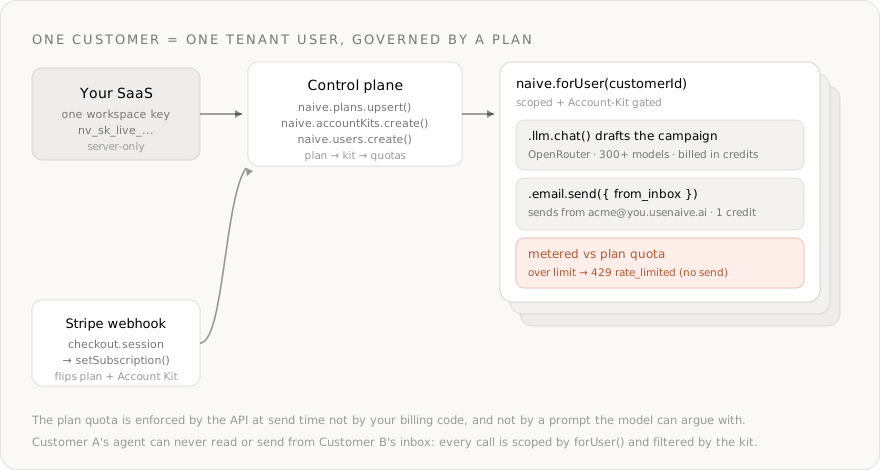
A multi-tenant email-marketing tool breaks the moment each customer needs their own sending identity and their own plan limit— you'd have to build per-tenant inboxes, a metering pipeline, and quota enforcement before writing any product - ›Naïve ships those as primitives: a tenant user per customer, an Account Kit that defines policy, an identity-aware inbox on your domain, and Customer Billing that maps a plan → kit → usage quotas
- ›
Every call is scoped with naive.forUser(customerId) and filtered by that customer's Account Kit— Customer A's agent can never read or send from Customer B's inbox - ›The agent drafts campaigns with naive.llm.chat(), a full OpenRouter wrapper over 300+ models (anthropic/claude-sonnet-4.6, openai/gpt-5.2), billed in credits
- ›
email is a metered primitive: when a tenant exceeds the plan's quota, the send returns 429 rate_limited— enforced server-side at execution time, not by your billing code - ›Upgrading a Stripe subscription flips the plan in one call (setSubscription), which re-assigns the Account Kit and lifts the quota instantly
Most "AI email marketing" demos are a single API key, a prompt, and a hardcoded SMTP sender. That works for one person. The moment you try to sell it as a product, the model isn't the hard part — identity and metering are:
- Each customer's agent must send from that customer's own address, so replies and deliverability stay theirs — not a shared relay.
- One customer's agent must never read or send from another customer's inbox.
- Each customer's plan limit has to be enforced by the system, not trusted to an agent that will happily blast 50,000 emails on a Free plan if the prompt slips.
Without a platform you end up building per-tenant inboxes with DKIM/SPF/DMARC, a usage-metering pipeline, and a quota-enforcement layer before you write a single line of product. That plumbing is the product — and it's exactly what Naïve ships as primitives.
This is a developer tutorial. Every code block runs against the current @usenaive-sdk/server, with signatures pulled straight from the docs. By the end you'll have a multi-tenant agentic email-marketing backend where each customer gets an isolated, governed agent that is gated by policy and quota enforcement so it does not exceed its plan.
What we're building
- A backend service that provisions an isolated AI email agent per customer.
- Two plans — Free (100 emails/month) and Pro (25,000 emails/month) — defined once as Account Kits plus usage quotas.
- Each customer gets their own identity-aware inbox on your domain (e.g.
acme@you.usenaive.ai). - The agent drafts a campaign with an OpenRouter model, then sends it from the customer's inbox.
- Sends are metered — when a customer hits their plan quota, the API returns
429 rate_limitedat send time. - Upgrading the customer's Stripe subscription flips the plan and lifts the quota in one call.
The primitives in play, all from the docs:
| Primitive | Role in the platform | Docs |
|---|---|---|
| Users | One tenant user per customer — the isolation boundary | naive.users |
| Account Kits | The plan's policy: which primitives are enabled | naive.accountKits |
| Customer Billing | Plans that map a key → Account Kit → usage quotas | naive.plans, forUser(id).billing |
| Per-customer identity-aware inbox on your domain | forUser(id).email | |
| LLM | OpenRouter-backed drafting across 300+ models | forUser(id).llm |
| Webhooks | Inbound replies & unsubscribes via email.received | naive.webhooks |
Step 0: Install and authenticate
You need a Naïve workspace key (nv_sk_...) from the dashboard → Settings → API keys. The SDK is server-only — the key is a server secret, never shipped to the browser.
npm install @usenaive-sdk/serverimport { Naive } from "@usenaive-sdk/server";
const naive = new Naive({ apiKey: process.env.NAIVE_API_KEY! });naive.*(the root client) acts on your default tenant user and exposes the control plane (naive.users,naive.accountKits,naive.plans).naive.forUser(id).*returns the same data-plane surface bound to a specific customer (email,llm,billing).
That forUser scoping is the whole game. Read it as: "do this, as this customer, under this customer's plan."
Step 1: Define the plans once — as Account Kits + quotas
A plan in Customer Billing maps a key to an Account Kit (what the tenant may do) plus quotas (how much, per period). Define the policy first.
Each kit just needs the email and llm primitives enabled — that's all an email agent uses:
const freeKit = await naive.accountKits.create({
  name: "Email — Free",
  primitives_config: {
    email: { enabled: true },
    llm: { enabled: true },
  },
});

const proKit = await naive.accountKits.create({
  name: "Email — Pro",
  primitives_config: {
    email: { enabled: true },
    llm: { enabled: true },
  },
});
Now map each plan key to its kit and its monthly send quota. email is one of the metered primitives (seo, aeo, email), so the number you put here is the hard ceiling Naïve enforces:
await naive.plans.upsert({
  key: "free",
  name: "Free",
  accountKitId: freeKit.id,
  quotas: { email: 100 },        // 100 sends / period
  period: "month",
});

await naive.plans.upsert({
  key: "pro",
  name: "Pro",
  accountKitId: proKit.id,
  stripePriceId: "price_123",    // your Stripe price for the Pro plan
  quotas: { email: 25000 },      // 25k sends / period
  period: "month",
});

const { plans } = await naive.plans.list();- The quota is per primitive, per period —
{ email: 100 }means 100 successful sends this month. stripePriceIdis optional and only used to tie the plan to your Stripe price; your app still owns the actual Stripe charge.- Metering and quota enforcement are free — they add no credit cost on top of the sends themselves.
Step 2: Provision a customer and subscribe them to a plan
When your app signs up a new customer, create a tenant user for them. Pass your own DB id as external_id so you can map back later:
const acme = await naive.users.create({
  external_id: "acme_db_uuid",
  email: "ops@acme.com",
  label: "Acme Corp",
});
Then give them a subscription. setSubscription with assignKit (default true) also applies the plan's Account Kit to the tenant in the same call — so subscribing is the single act that grants both the permissions and the quota:
// Seed every new signup on Free so they're metered from day one
await naive.forUser(acme.id).billing.setSubscription({
  planKey: "free",
  status: "active",
});
Note: Tenants without a subscription are not quota-limited. Seed a free-plan subscription on signup if you want every customer metered — otherwise an unsubscribed tenant can send unbounded.
You can read the rollup at any time:
const usage = await naive.forUser(acme.id).billing.usage();
// { plan: "free", status: "active", period: "month",
//   quotas: { email: 100 }, usage: { email: 0 } }
Step 3: Give the customer an identity-aware inbox
Email is one of the most fundamental primitives in Naïve. Every company gets a system domain auto-provisioned on registration, and inboxes are created on it. First confirm the domain is active (it may start pending_dns until the provider records verify):
const res = await fetch("https://api.usenaive.ai/v1/domains", {
  headers: { Authorization: `Bearer ${process.env.NAIVE_API_KEY}` },
});
const { domains } = await res.json();
// → [{ id, domain: "you.usenaive.ai", status: "active" }]
Now provision the customer's own sending identity. Each inbox is scoped to the tenant user and is the only address that customer's agent can send from:
const inbox = await naive.forUser(acme.id).email.createInbox({
  local_part: "acme",
});
// → { id: "inbox-uuid", address: "acme@you.usenaive.ai", status: "active" }- Replies land back in this inbox, so deliverability and reputation stay per-customer.
- DKIM, SPF, and DMARC are configured automatically for the domain — you don't touch DNS for the system domain.
- A customer can have several inboxes (
acme@,acme-news@); the agent can only send from inboxes it owns.
Step 4: Draft the campaign with an OpenRouter model
The llm primitive is a full wrapper over OpenRouter — one OpenAI-compatible endpoint over 300+ models, with the request/response bodies passed through exactly as OpenRouter defines them. You don't manage an OpenRouter key; Naïve holds it and bills each call in credits.

Because the body is OpenRouter's, you get its controls for free — a models[] fallback chain, a provider{} routing object, and response_format for structured output. Here the agent returns a subject line and body as strict JSON:
const draft = await naive.forUser(acme.id).llm.chat({
  model: "anthropic/claude-sonnet-4.6",
  models: ["anthropic/claude-sonnet-4.6", "openai/gpt-5.2"], // fallback chain
  messages: [
    {
      role: "system",
      content:
        "You write concise B2B marketing emails. Return JSON only: " +
        '{ "subject": string, "body": string }. Body is plain text, under 120 words.',
    },
    {
      role: "user",
      content:
        "Audience: ops leaders at mid-market logistics firms. " +
        "Goal: book a demo of our route-optimization tool. One clear CTA.",
    },
  ],
  response_format: { type: "json_object" }, // forwarded to OpenRouter as-is
});

const { subject, body } = JSON.parse(draft.choices[0].message.content);
console.log("credits:", draft.credits_used);response_format,temperature,tools,streamand the rest are forwarded straight to OpenRouter — see their API reference.- The typed
forUser(id).llmroute is Account-Kit gated and per-customer, so a customer whose kit disablesllmgetsforbiddeninstead of a draft. - LLM cost is billed from OpenRouter's returned
usage.cost($0.05 = 1 credit) and is separate from the email send quota.
Step 5: Send from the customer's own inbox — metered automatically
Sending requires the inbox UUID you're sending from. This enforces identity: the agent can only send from an address it owns. Loop the campaign over the recipient list:
const recipients = ["lead1@corp.com", "lead2@corp.com" /* … */];

for (const to of recipients) {
  const sent = await naive.forUser(acme.id).email.send({
    from_inbox: inbox.id,
    to,
    subject,
    body,
  });
  // → { id: "msg-uuid", status: "sent", credits_used: 0.016 }
}
Every successful send costs 0.016 credits and — because email is a metered primitive — records one usage event against Acme's plan quota for the period. You didn't write any metering code; subscribing them in Step 2 is what turned it on.
Step 6: The plan ceiling is enforced at send time
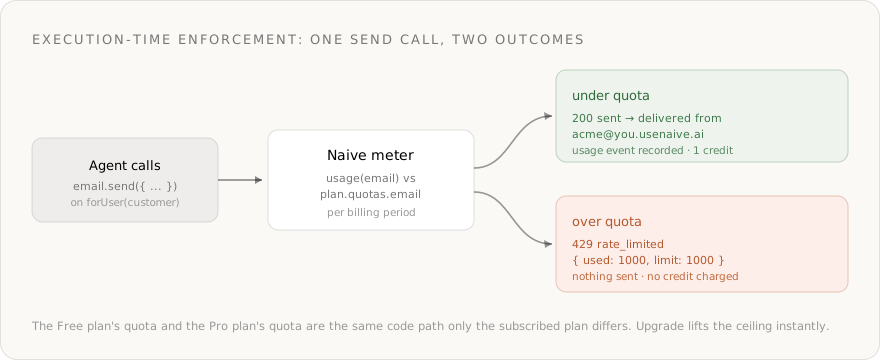
This is the part you can't fake with a prompt. Once Acme has sent 100 emails this month on the Free plan, the 101st send does not go out — the API returns 429 rate_limited before anything is delivered.
Every SDK method throws a typed NaiveError on a non-2xx response, so you handle the ceiling explicitly:
import { Naive, NaiveError } from "@usenaive-sdk/server";

try {
  await naive.forUser(acme.id).email.send({ from_inbox: inbox.id, to, subject, body });
} catch (err) {
  if (err instanceof NaiveError && err.status === 429 && err.code === "rate_limited") {
    // Plan quota exceeded — stop the run and prompt an upgrade.
    // Nothing was sent and no credit was charged for this call.
    await promptUpgrade(acme.id);
  } else {
    throw err;
  }
}
The raw error body carries the counts so you can show them in your UI:
{ "error": { "code": "rate_limited",
  "message": "Plan quota exceeded for 'email' (100/100 this period)",
  "used": 100, "limit": 100 } }
The enforcement lives in the API, not in your loop and not in the model's system prompt. A jailbroken agent, a buggy retry, or a customer pasting 10,000 addresses all hit the same wall: usage.email vs plan.quotas.email, checked on every call.
Step 7: An upgrade lifts the quota instantly
Your Stripe webhook is the trigger. When Acme upgrades to Pro, your checkout.session.completed / customer.subscription.updated handler calls setSubscription with the new plan key. Because assignKit defaults to true, the same call re-assigns the Pro Account Kit — lifting both permissions and the quota on the next send:
// Inside your verified Stripe webhook handler
await naive.forUser(acme.id).billing.setSubscription({
  planKey: "pro",
  status: "active",
  stripeCustomerId: event.data.object.customer,        // "cus_123"
  stripeSubscriptionId: event.data.object.subscription, // "sub_123"
  currentPeriodEnd: "2026-07-01T00:00:00Z",
});

const usage = await naive.forUser(acme.id).billing.usage();
// → { plan: "pro", quotas: { email: 25000 }, usage: { email: 100 } }- No redeploy, no per-tenant config edit — the policy change is one API call.
- Downgrades work the same way: set
planKey: "free"(orstatus: "canceled") and the lower ceiling applies immediately. - The Free and Pro paths are the same code — only the subscribed plan differs.
Step 8: Close the loop — replies, unsubscribes, and consent
A real campaign generates replies and unsubscribe requests, and you must honor them. Before you send at scale, collect consent the way your counsel expects (CAN-SPAM in the US requires a valid physical address, a clear way to opt out, and honoring unsubscribes within 10 business days — and many regions add stricter consent rules). Naïve handles delivery and inbound events; you own list consent and suppression.
Subscribe to the email.received event so an inbound message resumes your agent. The subscription secret is shown once — store it and use that same value when verifying signatures:
const sub = await naive.webhooks.create(
  "https://app.example.com/api/webhooks/naive",
  ["email.received"],
);
// persist sub.secret — e.g. process.env.NAIVE_WEBHOOK_SECRET = sub.secret
Verify the signature with the stored subscription secret, then read the message and act — here, suppressing anyone who replies "unsubscribe":
import { verifyWebhookSignature } from "@usenaive-sdk/server";

const WEBHOOK_SECRET = process.env.NAIVE_WEBHOOK_SECRET!; // the sub.secret you saved above

export async function POST(req: Request) {
  const raw = await req.text();
  const sig = req.headers.get("x-naive-signature") ?? "";
  if (!verifyWebhookSignature(WEBHOOK_SECRET, raw, sig)) {
    return new Response("bad signature", { status: 401 });
  }

  const { event, data } = JSON.parse(raw); // data.tenant_user_id = the customer
  if (event === "email.received") {
    const full = await naive.forUser(data.tenant_user_id).email.getEmail(data.email_id);
    if (/unsubscribe/i.test(full.body ?? full.snippet ?? "")) {
      await suppress(data.tenant_user_id, full.from);
    }
  }
  return new Response("ok");
}
Deliveries are HMAC-signed and retried (3 attempts), and data.tenant_user_id keeps every inbound event scoped to the right customer.
Going further: a customer's own domain or ESP is approval-gated
The system domain works out of the box. If a customer wants to send from their own domain or connect their own ESP/CRM (HubSpot, Mailchimp, a custom SMTP via Connections), that's a higher-trust action — and connecting a third-party service is approval-gated by default for tenant users.
A gated call doesn't throw; it returns HTTP 202 with a pending status you discriminate with isPendingApproval:
import { isPendingApproval } from "@usenaive-sdk/server";

const conn = await naive.forUser(acme.id).connections.connect("mailchimp");
if (isPendingApproval(conn)) {
  // Frozen until a human approves it in the Approvals queue (conn.approval_id).
  // The action replays automatically on approval — see /docs/getting-started/approvals
} else {
  // redirect the customer to conn.redirectUrl to finish OAuth
}
You get two independent layers of execution-time enforcement on the same product: quota (429 on every metered send) and approval (202 on connecting new authority). Both live in the API, not in a prompt.
What Naïve handles for you
| What | How it works | Cost |
|---|---|---|
| Per-customer isolation | One tenant user per customer; every call scoped by forUser() and filtered by the kit | Free |
| Plan → policy → quota | naive.plans.upsert maps a key → Account Kit → usage quotas | Free |
| Quota enforcement | Metered email sends return 429 rate_limited at the ceiling | Free |
| Identity-aware inboxes | Per-customer addresses on your domain, DKIM/SPF/DMARC configured | Free to create |
| Sending | email.send from the customer's own inbox | 0.016 credits / email |
| Drafting | llm.chat over OpenRouter, 300+ models | OpenRouter cost ($0.05 = 1 credit) |
| Inbound replies | email.received webhook, HMAC-signed and retried | Free |
| Subscriptions | billing.setSubscription flips plan + Account Kit in one call | Free |
Costs
- Metering and quota enforcement: free — no credit cost beyond the sends themselves.
- Each email send: 0.016 credits, deducted on success (a 429 charges nothing).
- Each draft: the exact OpenRouter token cost, converted at $0.05 = 1 credit.
- Inbound webhooks and inbox creation: free.
- See usenaive.ai/docs/getting-started/credits for current rates.
Get started
- Get a key at dashboard.usenaive.ai → Settings → API keys
- Define your plans — create Account Kits and
naive.plans.upsertwithemailquotas - Provision customers —
naive.users.create+billing.setSubscription - Give each an inbox —
forUser(id).email.createInbox - Draft and send —
forUser(id).llm.chatthenforUser(id).email.send - Wire Stripe — flip plans on your subscription webhook
The platform isolates each customer, drafts and sends from their own identity, and stops them at their plan's ceiling. You write the product.
- Customer Billing: usenaive.ai/docs/getting-started/customer-billing
- Email primitive: usenaive.ai/docs/getting-started/email
- LLM primitive: usenaive.ai/docs/getting-started/llm
- Account Kits: usenaive.ai/docs/getting-started/account-kits
- Full documentation: usenaive.ai/docs
Why can't I just build a multi-tenant email tool with SMTP and an LLM?+
How does Naïve isolate one customer from another?+
What exactly is enforced 'at send time'?+
Which models can the agent use, and how is it billed?+
Do my customers ever sign into Naïve?+
How do upgrades and downgrades work with Stripe?+
Building the autonomous company infrastructure.
Building multi-tenant AI agents into your SaaS means giving each customer an isolated, governed agent. Here's the full architecture and how to ship it.
An Account Kit is a reusable policy template that governs what a tenant user's AI agents can do — which primitives are enabled and which apps they can connect.
Provision a real email address for every AI Employee with DKIM, SPF, and DMARC configured automatically. Send, receive, schedule, and triage — with deliverability built for agent-volume sending.
Define plans that map to an Account Kit, a Stripe price, and usage quotas — then reflect each customer's subscription and read their metered usage. The monetization layer for building a multi-tenant product on Naïve.