- ›
A collections agent only earns its keep if it runs unattended for weeks— waking on a schedule, remembering exactly where each debtor sits on the escalation ladder, and never sending a reminder it wasn't allowed to. That state-plus-schedule-plus-authority is the part you can't fake with a cron script and an LLM call. - ›
Naïve ships it as primitives: naive.forUser(clientId).cron schedules the recurring dunning run inside that client's own agent container, and naive.forUser(clientId).memory is the durable per-client memory that survives between runs— both AccountKit-gated, both never shared across tenants. - ›
Every call is scoped with naive.forUser(clientId) and filtered by that client's Account Kit— Client A's agent can never read Client B's ledger, memory, or connected Stripe. - ›The agent composes each escalation-aware message with naive.llm.chat() over OpenRouter (300+ models, one OpenAI-compatible surface, billed in credits) and sends it from the client's own inbox.
- ›
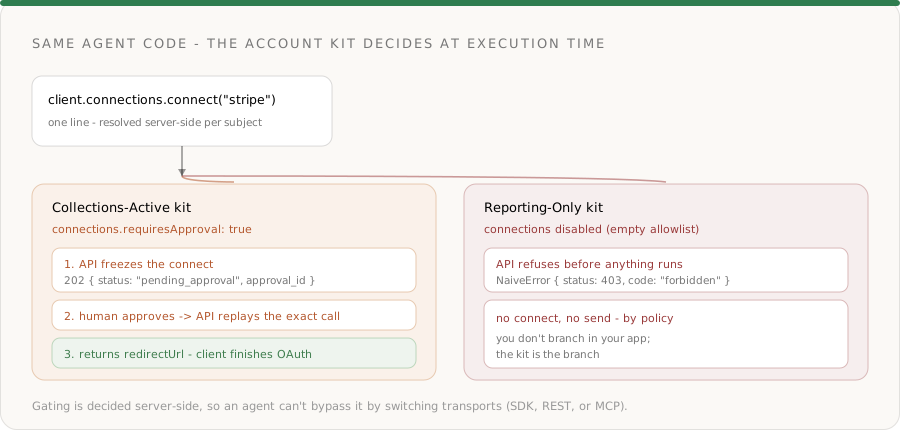
Execution-time enforcement is the API's job, not yours: connecting the client's Stripe is connections.connect— gated by default, so it returns 202 pending_approval and replays only after a human approves. A lower 'Reporting' tier has connections disabled entirely, so the same agent code returns forbidden. - ›
The whole arc— encode the policy, onboard a client, provision the agent, run one dunning cycle, then hand it to cron — is a few hundred lines against the current SDK.
Most "AI collections" demos stop at drafting a polite reminder. The useful part — the part a finance team actually pays for — is the agent that runs the whole dunning ladder unattended for weeks: it wakes every morning, remembers that invoice INV-1043 already got two reminders and the customer promised to pay by the 18th, sends the right next message, and escalates only when it should. The moment you try to run that across hundreds of clients, the LLM stops being the hard problem. Schedule, state, and authority do:
- Each client's agent must fire on its own schedule, inside its own isolated runtime — not one shared nightly batch that leaks context between tenants.
- It must remember where every invoice sits on the escalation ladder between runs — reminder count, promise-to-pay dates, disputes — or it will nag a customer who already paid.
- It must read that client's own ledger and send from that client's own inbox, and it must be impossible for it to reach into another client's data or take an action the client never authorized.
Without a platform you end up building a per-tenant scheduler, a durable per-tenant memory store, a per-client OAuth token vault, and an approval layer before you write a line of collections logic. That plumbing is the product — and it's exactly what Naïve ships as primitives. For the outbound-money mirror of this pattern, see Build an Agentic Accounts-Payable Platform; for the lifecycle model (scope, schedule, revoke), see The Governed Agent Profile.
This is a developer tutorial. Every code block runs against the current @usenaive-sdk/server, with signatures pulled straight from the docs. By the end you'll have a multi-tenant agentic collections backend where each client gets an isolated, scheduled, self-remembering agent that chases invoices — under permission.
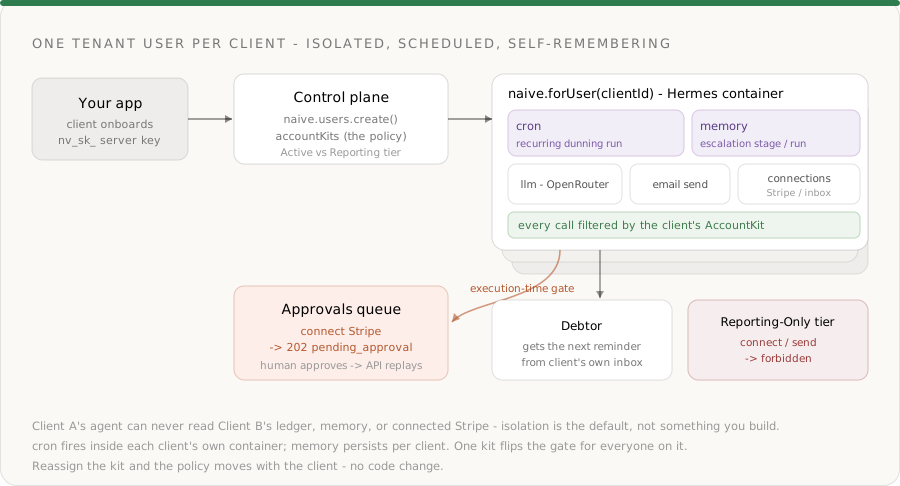
What we're building
- A backend service that provisions an isolated collections agent per client business.
- Each client connects their own billing system (Stripe) and inbox through hosted OAuth — once.
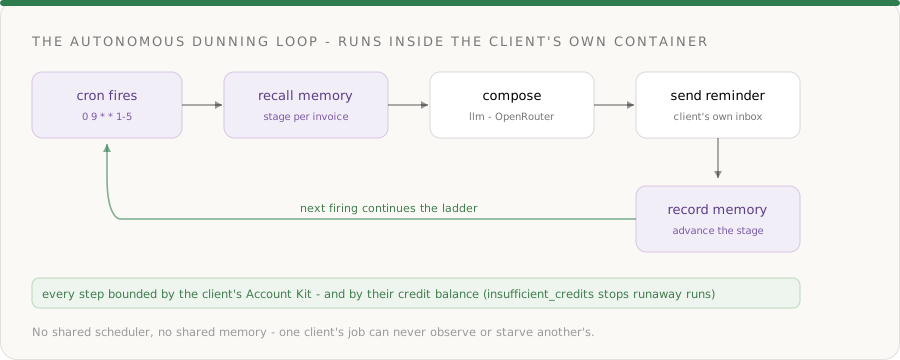
- The agent runs a daily dunning cycle: recall each overdue invoice's escalation stage from memory, compose the next message, send it, and record the new stage back to memory.
naive.forUser(clientId).cronschedules that cycle to run unattended;naive.forUser(clientId).memoryis the durable state that makes each run pick up where the last left off.- Two reusable Account Kits encode policy:
Collections-Activecan connect Stripe + send email;Reporting-Onlycan do neither, so the same agent code is denied at execution time.
The primitives in play, all from the docs:
| Primitive | Role in the collections agent | Docs |
|---|---|---|
| Users | One tenant user per client — the isolation boundary | naive.users |
| Account Kits | The client's collections policy: which primitives + apps are allowed | naive.accountKits |
| Orchestration › Cron | The recurring dunning schedule, inside the client's own container | forUser(id).cron |
| Orchestration › Memory | Durable per-client escalation state across runs | forUser(id).memory |
| Connections | Per-client access to Stripe + inbox + 1,000+ apps | forUser(id).connections |
| LLM | OpenRouter-backed message composition | forUser(id).llm |
| A per-client inbox to send reminders from | forUser(id).email | |
| Approvals | Execution-time human-in-the-loop on connecting a client's bank/billing | forUser(id).approvals |
Step 0: Install and authenticate
You need a Naïve workspace key (nv_sk_...) from Studio → Settings → API keys. The SDK is server-only — keys are server secrets, never shipped to the browser.
npm install @usenaive-sdk/serverimport { Naive, isPendingApproval } from "@usenaive-sdk/server";
const naive = new Naive({ apiKey: process.env.NAIVE_API_KEY! });naive.*(the root client) acts on your default tenant user and exposes the control plane (naive.users,naive.accountKits,naive.toolkits).naive.forUser(id).*returns the same data-plane surface — includingcron,memory,connections,llm, andemail— bound to a specific client.
That forUser scoping is the whole game. Read it as: "do this, as this client, under this client's policy."
Step 1: Encode collections policy as two Account Kits
An Account Kit is a reusable policy template. A collections agent touches money-adjacent systems, so the risk is mostly which systems it may reach and whether a human signs off on connecting them. Define two tiers once:
Collections-Active— the agent can connect the client's Stripe and send email, and it schedules its own dunning runs. Connecting a billing system freezes for human approval (the default).Reporting-Only— connections and email are disabled. The agent can summarize aging reports from data you pass it, but the same code that tries to connect Stripe or send a reminder is denied server-side.
// Active tier: can connect billing + inbox, and run scheduled dunning
const activeKit = await naive.accountKits.create({
name: "Collections-Active",
primitives_config: {
email: { enabled: true },
cron: { enabled: true },
memory: { enabled: true },
},
connections_config: {
mode: "allowlist",
toolkits: ["stripe", "gmail"], // confirm slugs first — see note below
requiresApproval: true, // connecting a billing system freezes for a human
},
});
// Reporting tier: no connections, no outbound email — read-only by policy
const reportingKit = await naive.accountKits.create({
name: "Reporting-Only",
primitives_config: {
email: { enabled: false },
cron: { enabled: true },
memory: { enabled: true },
},
connections_config: {
mode: "allowlist",
toolkits: [], // may connect nothing
},
});mode: "allowlist"withtoolkits: ["stripe", "gmail"]means an Active client can connect only those apps — try to connect anything else and the API returnsforbidden.connections_config.requiresApproval: trueis the execution-time gate onconnections.connect. Connecting a client's billing system is high-stakes, so it freezes for a human.Reporting-Onlydisablesemailand allows no toolkits, so an agent running the same dunning code against a Reporting client is stopped by the kit, not by anifstatement in your app.
Never hardcode an app slug you haven't confirmed exists. Discover them with the catalog the dashboard's Account Kit editor uses:
naive.toolkits.list({ search: "stripe" })(orGET /v1/toolkits?search=). Swap in whatever billing tool your client actually uses — QuickBooks, Xero, Chargebee, Recurly — by its confirmed slug.
Step 2: Provision a client as a tenant user
A tenant user is one of your end-users — here, a client business. They never sign into Naïve; you manage them through the SDK. Create one per client from your own onboarding flow and assign the right kit:
async function onboardClient(account: {
id: string; // your DB row id — your source of truth
name: string;
billingEmail: string;
tier: "active" | "reporting";
}) {
const client = await naive.users.create({
external_id: account.id,
email: account.billingEmail,
label: account.name,
account_kit_id: account.tier === "active" ? activeKit.id : reportingKit.id,
});
return client; // client.id → the handle you scope every future call with
}From here on, everything that client's agent does goes through their scoped client:
const client = naive.forUser(clientId);That single boundary is what makes the product multi-tenant-safe:
naive.forUser("client_a")andnaive.forUser("client_b")see entirely separate cron jobs, memory, connections, and inboxes.- Naïve resolves the subject user on every request and asserts it belongs to your company. A forged or cross-tenant id returns 404, not 403 — the existence of another company's data is itself something Naïve never leaks.
- There is no shared scheduler, no shared memory store, and no
WHERE client_id = ?for you to forget.
Step 3: Provision the client's agent and connect their billing system
cron and memory run inside the subject's own Hermes container, so a client needs an agent provisioned before you can schedule work or store memory for it. Provision one per client (idempotent, so retried webhooks don't double-provision):
const op = await naive.forUser(clientId).provision("collections", {
idempotencyKey: `collections:${clientId}`,
});
// op.status → "provisioning" | "active" | ... ; provisioning is asyncHere "collections" is an agent role you define once in your naive.config.ts agents block — its Account Kit, enabled primitives, and budget limits. provision(role) stamps out a dedicated Hermes container for that role, scoped to this client.
Now connect the client's billing system. This is the step that's painful without the moat — the agent must act inside the client's real Stripe. Connections handle OAuth, token storage, and execution-time auth for 1,000+ apps, per user, filtered by the Account Kit.
Because Collections-Active sets connections.requiresApproval: true, the connect is gated: the API freezes it and returns 202 pending_approval instead of starting OAuth. A human approves, and the API replays the exact call.
import { isPendingApproval } from "@usenaive-sdk/server";
const client = naive.forUser(clientId);
const res = await client.connections.connect("stripe", {
callbackUrl: "https://yourapp.com/oauth/done",
});
if (isPendingApproval(res)) {
// Active client: the connect was NOT started. Surface the approval to a human.
console.log("Connect frozen:", res.approval_id, "—", res.title);
await client.approvals.approve(res.approval_id); // a human approves
const resolved = await client.approvals.get(res.approval_id);
// resolved.status → "executed"; resolved.result holds { redirectUrl, ... }
// Send the client to resolved.result.redirectUrl to finish OAuth.
} else {
// (Un-gated kit) connect returned a redirect directly.
// Send the client to res.redirectUrl.
}This is execution-time permission enforcement, and it matters that the API does it:
- The action is frozen server-side the instant the agent calls it — there's no window where a half-authorized connection slips through.
- On approval, the API replays the exact frozen call. You never reconstruct the request or hold mutable state waiting for a human.
- It's policy, not plumbing: move a client between tiers (reassign the kit) and the gate moves with them — no code change.
For a Reporting-Only client, the identical line returns forbidden — connections are disabled by the kit. You don't branch in your app; the API refuses:
const reporting = naive.forUser(reportingClientId);
try {
await reporting.connections.connect("stripe", { callbackUrl });
} catch (err) {
// NaiveError: status 403, code "forbidden" — the kit doesn't permit connections
}Once approved and authorized, confirm the connection is live (cheap mirror read):
const connected = await client.connections.connected();
// [{ toolkit: "stripe", status: "ACTIVE" }]Step 4: Pull overdue invoices from the client's own Stripe
Execute a tool on the client's own connected Stripe. Don't guess a tool's name or argument schema — discover them at runtime for whatever the client connected:
const client = naive.forUser(clientId);
// The exact tool slugs + argument schemas Stripe exposes for this client
const tools = await client.connections.tools("stripe");
// → find the invoice-listing tool + its args, then call it:
// Confirm the invoice-listing tool slug via connections.tools("stripe") before calling execute.
const overdue = await client.connections.execute("stripe", "STRIPE_LIST_INVOICES", {
status: "open",
due_before: new Date().toISOString(),
});
// overdue → the client's own open, past-due invoices- Every
executeis bound to the scoped client and the client's own authenticated account — two clients running this concurrently never collide. - If you already track receivables in your own DB, skip this and feed your invoice rows straight into Step 6. The dunning logic doesn't care where the invoices come from.
Step 5: Recall where each invoice sits on the ladder — from memory
Here is the primitive that makes a scheduled agent different from a one-shot script. Between runs, the agent must remember what it already did. Memory is durable, per-client, long-term memory that lives in the client's Hermes container and is mirrored to the datastore.
At the start of a run, read back what the agent knows:
const client = naive.forUser(clientId);
const { memories } = await client.memory.list();
// memories → durable notes this client's agent has stored, e.g.
// "Invoice INV-1043: reminder 2 sent 2026-07-05. Customer replied promising
// payment by 2026-07-18. Do not escalate before then."memory.list()returns the client's stored knowledge; you match entries to your invoices to decide the next step for each.- Memory is scoped to the subject user — Client A's agent can never read Client B's promises-to-pay. There is no shared memory store to leak across tenants.
- It's AccountKit-gated like every other primitive, so a kit with
memorydisabled simply has no persistent state.
This is the state you cannot skip: without it, the agent re-sends reminder #1 to a customer who already got three, or nags someone who paid yesterday. With it, each scheduled run picks up exactly where the last one left off.
Step 6: Compose the next escalation with an OpenRouter model
The LLM primitive is a full wrapper over OpenRouter — one OpenAI-compatible endpoint routing to 300+ models, billed in Naïve credits from OpenRouter's reported usage cost. You don't hold an OpenRouter key; Naïve injects it server-side. Feed it the invoice and the recalled stage, and let it write a message that matches the escalation level — friendly nudge at stage 1, firm final notice at stage 4.

const client = naive.forUser(clientId);
const stage = 3; // derived from memory in Step 5
const composed = await client.llm.chat({
model: "anthropic/claude-sonnet-4.6",
models: ["anthropic/claude-sonnet-4.6", "openai/gpt-5.2"], // OpenRouter fallback chain
provider: { require_parameters: true }, // only route to providers honoring json_schema
messages: [
{
role: "system",
content:
"You write B2B accounts-receivable dunning emails. Match the tone to the escalation stage (1=gentle reminder … 4=final notice before hold). Be concise and professional. Never threaten, never invent fees, never contradict a recorded promise-to-pay.",
},
{
role: "user",
content: `Invoice INV-1043, $4,200, 21 days overdue. Escalation stage ${stage}. Prior context: reminder 2 sent 2026-07-05; no reply. Write the subject and body.`,
},
],
response_format: {
type: "json_schema",
json_schema: {
name: "dunning_message",
strict: true,
schema: {
type: "object",
properties: {
subject: { type: "string" },
body: { type: "string" },
},
required: ["subject", "body"],
additionalProperties: false,
},
},
},
});
const message = JSON.parse(composed.choices[0].message.content);
console.log("credits used:", composed.credits_used);modeltakes a provider-prefixed id —anthropic/claude-sonnet-4.6,openai/gpt-5.2. Browse them free withclient.llm.models("claude").modelsis an optional fallback chain OpenRouter tries in order if the first is unavailable.response_format: json_schemawithstrict: trueis OpenRouter's structured-output contract — the content comes back as a JSON string matching your schema, ready forJSON.parse(always validate in production).- Because the call is scoped to the client and AccountKit-gated, per-client model spend is metered and attributable.
Already have OpenAI/OpenRouter client code? Point its
baseURLathttps://api.usenaive.ai/v1/proxy/openrouterand keep your code as-is — Naïve injects the key and bills your credits. The drop-in proxy is not Account-Kit gated, so use the typedforUser(id).llmroutes (above) when you want per-client enforcement.
Step 7: Send from the client's own inbox, then advance the ladder in memory
Give the client a per-tenant inbox (once), then send the composed reminder. Sending is gated by the email primitive in the client's kit — Reporting-Only clients can't send at all.
const client = naive.forUser(clientId);
// Once per client: create the outbound inbox (idempotent in your own onboarding)
const inbox = await client.email.createInbox({ local_part: "billing" });
// Each cycle: send the composed reminder
await client.email.send({
from_inbox: inbox.id, // inbox id or address
to: "ap@debtor-co.com",
subject: message.subject,
body: message.body,
});Prefer the reminder to come from the client's real domain? Send it through their connected Gmail instead —
client.connections.execute("gmail", "GMAIL_SEND_EMAIL", { recipient_email, subject, body }). Same isolation, same kit gating; the choice is whose address the debtor sees. Inbound replies can trigger theemail.receivedwebhook so the agent reacts to promises-to-pay.
Now the step that makes tomorrow's run correct — record the new stage back to memory:
await client.memory.add({
content:
"Invoice INV-1043: reminder 3 (firm) sent 2026-07-10. No promise-to-pay on file. " +
"If unpaid and no reply by 2026-07-17, escalate to final notice (stage 4).",
});- Memory writes are incorporated into the client agent's durable knowledge; the next scheduled run reads them in Step 5.
- You now have a closed loop: recall → compose → send → record — and every piece of it is scoped to one client and bounded by their kit.
Step 8: Hand the whole cycle to cron
Everything above is one dunning cycle. To make it run unattended, register a cron job inside the client's own agent container. Each firing sends the prompt to that client's agent, which runs the cycle using its (kit-gated) tools and memory.
const client = naive.forUser(clientId);
const job = await client.cron.create({
schedule: "0 9 * * 1-5", // 9am UTC, weekdays
name: "Daily dunning cycle",
prompt:
"Run today's dunning cycle. For each open, past-due invoice in the connected " +
"Stripe: recall its escalation stage from memory, compose the next reminder " +
"matching that stage, send it from the billing inbox, then record the new stage " +
"and any promise-to-pay back to memory. Never escalate past a recorded promise-to-pay date.",
});
// job → { id, schedule, prompt, status: "active" }Manage it like any recurring job — all scoped to the client:
await client.cron.list(); // this client's jobs
await client.cron.trigger(job.id); // run now (great for testing)
await client.cron.executions(job.id); // run history: started/completed/status
await client.cron.pause(job.id); // stop firing (client paused / churned)
await client.cron.remove(job.id); // delete the job- The schedule fires inside the client's isolated container — there is no shared scheduler where one tenant's job can starve or observe another's.
- If the client runs out of credits, the firing fails with
insufficient_creditsrather than silently draining — autonomy stays bounded by the balance you provision. cron.trigger()lets you run a cycle on demand in development, then let the schedule take over in production.
Step 9: Put it together — onboard a client, run a cycle, automate it
The backend, end to end:
import { Naive, isPendingApproval } from "@usenaive-sdk/server";

const naive = new Naive({ apiKey: process.env.NAIVE_API_KEY! });
// One-time: define the two collections policies
const activeKit = await naive.accountKits.create({
name: "Collections-Active",
primitives_config: { email: { enabled: true }, cron: { enabled: true }, memory: { enabled: true } },
connections_config: { mode: "allowlist", toolkits: ["stripe", "gmail"], requiresApproval: true },
});
const reportingKit = await naive.accountKits.create({
name: "Reporting-Only",
primitives_config: { email: { enabled: false }, cron: { enabled: true }, memory: { enabled: true } },
connections_config: { mode: "allowlist", toolkits: [] },
});
// Per client: provision + govern + start the (gated) Stripe connect
export async function onboardClient(account: {
id: string; name: string; billingEmail: string; tier: "active" | "reporting";
}) {
const user = await naive.users.create({
external_id: account.id,
email: account.billingEmail,
label: account.name,
account_kit_id: account.tier === "active" ? activeKit.id : reportingKit.id,
});
const client = naive.forUser(user.id);
await client.provision("collections", { idempotencyKey: `collections:${user.id}` });
const res = await client.connections.connect("stripe", { callbackUrl: "https://yourapp.com/oauth/done" });
if (isPendingApproval(res)) {
return { clientId: user.id, approvalId: res.approval_id }; // a human approves, then send them to the redirect
}
return { clientId: user.id, connectUrl: res.redirectUrl };
}
// Per cycle: recall → compose → send → record (this is what cron runs for you)
export async function runDunningCycle(clientId: string, invoice: { number: string; amountCents: number; daysOverdue: number; stage: number }) {
const client = naive.forUser(clientId);
const { memories } = await client.memory.list();
const priorContext = memories.join("\n");
const composed = await client.llm.chat({
model: "anthropic/claude-sonnet-4.6",
models: ["anthropic/claude-sonnet-4.6", "openai/gpt-5.2"],
provider: { require_parameters: true },
messages: [
{ role: "system", content: "You write concise, professional B2B dunning emails. Match tone to the escalation stage; never threaten or invent fees; respect any recorded promise-to-pay." },
{ role: "user", content: `Invoice ${invoice.number}, ${invoice.amountCents / 100} due, ${invoice.daysOverdue} days overdue. Stage ${invoice.stage}. Prior context:\n${priorContext}` },
],
response_format: {
type: "json_schema",
json_schema: {
name: "dunning_message", strict: true,
schema: { type: "object", properties: { subject: { type: "string" }, body: { type: "string" } }, required: ["subject", "body"], additionalProperties: false },
},
},
});
const message = JSON.parse(composed.choices[0].message.content);
// from_inbox accepts an inbox id or address; create the "billing" inbox once at onboarding.
await client.email.send({ from_inbox: "billing", to: "ap@debtor-co.com", subject: message.subject, body: message.body });
await client.memory.add({ content: `Invoice ${invoice.number}: reminder stage ${invoice.stage} sent ${new Date().toISOString().slice(0, 10)}.` });
return { sent: true, stage: invoice.stage };
}
// Automate it: the client's own agent runs the cycle on a schedule
export async function scheduleDunning(clientId: string) {
return naive.forUser(clientId).cron.create({
schedule: "0 9 * * 1-5",
name: "Daily dunning cycle",
prompt: "Run today's dunning cycle for every open past-due invoice: recall each invoice's stage from memory, send the next reminder, and record the new stage. Never escalate past a recorded promise-to-pay.",
});
}That's a complete, multi-tenant agentic collections backend. The dunning logic is small; the platform carries identity, isolation, scheduling, memory, and authority.
Why this can't exist without the moat
Strip Naïve out and rebuild Steps 2–8 yourself:
- A per-tenant scheduler — one that fires each client's job in its own isolated runtime, with run history and manual triggers, that can't leak context or starve one tenant behind another.
- Durable per-tenant memory — a store the agent reads and writes every run, scoped so Client A's promises-to-pay never reach Client B, mirrored for durability.
- Per-client OAuth for the billing system + inbox — token storage, refresh, and revocation, per client, for every integration you support.
- Hard tenant isolation — a scoping layer that blocks cross-tenant reads server-side, returning 404 on a forged id, not "we remembered the
WHERE." - An approval queue with replay — freeze connecting a client's bank/billing at execution time, surface it to a human, and replay the exact call on approval.
Each of those is a project. Together they're the reason a serious multi-tenant collections product is hard. Naïve makes them forUser(id).cron, forUser(id).memory, an Account Kit, and isPendingApproval(res) — so you ship the agent, not the plumbing.
Hand the tools to the agent directly (optional)
Everything above is explicit orchestration. To let an LLM drive the loop instead, agentTools() returns a ready meta-toolset bounded by the client's Account Kit — the model discovers and runs connected apps, memory, email, and cron itself, and sensitive methods (like connections.connect) still resolve to a pending_approval payload it relays to the human.
const kit = naive.forUser(clientId).agentTools();
// kit.tools  → tool-use definitions
// kit.handle(name, input) → dispatcher, AccountKit-gated server-side
Or hand the client's agent a short-lived, scoped MCP session:
const session = await naive.forUser(clientId).session();
console.log(session.mcp.url, session.mcp.headers);
Ship it
- Get a key at studio.usenaive.ai → API keys.
- Define the two kits once —
Collections-Active(connect Stripe + email, approval on connect) andReporting-Only(no connections, no email). - Provision a client with
naive.users.create({ account_kit_id }), thenforUser(id).provision()and start the gated Stripe connect. - Recall each invoice's stage from
memory, compose with an OpenRouter model, send from the client's inbox, record the new stage. - Automate it with
forUser(id).cron.create()and watch the client's own agent run the ladder unattended.
- Start here: studio.usenaive.ai
- SDK quickstart: usenaive.ai/docs/sdk/quickstart
- Orchestration (Cron + Memory): usenaive.ai/docs/getting-started/orchestration
- Account Kits: usenaive.ai/docs/getting-started/account-kits
- Connections: usenaive.ai/docs/getting-started/connections
- Approvals: usenaive.ai/docs/getting-started/approvals
- LLM (OpenRouter): usenaive.ai/docs/getting-started/llm
- Full documentation: usenaive.ai/docs
Why can't I just build a dunning agent with a cron script and an LLM API?+
How is each client's collections agent isolated from the others?+
What exactly do cron and memory do here?+
Which actions require approval, and how is that enforced at execution time?+
How does the agent read overdue invoices and send from the client's own inbox?+
Which models write the reminders, and how is it billed?+
Do my clients ever sign into Naïve?+
Building the autonomous company infrastructure.
AI workforce orchestration with a CEO agent, kanban task board, strategic objectives, cron scheduling, and persistent memory — so your agent can plan, delegate, and execute multi-step workflows without manual supervision.
Build a multi-tenant AI accounts-payable platform on Naïve: an agent reads invoices, extracts line items, and pays each bill from a capped per-invoice card.
A governed agent profile is an AI agent with identity, spend limits, approvals, audit, and instant revoke — enforced on every action. Here's the full lifecycle.
Per-user MCP sessions give AI agents delegated, revocable access — short-lived, kit-scoped credentials instead of your workspace key. Here's the pattern.