- ›
An AI that pays vendor bills is only useful if it can move real money out of each client's account— which is exactly the part that's impossible to ship safely without per-client identity, scoped accounts, and execution-time spend controls - ›Naïve gives you those as primitives: a tenant user per client business, an Account Kit that encodes that client's AP policy, per-client virtual cards, and a human-in-the-loop approval queue that freezes and replays payments
- ›
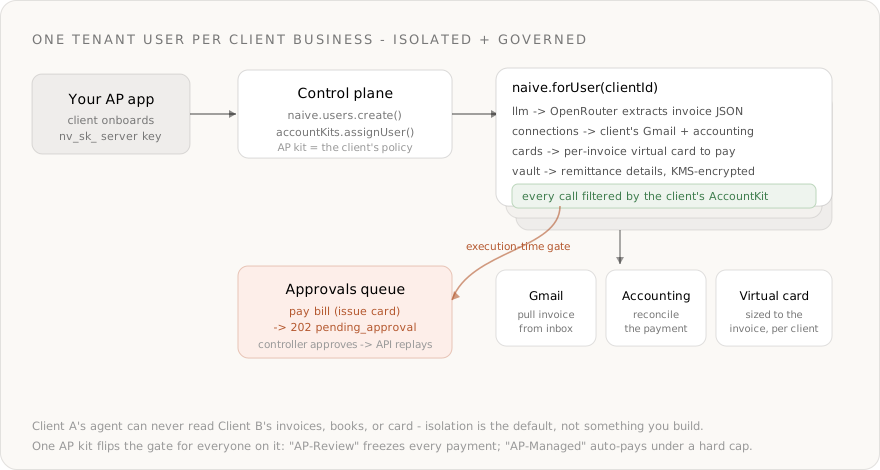
Every call is scoped with naive.forUser(clientId) and filtered by that client's Account Kit— Client A's agent can never read Client B's invoices, books, or card - ›
The agent extracts structured invoice data with naive.llm.chat() using OpenRouter's response_format: json_schema (strict mode)— a full OpenRouter wrapper over 300+ models, billed in credits - ›
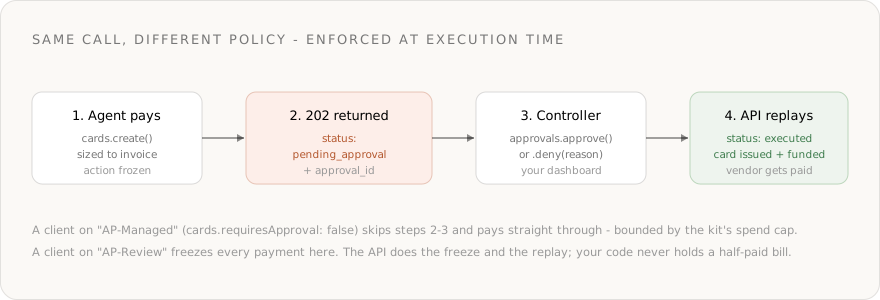
Issuing the card that pays a bill is cards.create— gated by default: 'AP-Review' clients return 202 pending_approval and replay only after a controller approves; 'AP-Managed' clients pay straight through, bounded by the kit's spend cap - ›
The whole arc— define the policy, onboard a client, pull the invoice, extract it, pay it, reconcile it — is ~160 lines against the current SDK
Most "AI bookkeeper" demos stop at reading a PDF. The useful part — the part a finance team actually pays for — is the agent that pays the bill. And the moment your agent moves real money out of a client's account, the model stops being the hard problem. Identity and authority do:
- Each client's agent must read that client's own invoices and accounting, not a shared inbox.
- One client's agent must never read or pay from another client's account.
- Moving money — issuing a card, funding it — needs a human in the loop, enforced when the payment runs, not as a nightly batch check.
Without a platform you end up building a per-client OAuth token store, encryption and rotation, a hard tenant-isolation layer, a card-issuing integration, and a bespoke approval queue before you write a single line of AP logic. That plumbing is the product — and it's exactly what Naïve ships as primitives.
This is a developer tutorial. Every code block runs against the current @usenaive-sdk/server, with signatures pulled straight from the docs. By the end you'll have a multi-tenant agentic AP backend where each client gets an isolated, governed agent that reads, extracts, pays, and reconciles.
What we're building
- A backend service that provisions an isolated AP agent per client business.
- Each client connects their own invoice inbox (Gmail) and accounting tool (e.g. QuickBooks) through hosted OAuth.
- For each bill, the agent pulls the invoice, extracts structured line items with an OpenRouter model, issues a per-invoice virtual card to pay it, and reconciles the payment back to the client's books.
- Two reusable Account Kits encode policy:
AP-Managedauto-pays under a hard cap;AP-Reviewfreezes every payment for a human controller. - Spend is per client, per invoice — attributable and capped, never a shared corporate card.
The primitives in play, all from the docs:
| Primitive | Role in the AP agent | Docs |
|---|---|---|
| Users | One tenant user per client — the isolation boundary | naive.users |
| Account Kits | The client's AP policy: spend cap + approval rule | naive.accountKits |
| Connections | Per-client access to Gmail + accounting + 1,000+ apps | forUser(id).connections |
| LLM | OpenRouter-backed structured invoice extraction | forUser(id).llm |
| Virtual Cards | A per-invoice card that pays the vendor | forUser(id).cards |
| Approvals | Execution-time human-in-the-loop on money movement | forUser(id).approvals |
| Vault | KMS-encrypted remittance details, per client | forUser(id).vault |
Step 0: Install and authenticate
You need a Naïve workspace key (nv_sk_...) from the dashboard → Settings → API keys. The SDK is server-only — keys are server secrets, never shipped to the browser.
npm install @usenaive-sdk/serverimport { Naive, isPendingApproval } from "@usenaive-sdk/server";
const naive = new Naive({ apiKey: process.env.NAIVE_API_KEY! });naive.*(the root client) acts on your default tenant user and exposes the control plane (naive.users,naive.accountKits,naive.toolkits).naive.forUser(id).*returns the same data-plane surface bound to a specific client.
That forUser scoping is the whole game. Read it as: "do this, as this client, under this client's policy."
Step 1: Encode AP policy as two Account Kits
An Account Kit is a reusable policy template. AP risk is mostly about how much and who signs off, so define two tiers once:
AP-Managed— the agent pays straight through, bounded by a hard per-card cap. Use for trusted, recurring, low-dollar vendors.AP-Review— every payment freezes for a human controller. Use for new vendors, large bills, or regulated clients.
Both allowlist only the apps an AP agent should ever touch (the client's inbox and accounting tool), and both enable cards and vault. The only difference is the cap and the approval flag.
// Auto-pay tier: cards execute immediately, capped at $1,000 per card
const managedKit = await naive.accountKits.create({
name: "AP-Managed",
primitives_config: {
cards: {
enabled: true,
requiresApproval: false, // pay straight through…
defaults: { spending_limit_cents: 100000 }, // …but never above $1,000/card
},
vault: { enabled: true },
},
connections_config: {
mode: "allowlist",
toolkits: ["gmail", "quickbooks"], // confirm slugs first — see note below
requiresApproval: false,
},
});
// Review tier: every card issuance freezes for a human
const reviewKit = await naive.accountKits.create({
name: "AP-Review",
primitives_config: {
cards: {
enabled: true,
requiresApproval: true, // freeze every payment for approval
defaults: { spending_limit_cents: 500000 },
},
vault: { enabled: true },
},
connections_config: {
mode: "allowlist",
toolkits: ["gmail", "quickbooks"],
requiresApproval: false,
},
});mode: "allowlist"means these clients can connect only Gmail and their accounting tool — try to connect anything else and the API returnsforbidden.cards.defaults.spending_limit_centssets the default cap new cards inherit, so even an auto-pay client can't be drained by one bad invoice.cards.requiresApprovalis the execution-time gate. It'strueby default for cards on tenant users —AP-Managedexplicitly opts out;AP-Reviewkeeps it.
Never hardcode an app slug you haven't confirmed exists. Discover them with the catalog the dashboard's Account Kit editor uses:
naive.toolkits.list({ search: "quickbooks" })(orGET /v1/toolkits?search=). Swap in whatever accounting tool your client actually uses — Xero, NetSuite, Bill.com — by its confirmed slug.
Step 2: Provision a client as a tenant user
A tenant user is one of your end-users — here, a client business. They never sign into Naïve; you manage them through the SDK. Create one per client from your own onboarding flow and assign the right kit:
async function onboardClient(account: {
id: string; // your DB row id — your source of truth
name: string;
billingEmail: string;
tier: "managed" | "review";
}) {
const client = await naive.users.create({
external_id: account.id,
email: account.billingEmail,
label: account.name,
account_kit_id: account.tier === "managed" ? managedKit.id : reviewKit.id,
});
return client; // client.id → the handle you scope every future call with
}From here on, everything that client's agent does goes through their scoped client:
const client = naive.forUser(clientId);That single boundary is what makes the product multi-tenant-safe:
naive.forUser("client_a")andnaive.forUser("client_b")see entirely separate connections, cards, and secrets.- Naïve resolves the subject user on every request and asserts it belongs to your company. A forged or cross-tenant id returns 404, not 403 — the existence of another company's data is itself something Naïve never leaks.
- There is no shared inbox, no shared budget, no
WHERE client_id = ?for you to forget.
Step 3: Connect the client's own inbox and accounting tool
This is the step that's painful without the moat. The agent has to act inside the client's real accounts. Connections handle the OAuth, token storage, and execution-time auth for 1,000+ apps — per user, filtered by the Account Kit.
connect() returns a hosted redirectUrl. You send the client there; once they finish OAuth, the connection flips to ACTIVE.
const client = naive.forUser(clientId);
// Gmail (the invoice inbox) — allowlisted, not gated → returns a redirect
const gmail = await client.connections.connect("gmail", {
callbackUrl: "https://yourapp.com/oauth/done",
});
// In your route handler: res.redirect(gmail.redirectUrl)
// The accounting tool — same flow, on whatever slug you confirmed in Step 1
const books = await client.connections.connect("quickbooks", {
callbackUrl: "https://yourapp.com/oauth/done",
});Check what a client has connected at any time — this reads Naïve's local mirror, so it's cheap:
const connected = await client.connections.connected();
// [{ toolkit: "gmail", status: "ACTIVE" }, { toolkit: "quickbooks", status: "ACTIVE" }]Step 4: Pull the invoice from the client's inbox
Most invoices arrive by email. Execute a tool on the client's own connected Gmail to fetch them. Don't guess a tool's name or argument schema — discover them at runtime for whatever the client connected:
const client = naive.forUser(clientId);
// The exact tool slugs + argument schemas Gmail exposes for this client
const tools = await client.connections.tools("gmail");
// → find the fetch tool and its args, then call it:
const inbox = await client.connections.execute("gmail", "GMAIL_FETCH_EMAILS", {
query: "label:invoices has:attachment newer_than:7d",
max_results: 10,
});- Every
executeis bound to the scoped client and the client's own authenticated account — two clients running this concurrently never collide. - If you already receive invoices another way (a webhook, an uploaded PDF, a forwarding address), skip this step and feed the raw invoice text straight into Step 5.
Step 5: Extract the invoice with an OpenRouter model
The LLM primitive is a full wrapper over OpenRouter — one OpenAI-compatible endpoint routing to 300+ models, billed in Naïve credits from OpenRouter's reported usage cost. You don't hold an OpenRouter key; Naïve injects it server-side. Because the request body is exactly OpenRouter's, you get structured outputs for free: pass response_format: { type: "json_schema", strict: true } and the model is forced to return a typed object — no regex, no hallucinated fields.

const client = naive.forUser(clientId);
const extraction = await client.llm.chat({
model: "anthropic/claude-sonnet-4.6",
models: ["anthropic/claude-sonnet-4.6", "openai/gpt-5.2"], // OpenRouter fallback chain
provider: { require_parameters: true }, // only route to providers that honor json_schema
messages: [
{
role: "system",
content:
"You extract billing data from vendor invoices. Return only fields you can read verbatim; never invent an amount or account number.",
},
{ role: "user", content: `Invoice:\n${invoiceText}` },
],
response_format: {
type: "json_schema",
json_schema: {
name: "invoice",
strict: true,
schema: {
type: "object",
properties: {
vendor_name: { type: "string" },
invoice_number: { type: "string" },
currency: { type: "string", description: "ISO 4217, e.g. USD" },
amount_due_cents: { type: "integer", description: "Total due in minor units" },
due_date: { type: "string", description: "ISO 8601 date" },
remittance: { type: "string", description: "How the vendor wants to be paid" },
},
required: ["vendor_name", "invoice_number", "currency", "amount_due_cents", "due_date"],
additionalProperties: false,
},
},
},
});
const invoice = JSON.parse(extraction.choices[0].message.content);
console.log("credits used:", extraction.credits_used);
// invoice.amount_due_cents → exactly what the card needs to be sized tomodeltakes a provider-prefixed id —anthropic/claude-sonnet-4.6,openai/gpt-5.2. Browse them free withclient.llm.models("claude").modelsis an optional fallback chain OpenRouter tries in order if the first is unavailable.response_format: json_schemawithstrict: trueis OpenRouter's structured-output contract — the response content should match your schema closely enough forJSON.parsein production (always validate).- Because the call is scoped to the client and AccountKit-gated, per-client model spend is metered and attributable.
Already have OpenAI/OpenRouter client code? Point its
baseURLathttps://api.usenaive.ai/v1/proxy/openrouterand keep your code as-is — Naïve injects the key and bills your credits. The drop-in proxy is not Account-Kit gated, so use the typedforUser(id).llmroutes (above) when you want per-client enforcement.
Step 6: Pay the bill — and watch policy enforce itself
Now move money. Issue a virtual card sized to the extracted amount, scoped to the client. This is the moment the moat earns its keep: the same line of code behaves differently depending on the client's kit, and the API — not your code — enforces it.
A managed virtual card needs a cardholder once per company (this is your platform's card-program identity, for KYC). Create it a single time via REST:
curl -X POST https://api.usenaive.ai/v1/cards/cardholder \
-H "Authorization: Bearer nv_sk_your_key" \
-H "Content-Type: application/json" \
-d '{
"firstName": "Acme", "lastName": "Payments",
"email": "ap@yourplatform.com",
"billingLine1": "123 Market St", "billingCity": "San Francisco",
"billingState": "CA", "billingPostalCode": "94105",
"dobDay": 1, "dobMonth": 1, "dobYear": 1990
}'Then the agent issues the per-invoice card:
const client = naive.forUser(clientId);
const res = await client.cards.create({
name: `${invoice.vendor_name} — ${invoice.invoice_number}`,
spending_limit_cents: invoice.amount_due_cents, // sized to the bill
provider: "managed_virtual",
});
if (isPendingApproval(res)) {
// AP-Review client: the card was NOT created. Nothing has been paid.
// Surface res.approval_id to the client's controller.
console.log("Payment frozen:", res.approval_id, "—", res.title);
// A controller approves from your dashboard (or via the operator key):
await client.approvals.approve(res.approval_id);
// The API replays the exact frozen cards.create and records the result:
const resolved = await client.approvals.get(res.approval_id);
console.log(resolved.status); // "executed" → result holds the new card + checkout_url
} else {
// AP-Managed client: the card was issued straight through, under the kit's cap.
console.log("Card issued:", res);
}This is execution-time permission enforcement, and it matters that the API does it:
- The action is frozen server-side the instant the agent calls it — there's no window where a half-authorized payment slips through.
- On approval, the API replays the exact frozen call. You never reconstruct the request or hold mutable state waiting for a human.
- It's policy, not plumbing: move a client from
AP-ReviewtoAP-Managed(reassign the kit) and the gate moves with them — no code change.
You can block and poll instead of webhooking:
await client.approvals.wait(res.approval_id); // resolves when approved/deniedWhat's gated by default for agent calls on tenant users, straight from the docs:
| Action | action_type |
|---|---|
| Issue a virtual card | cards.create |
| Top up a card | cards.topup |
| Purchase a domain | domains.purchase |
| Start KYC | verification.start |
| Form / file a company | formation.create, formation.submit |
| Connect a 3rd-party service | connections.connect |
Calls on your own default user run un-gated; only agent calls on real tenant users are gated.
Step 7: Fund the card, get credentials, pay the vendor
Once the card exists (issued directly, or replayed after approval), finish the payment. Managed virtual cards are network-branded card credentials — they fund through a checkout (your platform's treasury), then activate:

const headers = {
Authorization: `Bearer ${process.env.NAIVE_API_KEY!}`,
"Content-Type": "application/json",
};
const base = `https://api.usenaive.ai/v1/users/${clientId}`;
// 1. The create result carried a checkout_url — fund it (your treasury), then issue:
await fetch(`${base}/cards/${cardId}/check-payment`, { method: "POST", headers });
// 2. Read the PAN/CVC to pay the vendor's portal:
const details = await (await fetch(`${base}/cards/${cardId}/details`, { headers })).json();
// details → { number, cvc, exp_month, exp_year, last4, remaining_cents }- Pay the vendor's hosted portal / card-on-file flow with the returned PAN — a single-use card sized to one invoice, so the blast radius of a leak is exactly one bill.
- Managed virtual cards capture real transactions automatically via payment webhooks; for offline or portal payments, log the spend so the ledger is complete:
await fetch(`${base}/cards/${cardId}/log-transaction`, {
method: "POST",
headers,
body: JSON.stringify({
amount_cents: invoice.amount_due_cents,
merchant_name: invoice.vendor_name,
description: `Invoice ${invoice.invoice_number}`,
}),
});Step 8: Reconcile back to the client's books
Close the loop by writing the payment into the client's own accounting tool — again on their connected account, via the tool slug the app reports. Popular accounting apps (QuickBooks Online, Xero, NetSuite, Bill.com, and others) are connectable per client; pick the slug your client actually uses.

const client = naive.forUser(clientId);
// Discover the right tool + arg schema for this client's accounting app, then call it
const acctTools = await client.connections.tools("quickbooks");
// → e.g. record a bill payment with the slug + args QuickBooks exposes
await client.connections.execute("quickbooks", "QUICKBOOKS_CREATE_BILL_PAYMENT", {
vendor: invoice.vendor_name,
amount: invoice.amount_due_cents / 100,
reference: invoice.invoice_number,
});Stash anything you'll need again — a vendor's preferred remittance details, an account number — in the client's encrypted vault, not your database:
await client.vault.put(`vendor:${invoice.vendor_name}:remittance`, invoice.remittance, {
kind: "note",
});Step 9: Put it together — onboard a client, pay a bill
The whole backend, end to end:
import { Naive, isPendingApproval } from "@usenaive-sdk/server";

const naive = new Naive({ apiKey: process.env.NAIVE_API_KEY! });
// One-time: define the two AP policies
const managedKit = await naive.accountKits.create({
name: "AP-Managed",
primitives_config: {
cards: { enabled: true, requiresApproval: false, defaults: { spending_limit_cents: 100000 } },
vault: { enabled: true },
},
connections_config: { mode: "allowlist", toolkits: ["gmail", "quickbooks"], requiresApproval: false },
});
const reviewKit = await naive.accountKits.create({
name: "AP-Review",
primitives_config: {
cards: { enabled: true, requiresApproval: true, defaults: { spending_limit_cents: 500000 } },
vault: { enabled: true },
},
connections_config: { mode: "allowlist", toolkits: ["gmail", "quickbooks"], requiresApproval: false },
});
// Per client: provision + govern + start OAuth
export async function onboardClient(account: { id: string; name: string; billingEmail: string; tier: "managed" | "review" }) {
const user = await naive.users.create({
external_id: account.id,
email: account.billingEmail,
label: account.name,
account_kit_id: account.tier === "managed" ? managedKit.id : reviewKit.id,
});
const client = naive.forUser(user.id);
const gmail = await client.connections.connect("gmail", { callbackUrl: "https://yourapp.com/oauth/done" });
return { clientId: user.id, connectUrl: gmail.redirectUrl };
}
// Per bill: extract → pay → (approve if frozen) → reconcile
export async function payInvoice(clientId: string, invoiceText: string) {
const client = naive.forUser(clientId);
const extraction = await client.llm.chat({
model: "anthropic/claude-sonnet-4.6",
models: ["anthropic/claude-sonnet-4.6", "openai/gpt-5.2"],
provider: { require_parameters: true },
messages: [
{ role: "system", content: "Extract invoice fields verbatim; never invent an amount." },
{ role: "user", content: `Invoice:\n${invoiceText}` },
],
response_format: {
type: "json_schema",
json_schema: {
name: "invoice",
strict: true,
schema: {
type: "object",
properties: {
vendor_name: { type: "string" },
invoice_number: { type: "string" },
amount_due_cents: { type: "integer" },
due_date: { type: "string" },
},
required: ["vendor_name", "invoice_number", "amount_due_cents", "due_date"],
additionalProperties: false,
},
},
},
});
const invoice = JSON.parse(extraction.choices[0].message.content);
const res = await client.cards.create({
name: `${invoice.vendor_name} — ${invoice.invoice_number}`,
spending_limit_cents: invoice.amount_due_cents,
provider: "managed_virtual",
});
if (isPendingApproval(res)) {
return { status: "pending_approval", approvalId: res.approval_id, invoice };
}
return { status: "paid", card: res, invoice };
}That's a complete, multi-tenant agentic AP backend. The bookkeeping logic is small; the platform carries identity, isolation, authority, and spend.
Why this can't exist without the moat
Strip Naïve out and rebuild Steps 2–7 yourself:
- Per-client OAuth for the inbox + every accounting tool — token storage, refresh, and revocation, per client, for each integration you support.
- Encryption at rest — a KMS-backed vault so a leaked row isn't a leaked ledger.
- Hard tenant isolation — a scoping layer that is designed to block cross-tenant reads server-side, returning 404 on a forged id, not "we remembered the
WHERE." - Real card issuing, per client — cardholder/KYC, funding, PAN retrieval, transaction capture, single-use cards sized to a bill.
- An approval queue with replay — freeze money movement at execution time, surface it to a human, and replay the exact call on approval.
Each of those is a project. Together they're the reason a serious multi-tenant AP product is hard. Naïve makes them forUser(id), an Account Kit, and isPendingApproval(res) — so you ship the agent, not the plumbing.
Hand the tools to the agent directly (optional)
Everything above is explicit orchestration. To let an LLM drive the loop, agentTools() returns a ready meta-toolset bounded by the client's Account Kit — the model discovers and runs connected apps and Naïve primitives itself, and sensitive methods (like cards.create) still resolve to a pending_approval payload it relays to the human.
const kit = naive.forUser(clientId).agentTools();
// kit.tools  → Anthropic tool-use definitions
// kit.handle(name, input) → dispatcher, AccountKit-gated server-side
Or hand the client's agent a short-lived, scoped MCP session:
const session = await naive.forUser(clientId).session();
console.log(session.mcp.url, session.mcp.headers);
Ship it
- Get a key at dashboard.usenaive.ai → API keys.
- Define the two AP kits once —
AP-Managed(cap, no approval) andAP-Review(approval on every card). - Provision a client with
naive.users.create({ account_kit_id })and start OAuth via the hostedredirectUrl. - Extract each invoice with an OpenRouter model in strict
json_schemamode. - Pay with a per-invoice virtual card and watch the gate freeze and replay for
AP-Reviewclients. - Reconcile the payment back to the client's accounting tool.
- Start here: dashboard.usenaive.ai
- SDK quickstart: usenaive.ai/docs/sdk/quickstart
- Users: usenaive.ai/docs/getting-started/users
- Account Kits: usenaive.ai/docs/getting-started/account-kits
- Connections: usenaive.ai/docs/getting-started/connections
- Virtual Cards: usenaive.ai/docs/getting-started/cards
- Approvals: usenaive.ai/docs/getting-started/approvals
- LLM (OpenRouter): usenaive.ai/docs/getting-started/llm
- Full documentation: usenaive.ai/docs
Why can't I just build an AP agent with an LLM API and a card-issuing integration?+
How does Naïve keep one client's books isolated from another's?+
What is an Account Kit and how does it encode AP policy?+
Which payment actions require approval, and can I change that?+
Which models extract the invoice, and how is it billed?+
Do clients ever sign into Naïve?+
How does the card actually pay a real vendor?+
Building the autonomous company infrastructure.
A governed agent profile is an AI agent with identity, spend limits, approvals, audit, and instant revoke — enforced on every action. Here's the full lifecycle.
How to add human approval to an AI agent: gate sensitive actions on your Account Kit, surface pending approvals, and replay on approve. A step-by-step guide.
Issue virtual cards for your agents — a prepaid gift card or a managed virtual card — funded via checkout, capped by a spending limit, and fully audited.
The connections primitive gives each end-user's agents authenticated access to 1,000+ third-party apps — per user, gated by the Account Kit, in one surface.