- ›
AI answer engines (ChatGPT, Claude, Gemini, Perplexity) are the new search results— and brands now need to track and optimize for what those models say about them. That's AEO/GEO (Answer Engine / Generative Engine Optimization). - ›
A multi-tenant AEO product is painful to build alone: per-customer AI-visibility data, SEO data, an LLM to write content, per-tenant isolation, metered usage, plan quotas, and a human gate on publishing— all before any product logic. - ›Naïve ships those as primitives: the AEO and SEO primitives for the data, the LLM primitive (an OpenRouter wrapper) for the writing, tenant users + Account Kits for isolation and policy, and Customer Billing for plans, metering, and quota enforcement.
- ›
Every call is scoped with naive.forUser(brandId) and filtered by that brand's Account Kit and plan— Brand A can never read Brand B's audits, and an over-quota tenant is stopped with 429 rate_limited at execution time. - ›
The agent writes answer-optimized content with naive.llm.chat() using OpenRouter structured outputs (response_format json_schema), then publishes to the brand's own connected CMS— and connecting that CMS is frozen for human approval. - ›
The full arc— define plans, provision a brand, audit AI answers, find gaps, write content, publish with approval, meter and enforce quota — runs against the current @usenaive-sdk/server.
AI answer engines are the new front page. When someone asks ChatGPT, Claude, Gemini, or Perplexity "what's the best project management tool for agencies?", the model returns an answer — and a short list of cited sources. For a growing share of buyers, that answer is the search result. Brands now need to know what those models say about them, and influence it. That discipline has a name: AEO (Answer Engine Optimization), also called GEO (Generative Engine Optimization).
Most "AI SEO" demos are a single prompt against one model. The moment you try to sell AEO as a product to a roster of brands, the model isn't the hard part — the platform is:
- You need real AI-visibility data across four answer engines, plus classic keyword/SERP/backlink data to ground strategy.
- One brand's audits and content must never leak into another customer's account.
- You're a SaaS, so usage must be metered and quota-limited per plan — enforced when the call runs, not reconciled later.
- Publishing to a customer's live site is high-stakes — it needs a human in the loop, enforced at execution time.
Without a platform you'd build per-tenant isolation, a metering layer, a quota engine, a data pipeline for four LLMs, and an approval workflow before writing a line of product. That plumbing is the product — and it's exactly what Naïve ships as primitives.
This is a developer tutorial. Every code block runs against the current @usenaive-sdk/server, with signatures pulled straight from the docs. By the end you'll have a multi-tenant AEO backend where each brand gets an isolated, metered, governed AI agent. For lighter-weight loops see SEO keyword research and brand mention tracking; for billing tiers see usage-metered SEO SaaS.
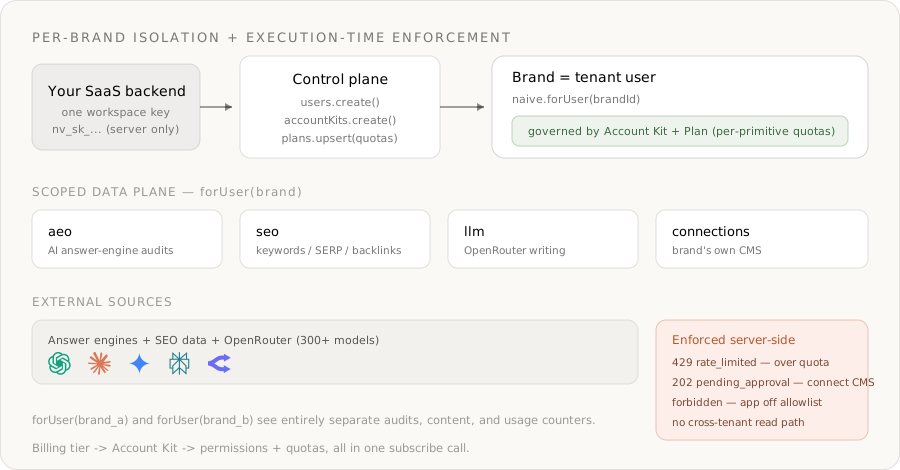
What we're building
- A backend service that provisions an isolated AI agent per brand (the customer of your product).
- The agent audits how ChatGPT, Claude, Gemini, and Perplexity answer questions about the brand, and tracks mention share vs. competitors.
- The agent grounds strategy with keyword volume, SERP competitors, and backlink data from the SEO primitive.
- The agent writes an answer-optimized content brief and draft with an OpenRouter model, using structured outputs.
- The agent publishes to the brand's own connected CMS — and connecting that CMS is frozen for human approval.
- Everything is metered per tenant and quota-enforced at execution time by a Customer-Billing plan.
The primitives in play, all from the docs:
| Primitive | Role in the AEO platform | Docs |
|---|---|---|
| Users | One tenant user per brand — the isolation boundary | naive.users |
| Account Kits | The brand's policy: enabled primitives, allowed apps, approval rules | naive.accountKits |
| Customer Billing | Plans, subscriptions, metering, and per-primitive quotas | naive.plans, forUser(id).billing |
| AEO / GEO | What LLMs say about the brand + mention metrics | forUser(id).aeo |
| SEO | Keyword volume, SERP competitors, backlinks | forUser(id).seo |
| LLM | OpenRouter-backed writing across 300+ models | forUser(id).llm |
| Connections | Per-brand access to their CMS (Webflow, WordPress, …) | forUser(id).connections |
| Approvals | Human-in-the-loop on connecting the CMS | forUser(id).approvals |
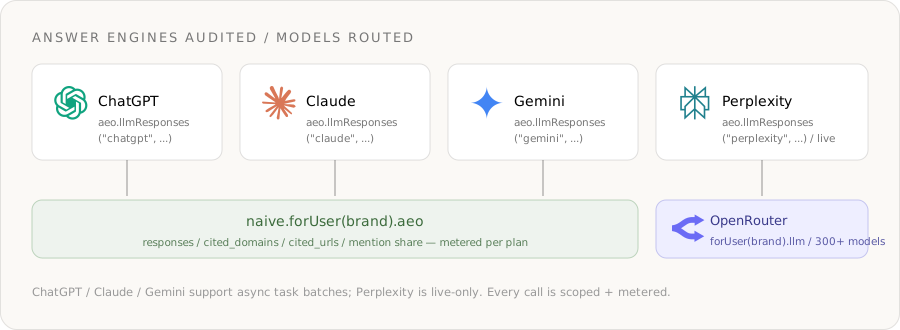
The answer engines and data sources the platform reads from:
Step 0: Install and authenticate
You need one Naïve workspace key (nv_sk_...) from the dashboard → Settings → API keys. The SDK is server-only — keys are server secrets, never shipped to the browser.
npm install @usenaive-sdk/serverimport { Naive } from "@usenaive-sdk/server";
const naive = new Naive({ apiKey: process.env.NAIVE_API_KEY! });naive.*(the root client) acts on your default tenant user and exposes the control plane (naive.users,naive.accountKits,naive.plans).naive.forUser(id).*returns the same data-plane surface (aeo,seo,llm,connections,billing) bound to a specific brand.
That forUser scoping is the whole game. Read it as: "do this, as this brand, under this brand's policy and plan."
Step 1: Define the policy and the plans once
A brand's capabilities come from two things working together:
- An Account Kit — a reusable policy template that declares which primitives are enabled and which third-party apps the brand may connect.
- A Customer-Billing plan — maps a plan key to that Account Kit plus per-primitive quotas.
Define a "Starter" and a "Growth" tier a single time. Each kit:
- Enables the primitives an AEO agent needs (
llmfor writing). - Allowlists only the CMS apps a brand may connect (try anything else and the API returns
forbidden). - Leaves approval on for connecting a third-party service (the default), so granting the agent write access to a live site is gated.
// One Account Kit per tier. Connecting a CMS is gated by default for tenant users.
const starterKit = await naive.accountKits.create({
  name: "AEO Starter",
  primitives_config: {
    llm: { enabled: true },
  },
  connections_config: {
    mode: "allowlist",
    toolkits: ["webflow", "wordpress"], // the only CMSs a brand may connect
    // requiresApproval defaults on for connecting — we keep it on
  },
});

const growthKit = await naive.accountKits.create({
  name: "AEO Growth",
  primitives_config: { llm: { enabled: true } },
  connections_config: { mode: "allowlist", toolkits: ["webflow", "wordpress", "contentful"] },
});
Discover valid app slugs with
GET /v1/toolkits?search=— the same catalog the dashboard's Account Kit editor uses. Never hardcode a slug you haven't confirmed exists.
Now map each kit to a plan with quotas. Metered primitives (aeo, seo, email) record one usage event per successful call, and the API returns 429 rate_limited the moment a tenant exceeds the quota:
await naive.plans.upsert({
  key: "starter",
  name: "AEO Starter",
  accountKitId: starterKit.id,      // assigned to the tenant on subscribe
  stripePriceId: "price_starter",   // your Stripe price (optional)
  quotas: { aeo: 100, seo: 500 },   // calls per period
  period: "month",
});

await naive.plans.upsert({
  key: "growth",
  name: "AEO Growth",
  accountKitId: growthKit.id,
  stripePriceId: "price_growth",
  quotas: { aeo: 1000, seo: 5000 },
  period: "month",
});- The plan's
accountKitIdis what ties billing tier → permissions. Subscribe a brand togrowthand they get the Growth kit's policy automatically. quotasare the per-primitive call budgets enforced at execution time. No quota engine to build.
Step 2: Provision a brand and subscribe them
A tenant user is one of your end-users — here, a brand. They never sign into Naïve; you manage them through the SDK. Create one per brand from your own signup flow, then set their subscription (which applies the plan's Account Kit in the same call):
async function onboardBrand(dbBrand: { id: string; email: string; name: string; planKey: "starter" | "growth" }) {
  // 1. Provision the isolation boundary
  const brand = await naive.users.create({
    external_id: dbBrand.id,        // your DB row id — stable, your source of truth
    email: dbBrand.email,
    label: dbBrand.name,
  });

  // 2. Subscribe — assignKit (default true) applies the plan's Account Kit to the brand
  await naive.forUser(brand.id).billing.setSubscription({
    planKey: dbBrand.planKey,
    status: "active",
    stripeCustomerId: "cus_...",        // from your Stripe webhook
    stripeSubscriptionId: "sub_...",
    currentPeriodEnd: "2026-07-01T00:00:00Z",
    assignKit: true,
  });

  return brand; // brand.id → the handle you scope every future call with
}
From here on, everything the brand's agent does goes through their scoped client:
const brand = naive.forUser(brandId);naive.forUser("brand_a") and naive.forUser("brand_b") see entirely separate audits, content, connections, and usage counters. There is no shared state, no cross-tenant read path to get wrong.
Step 3: Audit how AI answer engines describe the brand
This is the core of AEO. The AEO primitive asks the real answer engines a question and returns the response plus the domains and URLs they cited — so you can see whether the brand shows up, and who's winning the answer.
const brand = naive.forUser(brandId);

// What does ChatGPT actually say for a high-intent buyer query?
const chatgpt = await brand.aeo.llmResponses("chatgpt", {
  user_prompt: "best project management software for agencies 2026",
  model_name: "gpt-4o-mini",
});

const answer = chatgpt.results[0];
console.log(answer.response);        // the model's full answer
console.log(answer.cited_domains);   // e.g. ["asana.com", "linear.app", "notion.so"]
console.log(answer.cited_urls);      // the exact pages it cited
Run the same prompt across every engine to see where the brand is present or absent. ChatGPT, Claude, and Gemini support async tasks for batch audits; Perplexity is live-only:
const engines = ["chatgpt", "claude", "gemini", "perplexity"] as const;
const modelByEngine = {
  chatgpt: "gpt-4o-mini",
  claude: "claude-3-5-haiku-latest",
  gemini: "gemini-2.0-flash",
  perplexity: "sonar",
} as const;

const audits = await Promise.all(
  engines.map((engine) =>
    brand.aeo.llmResponses(engine, {
      user_prompt: "best project management software for agencies 2026",
      model_name: modelByEngine[engine], // each engine expects its own model id — list with GET .../{engine}/models
    }),
  ),
);
Then quantify share of voice — how often the brand (and its competitors) are mentioned and cited across LLMs:
const mentions = await brand.aeo.llmMentions("search", {
  keyword: "project management software for agencies",
  target: [{ domain: "yourbrand.com" }, { domain: "asana.com" }, { domain: "notion.so" }],
});

const me = mentions.results.find((r) => r.target === "yourbrand.com");
console.log(me?.mention_count);   // how often we appear in LLM answers
console.log(me?.llm_platforms);   // which engines mention us
console.log(me?.cited_urls);      // which of our pages get cited
And size the opportunity with AI-search keyword volume:
const volume = await brand.aeo.aiKeywords({
  keywords: ["project management for agencies", "agency resource planning tool"],
});
// volume.results → [{ keyword, ai_search_volume, competition }, ...]
Each of these calls is metered against the brand's plan. The brand's agent literally cannot run more audits than their tier allows — more on that enforcement in Step 6.
Step 4: Ground the strategy with SEO data
AI answers are heavily influenced by the classic web — the pages models retrieve and cite. The SEO primitive wraps keyword, SERP, and backlink data so the agent builds on facts, not vibes.
const brand = naive.forUser(brandId);

// Who ranks for the query today? These are the pages LLMs are likely to cite.
const serp = await brand.seo.serpCompetitors(["project management software for agencies"]);

// Real search demand + difficulty for the topic cluster
const overview = await brand.seo.labs("google", "keyword-overview", {
  keywords: ["project management for agencies"],
  location_code: 2840, // US
});

// Why do the cited domains win? Audit their backlink authority.
const authority = await brand.seo.backlinksSummary("asana.com");
console.log(authority.results[0].total_referring_domains, authority.results[0].rank);
Now the agent has a complete picture per brand: which engines mention them, who's being cited instead, the demand behind the query, and the authority of the incumbents. That's the input to the writing step.
Step 5: Write answer-optimized content with an OpenRouter model
The LLM primitive is a full wrapper over OpenRouter — one OpenAI-compatible endpoint routing to 300+ models, billed in Naïve credits from the exact cost OpenRouter reports. You don't hold an OpenRouter key; Naïve injects it server-side. Because the request/response bodies are exactly OpenRouter's, you get provider-prefixed model ids, a models[] fallback chain, a provider{} routing object, and response_format for structured outputs — all for free.
Use structured outputs so the agent returns a machine-usable content plan, not prose you have to parse:
const brand = naive.forUser(brandId);

const plan = await brand.llm.chat({
  model: "anthropic/claude-sonnet-4.6",
  models: ["anthropic/claude-sonnet-4.6", "openai/gpt-5.2"], // OpenRouter fallback chain
  provider: { sort: "throughput", data_collection: "deny" },  // OpenRouter routing
  messages: [
    {
      role: "system",
      content:
        "You are an AEO strategist. Given how AI answer engines respond and the SERP/backlink data, " +
        "produce an answer-optimized article plan that maximizes the chance of being cited by LLMs.",
    },
    {
      role: "user",
      content: JSON.stringify({
        query: "best project management software for agencies 2026",
        chatgpt_answer: answer.response,
        cited_domains: answer.cited_domains,
        serp_competitors: serp.results,
        our_mentions: me,
      }),
    },
  ],
  // OpenRouter structured outputs — the body is forwarded as-is
  response_format: {
    type: "json_schema",
    json_schema: {
      name: "aeo_brief",
      strict: true,
      schema: {
        type: "object",
        additionalProperties: false,
        properties: {
          title: { type: "string" },
          target_question: { type: "string" },
          tl_dr_answer: { type: "string", description: "A direct 2-sentence answer LLMs can lift verbatim" },
          headings: { type: "array", items: { type: "string" } },
          faqs: {
            type: "array",
            items: {
              type: "object",
              additionalProperties: false,
              properties: { q: { type: "string" }, a: { type: "string" } },
              required: ["q", "a"],
            },
          },
        },
        required: ["title", "target_question", "tl_dr_answer", "headings", "faqs"],
      },
    },
  },
});

const brief = JSON.parse(plan.choices[0].message.content);
console.log("credits used:", plan.credits_used);modeltakes a provider-prefixed id —anthropic/claude-sonnet-4.6,openai/gpt-5.2. Browse them free withbrand.llm.models("claude").response_format: { type: "json_schema", strict: true }is OpenRouter's structured-output contract — the model returns JSON matching your schema, soJSON.parseis safe.- The
tl_dr_answerandfaqsmatter for AEO specifically: answer engines preferentially lift concise, self-contained answers and Q&A blocks.
Already have OpenAI/OpenRouter client code? Point its
baseURLathttps://api.usenaive.ai/v1/proxy/openrouterand keep your code as-is — Naïve injects the key and bills your credits. The drop-in proxy is not Account-Kit gated, so use the typedforUser(id).llmroutes (above) when you want per-brand enforcement and metering.
Step 6: Metering and quota enforcement — at execution time
Because every aeo and seo call is metered against the brand's plan, you get usage tracking and quota enforcement for free. Read the current period's usage at any time:
const usage = await naive.forUser(brandId).billing.usage();
// { plan: "starter", status: "active", period: "month",
//   quotas: { aeo: 100, seo: 500 }, usage: { aeo: 100, seo: 213 } }
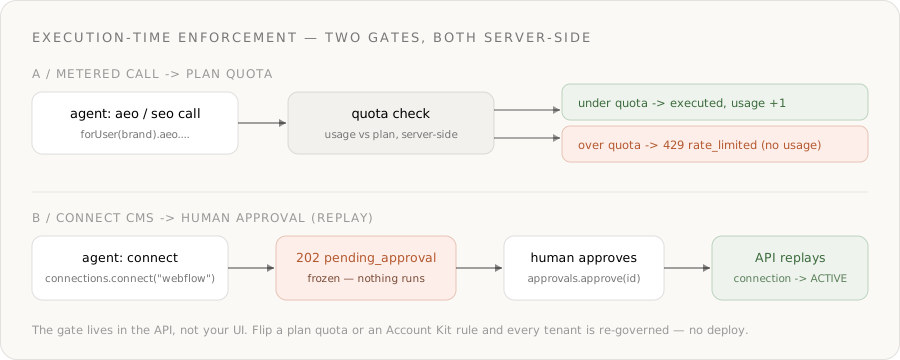
When a tenant exceeds a primitive's quota, the next call returns 429 rate_limited — server-side, the instant the call runs. Your agent loop just has to handle it:
import { NaiveError } from "@usenaive-sdk/server";

async function auditWithinQuota(brandId: string, prompt: string) {
  try {
    return await naive.forUser(brandId).aeo.llmResponses("chatgpt", {
      user_prompt: prompt,
      model_name: "gpt-4o-mini",
    });
  } catch (err) {
    if (err instanceof NaiveError && err.code === "rate_limited") {
      // The brand hit their plan quota. Stop the agent; prompt an upgrade.
      return { quotaExceeded: true };
    }
    throw err;
  }
}
This is execution-time permission enforcement, and it matters that the API does it, not your code:
- The quota is checked server-side the instant the agent calls — there's no way for a tenant to run more audits than their tier by hammering your endpoint.
- It's policy, not plumbing: change a plan's
quotasand every brand on that plan is re-limited, with no deploy. - Tenants without a subscription aren't quota-limited — seed a free-plan subscription on signup if you want every brand metered.
Upgrading a brand is one call — setSubscription swaps the plan and the Account Kit together:
await naive.forUser(brandId).billing.setSubscription({ planKey: "growth", status: "active", assignKit: true });
// Higher quotas + the Growth kit's larger CMS allowlist, atomically.
Step 7: Publish to the brand's CMS — with a human gate
Generating content is safe; pushing it to a customer's live website is not. The agent publishes through the brand's own connected CMS via the Connections primitive — and connecting a third-party service is approval-gated by default for tenant users. The agent's connect call freezes instead of starting OAuth:
import { isPendingApproval } from "@usenaive-sdk/server";

const brand = naive.forUser(brandId);

// Agent attempts to connect the brand's Webflow — gated by default
const res = await brand.connections.connect("webflow", {
  callbackUrl: "https://yourapp.com/oauth/done",
});

if (isPendingApproval(res)) {
  // Nothing happened yet. Surface res.approval_id to the brand's admin.
  console.log("CMS connect awaiting approval:", res.approval_id);

  // A human approves (from your dashboard, or the operator key):
  await brand.approvals.approve(res.approval_id);

  // The API replays the frozen connect and returns the hosted redirect
  const resolved = await brand.approvals.get(res.approval_id);
  // resolved.status === "executed" → resolved.result holds the redirectUrl
} else {
  // Un-gated path: send the brand admin to res.redirectUrl to finish OAuth
}
What's gated by default for agent calls on tenant users, straight from the Approvals docs:
| Action | action_type |
|---|---|
| Connect / sign up for a 3rd-party service | connections.connect |
| Issue or top up a virtual card | cards.create, cards.topup |
| Purchase a domain | domains.purchase |
| Start KYC | verification.start |
| Form / file a company | formation.create, formation.submit |
Once the brand finishes OAuth, the connection flips to ACTIVE and the agent publishes. Don't guess a tool's name or arguments — discover them at runtime for whatever the brand connected:
const tools = await brand.connections.tools("webflow");
// → the exact tool slugs + arg schemas Webflow exposes

// Then execute the publish tool the catalog reports, with the structured brief
await brand.connections.execute("webflow", "<PUBLISH_TOOL_SLUG>", {
  title: brief.title,
  body: renderArticle(brief), // your renderer turns the brief into HTML/markdown
});
Two brands publishing concurrently never collide: each execute is bound to its own scoped client and its own connected account.
Step 8: Put it together — onboard a brand, run an AEO cycle
The whole backend, end to end:
import { Naive, isPendingApproval, NaiveError } from "@usenaive-sdk/server";

const naive = new Naive({ apiKey: process.env.NAIVE_API_KEY! });

// One-time: policy + plans
const starterKit = await naive.accountKits.create({
  name: "AEO Starter",
  primitives_config: { llm: { enabled: true } },
  connections_config: { mode: "allowlist", toolkits: ["webflow", "wordpress"] },
});
await naive.plans.upsert({
  key: "starter",
  name: "AEO Starter",
  accountKitId: starterKit.id,
  quotas: { aeo: 100, seo: 500 },
  period: "month",
});

// Per brand: provision + subscribe (applies the plan's Account Kit)
export async function onboardBrand(b: { id: string; email: string; name: string }) {
  const brand = await naive.users.create({ external_id: b.id, email: b.email, label: b.name });
  await naive.forUser(brand.id).billing.setSubscription({
    planKey: "starter",
    status: "active",
    assignKit: true,
  });
  return brand.id;
}

// Per cycle: audit → ground → write → (publish via approved CMS)
export async function runAeoCycle(brandId: string, query: string) {
  const brand = naive.forUser(brandId);

  try {
    const chatgpt = await brand.aeo.llmResponses("chatgpt", { user_prompt: query, model_name: "gpt-4o-mini" });
    const answer = chatgpt.results[0];

    const mentions = await brand.aeo.llmMentions("search", {
      keyword: query,
      target: [{ domain: "yourbrand.com" }],
    });
    const serp = await brand.seo.serpCompetitors([query]);

    const plan = await brand.llm.chat({
      model: "anthropic/claude-sonnet-4.6",
      models: ["anthropic/claude-sonnet-4.6", "openai/gpt-5.2"],
      messages: [
        { role: "system", content: "You are an AEO strategist. Output an answer-optimized article plan." },
        { role: "user", content: JSON.stringify({ query, answer: answer.response, cited: answer.cited_domains, serp: serp.results, mentions: mentions.results }) },
      ],
      response_format: { type: "json_schema", json_schema: { name: "aeo_brief", strict: true, schema: BRIEF_SCHEMA } },
    });

    return { brief: JSON.parse(plan.choices[0].message.content), creditsUsed: plan.credits_used };
  } catch (err) {
    if (err instanceof NaiveError && err.code === "rate_limited") return { quotaExceeded: true };
    throw err;
  }
}

// On demand: connect the brand's CMS (freezes for approval)
export async function connectCms(brandId: string, cms: string) {
  const brand = naive.forUser(brandId);
  const res = await brand.connections.connect(cms, { callbackUrl: "https://yourapp.com/oauth/done" });
  if (isPendingApproval(res)) return { status: "pending", approvalId: res.approval_id };
  return { status: "ready", redirectUrl: res.redirectUrl };
}
That's a complete, multi-tenant agentic AEO backend. The product logic is small; the platform carries identity, isolation, metering, quotas, and authority.
Step 9: Put the cycle on autopilot
AEO is a tracking discipline — answer engines change their responses constantly, so audits should run on a schedule. Set up a recurring job that re-audits each brand and flags movement. With the CLI:
naive cron create "0 9 * * 1" \
  "Re-audit AI answer-engine visibility for every active brand. Compare mention share vs last week. Draft an answer-optimized brief for any query where we lost a citation." \
  --name "Weekly AEO audit"
Or hand the whole toolset to an LLM and let it drive the loop — agentTools() returns a ready meta-toolset bounded by the brand's Account Kit and plan, so the model discovers and runs the aeo, seo, llm, and connected-app tools itself, and gated methods still resolve to a pending_approval payload it relays to the human:
const kit = naive.forUser(brandId).agentTools();
// kit.tools  → tool-use definitions, filtered by the brand's kit + plan
// kit.handle(name, input) → dispatcher, AccountKit-gated and quota-metered server-side
Why this can't exist without the moat
Strip Naïve out and rebuild Steps 1–7 yourself:
- A four-engine AI-visibility pipeline — query ChatGPT, Claude, Gemini, and Perplexity, parse answers, and extract cited domains/URLs reliably, per tenant.
- Real SEO data — keyword volume, SERP competitors, and backlink authority from a maintained provider.
- Hard tenant isolation — a scoping layer that is designed to block cross-tenant reads server-side, not just "we remembered the
WHERE brand_id =." - A metering + quota engine — count every call per tenant per primitive and reject over-quota requests at execution time, mapped to billing tiers.
- An approval queue with replay — freeze connecting a customer's live CMS, surface it to a human, and replay the exact call on approval.
Each of those is a project. Together they're the reason a serious multi-tenant AEO product is hard. Naïve makes them forUser(id), an Account Kit, a plan with quotas, and isPendingApproval(res) — so you ship the product, not the plumbing.
Ship it
- Get a key at dashboard.usenaive.ai → API keys.
- Define the kits and plans once — allowlist the CMSs, set per-primitive quotas, keep connect-approval on.
- Provision a brand with
naive.users.create()andbilling.setSubscription({ assignKit: true }). - Audit AI answers across the four engines and quantify mention share.
- Ground and write with SEO data and an OpenRouter model using structured outputs.
- Connect the CMS and watch the approval gate freeze and replay it; publish.
- Start here: dashboard.usenaive.ai
- SDK quickstart: usenaive.ai/docs/sdk/quickstart
- AEO / GEO: usenaive.ai/docs/getting-started/aeo
- SEO: usenaive.ai/docs/getting-started/seo
- Customer Billing: usenaive.ai/docs/getting-started/customer-billing
- LLM (OpenRouter): usenaive.ai/docs/getting-started/llm
- Connections: usenaive.ai/docs/getting-started/connections
- Approvals: usenaive.ai/docs/getting-started/approvals
- Full documentation: usenaive.ai/docs
What is AEO / GEO, and how is it different from SEO?+
Why can't I just build a multi-tenant AEO tool with the OpenAI API and a scraper?+
How does Naïve isolate one brand (tenant) from another?+
How is usage metered and limited per customer?+
Which models can the agent use to write content, and how is it billed?+
Where does human approval come in?+
Building the autonomous company infrastructure.
Building multi-tenant AI agents into your SaaS means giving each customer an isolated, governed agent. Here's the full architecture and how to ship it.
An Account Kit is a reusable policy template that governs what a tenant user's AI agents can do — which primitives are enabled and which apps they can connect.
Keyword volume, backlinks, SERP competitors, and ranked-keyword data for classic search — plus AEO/GEO visibility into whether ChatGPT, Claude, Gemini, and Perplexity actually mention you. The full visibility stack behind one key.
Human-in-the-loop approvals that freeze sensitive actions until you say yes, a per-user audit trail of everything an agent did, short-lived scoped MCP sessions, and unified async job tracking — the controls that make an autonomous fleet safe to run.