- ›
An agentic access-governance tool breaks the moment the agent must act inside each customer company's own GitHub org and Slack workspace— you'd have to build per-company admin-OAuth storage, token refresh, hard tenant isolation, and a per-tool allow/deny gate before any product logic - ›
Naïve ships those as primitives: a tenant user per company, an Account Kit that defines their plan, per-user connections to GitHub, Slack, and 1,000+ apps, and human-in-the-loop approvals— all enforced server-side - ›
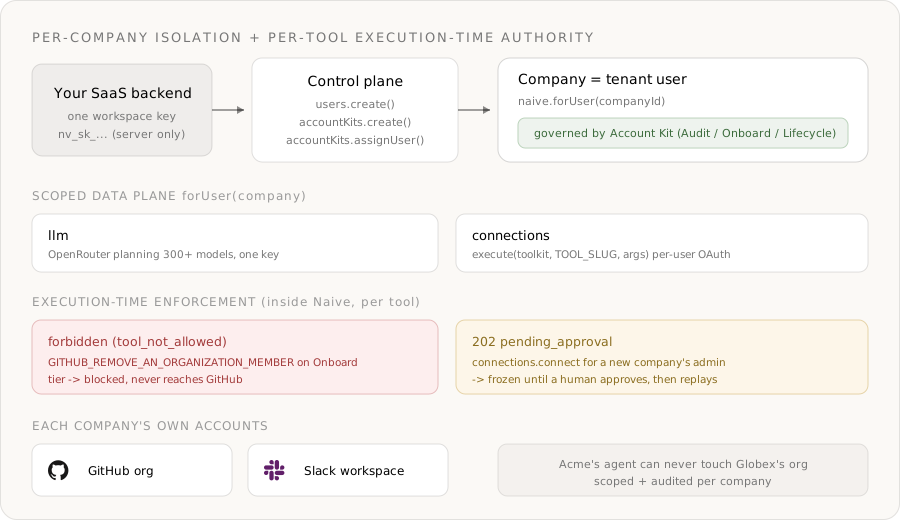
The product's plan tiers ARE Account Kits, and the moat lever here is the per-tool filter (tools.<toolkit>.enable/.disable): the same connected GitHub can expose only read tools, only read + add tools, or the full set including removals— decided by the kit - ›Permission is enforced at execution time, per tool: an Onboard-tier agent that calls GITHUB_REMOVE_AN_ORGANIZATION_MEMBER gets forbidden (tool_not_allowed) thrown by the API even though GitHub is connected and allowed
- ›Granting the agent admin reach into a new company is the approval-gated step: connections.connect returns 202 pending_approval until a human approves, then the connect flow replays
- ›The agent turns an HR signal into a structured plan with naive.llm.chat() (an OpenRouter wrapper over 300+ models), and every action is scoped with naive.forUser(companyId) and written to a per-company audit log
Most "AI access-governance" demos are a single model key, a clever prompt, and one hardcoded GitHub admin token. That works for a demo. The moment you try to sell it as a product — where each of your customer companies points the agent at their own GitHub org and their own Slack workspace — the model stops being the hard part. Identity and authority take over:
- The agent must act inside that company's own GitHub org and Slack workspace, never a shared bot or your platform's admin account.
- One company's agent must never be able to remove a member from, or read the roster of, another company's org.
- What the agent is allowed to do has to match the plan that company pays for — and "allowed" has to be enforced per individual operation, when the agent acts: an agent that can add a repo collaborator must be physically unable to remove an org member unless its tier grants that, no matter what a prompt-injected HR ticket tries to talk it into.
Without a platform you end up building a per-company admin-OAuth store across GitHub and Slack, token refresh and encryption, a hard tenant-isolation layer, and a per-tool allow/deny gate before you write a single line of governance logic. That plumbing is the product — and it's exactly what Naïve ships as primitives.
This is a developer tutorial. Every code block runs against the current @usenaive-sdk/server, with signatures pulled straight from the docs. By the end you'll have a multi-tenant access-governance backend where each company gets an isolated agent whose powers are decided per tool by its plan — and enforced by the API.
What we're building
- A backend service that provisions an isolated access-governance agent per customer company.
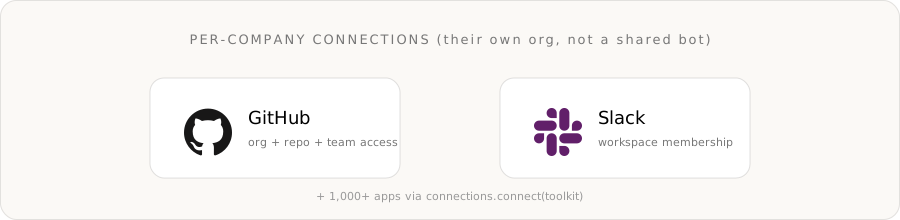
- Each company connects their own GitHub org and Slack workspace — through Naïve's hosted connect flow.
- The agent reads an HR signal (a joiner or a leaver), turns it into a structured access plan with an OpenRouter model, then runs that plan against the company's own org: add repo collaborators and team members, invite to Slack — and, only on the top tier, remove org members and revoke Slack access.
- The plan tier is a reusable Account Kit, and the lever is the per-tool filter: an Audit agent can only read; an Onboard agent can read and add; a Lifecycle agent can also remove — and the limit is enforced at execution time, per tool.
- Granting the agent admin reach into a new company is approval-gated, and every action lands in a per-company audit log.
The primitives in play, all from the docs:
| Primitive | Role in the access agent | Docs |
|---|---|---|
| Users | One tenant user per company — the isolation boundary | naive.users |
| Account Kits | The plan tier: allowed apps, enabled tools, approval rules | naive.accountKits |
| Connections | Per-company access to GitHub, Slack, and 1,000+ apps | forUser(id).connections |
| LLM | OpenRouter-backed planning across 300+ models | forUser(id).llm |
| Approvals | Human-in-the-loop on connecting a company's admin | forUser(id).approvals |
| Logs | Per-company audit trail of every agent action | forUser(id).logs |
The two apps the agent drives are connected per company through Naïve's connections provider:
Step 0: Install and authenticate
You need a Naïve workspace key (nv_sk_...) from the dashboard → Settings → API keys. The SDK is server-only — keys are server secrets, never shipped to the browser.
npm install @usenaive-sdk/serverimport { Naive, NaiveError, isPendingApproval } from "@usenaive-sdk/server";
const naive = new Naive({ apiKey: process.env.NAIVE_API_KEY! });Two surfaces matter, and the difference is the whole design:
naive.*(the root client) acts on your default tenant user and exposes the control plane (naive.users,naive.accountKits).naive.forUser(id).*returns the same data-plane surface (connections,llm,approvals,logs) bound to a specific company.
That forUser scoping is the whole game. Read it as: "do this, as this company, under this company's plan." Acme's agent is naive.forUser(acmeId); it has no path to Globex's org.
Step 1: Define the plan tiers as Account Kits
This is the move that makes the product multi-tenant and safe. An Account Kit is a reusable policy template that controls which apps a user may connect (mode + toolkits), which individual tools are callable inside each app (tools.<toolkit>.enable / .disable), and which sensitive actions require human approval.
The lever that matters here is the per-tool filter. The architecture docs describe it precisely: "Within an allowed toolkit, restrict to specific tools with tools.<toolkit>.enable or .disable (mutually exclusive)." That is what lets the same connected GitHub be read-only, add-only, or full-lifecycle depending on the tier — without reconnecting anything.
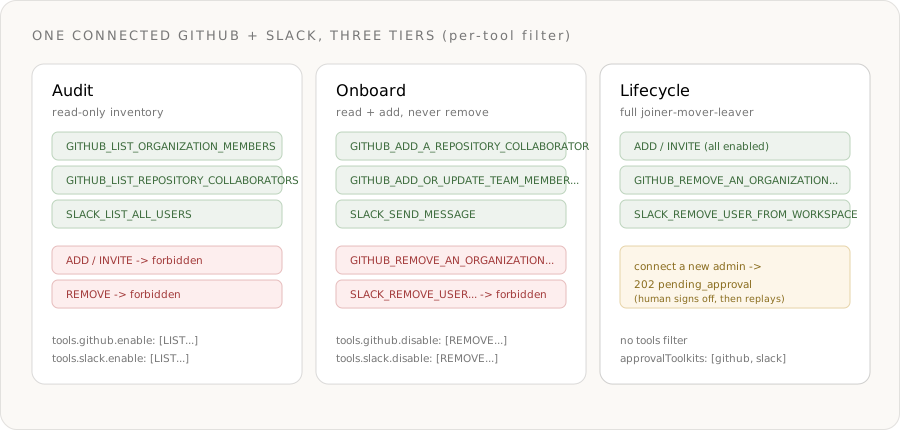
Audit — read-only inventory. GitHub and Slack are allowed, but only the LIST/FIND tools are enabled. Every write or remove call is filtered out server-side.
const auditKit = await naive.accountKits.create({
  name: "Access — Audit",
  primitives_config: { llm: { enabled: true } },
  connections_config: {
    mode: "allowlist",
    toolkits: ["github", "slack"],
    tools: {
      github: { enable: ["GITHUB_LIST_ORGANIZATION_MEMBERS", "GITHUB_LIST_REPOSITORY_COLLABORATORS"] },
      slack: { enable: ["SLACK_LIST_ALL_USERS", "SLACK_FIND_USER_BY_EMAIL_ADDRESS"] },
    },
  },
});
Onboard — read + add, never remove. The agent can grant access but the destructive tools are explicitly disabled. GitHub is connected and allowed; GITHUB_REMOVE_AN_ORGANIZATION_MEMBER still returns forbidden.
const onboardKit = await naive.accountKits.create({
  name: "Access — Onboard",
  primitives_config: { llm: { enabled: true } },
  connections_config: {
    mode: "allowlist",
    toolkits: ["github", "slack"],
    tools: {
      // disable is mutually exclusive with enable: everything in the toolkit
      // EXCEPT these destructive tools is callable.
      github: {
        disable: [
          "GITHUB_REMOVE_AN_ORGANIZATION_MEMBER",
          "GITHUB_REMOVE_A_REPOSITORY_COLLABORATOR",
        ],
      },
      slack: { disable: ["SLACK_REMOVE_USER_FROM_WORKSPACE"] },
    },
  },
});
Lifecycle — full joiner-mover-leaver. No per-tool restriction, so removal tools are callable. But connecting a new company's admin is approval-gated: connections.connect for GitHub and Slack freezes for a human before the agent ever gets destructive reach into a fresh org.
const lifecycleKit = await naive.accountKits.create({
  name: "Access — Lifecycle",
  primitives_config: { llm: { enabled: true } },
  connections_config: {
    mode: "allowlist",
    toolkits: ["github", "slack"],
    // no tools filter → every tool in the allowed toolkits is callable
    requiresApproval: false,
    approvalToolkits: ["github", "slack"], // connecting a new admin needs a human
  },
});
A few facts to internalize, all from the docs:
tools.<toolkit>.enableand.disableare mutually exclusive — use one per toolkit. (architecture)- A disabled or non-enabled tool is filtered out of the agent's reach; calling it returns
forbiddenwith the hinttool_not_allowed. (errors) connections.connectis approval-gated by default;approvalToolkitslets you require approval for connecting specific apps only. (connections)
Step 2: Provision a company and connect its org
Each customer company is a tenant user. Create it and assign the tier it pays for. Tenant users never sign into Naïve — you manage them entirely through the SDK.
const acme = await naive.users.create({
  external_id: "company_acme",      // your stable id for the company
  email: "it@acme.example",
  label: "Acme Inc — IT",
  account_kit_id: onboardKit.id,    // starts on the Onboard tier
});
Now the company's IT admin authorizes their own GitHub org and Slack workspace once. connect returns a hosted redirectUrl; you send the admin there, and the connection becomes ACTIVE when they finish OAuth.
Because the Onboard tier doesn't gate connecting, this resolves immediately:
const acmeClient = naive.forUser(acme.id);

const gh = await acmeClient.connections.connect("github", {
  callbackUrl: "https://app.yourgov.com/oauth/callback",
});
// gh = { toolkit, connectedAccountId, redirectUrl, status: "INITIATED" }
// Send the admin to gh.redirectUrl. After OAuth, the connection is ACTIVE.

await acmeClient.connections.connect("slack", {
  callbackUrl: "https://app.yourgov.com/oauth/callback",
});
Confirm status cheaply from Naïve's local mirror before the agent acts:
const connected = await acmeClient.connections.connected();
// active/expired connections for this company only — no live provider call
Step 3: Discover the real tool schema — never hardcode
Each app exposes its own tools with stable slugs. Before the agent calls execute, list the live schema for the app so you bind to real tools and real arguments:
const { toolkit, tools } = await acmeClient.connections.tools("github");
// tools[] carries { slug, description, input schema } for every GitHub tool
// the agent (and you) can call — already filtered by Acme's Account Kit.
This is also the cleanest way to feed an LLM agent its allowed surface: the kit filter means a disabled tool is simply absent from the list, so the model is never even offered a tool it can't run.
Step 4: Onboard a hire — plan, then act
The agent's job: take an HR signal and turn it into a concrete access plan. Use naive.forUser(id).llm.chat() — a full OpenRouter wrapper over 300+ models with an OpenAI-compatible body (docs).
const signal =
  "New hire: Jordan Lee (github: jlee-acme, email: jordan@acme.example). " +
  "Role: backend engineer. Grant push to the `payments-api` repo, add to the " +
  "`backend` team, and invite to the #engineering Slack channel.";

const plan = await acmeClient.llm.chat({
  model: "anthropic/claude-sonnet-4.6",
  models: ["anthropic/claude-sonnet-4.6", "openai/gpt-5.2"], // fallback chain
  messages: [
    {
      role: "system",
      content:
        "You are an access-provisioning planner. Output a JSON array of steps, " +
        "each { toolkit, tool, arguments } using only the tool slugs provided.",
    },
    { role: "user", content: signal },
  ],
});

const steps = JSON.parse(plan.choices[0].message.content);
console.log("planned in", plan.credits_used, "credits");
Then run each step against Acme's own GitHub and Slack. The execute signature is connections.execute(toolkit, toolSlug, arguments) and returns { successful, error, data } (docs):
// Grant push access to a repo (org-owned repo → permission applies)
await acmeClient.connections.execute("github", "GITHUB_ADD_A_REPOSITORY_COLLABORATOR", {
  owner: "acme",
  repo: "payments-api",
  username: "jlee-acme",
  permission: "push",
});

// Add to a GitHub team (invites to the org if not yet a member)
await acmeClient.connections.execute("github", "GITHUB_ADD_OR_UPDATE_TEAM_MEMBERSHIP_FOR_USER", {
  org: "acme",
  team_slug: "backend",
  username: "jlee-acme",
  role: "member",
});

// Welcome them in Slack from the company's own workspace
await acmeClient.connections.execute("slack", "SLACK_SEND_MESSAGE", {
  channel: "#engineering",
  markdown_text: "Welcome to the backend team, Jordan! :wave:",
});
Every one of those calls runs inside Acme's connected org and workspace. There is no shared bot and no cross-tenant surface.
Step 5: The moat — a destructive call the agent simply cannot make
Here's the part you can't get from "a model plus two SDKs." Acme is on the Onboard tier. Suppose the agent — fed a malicious or malformed HR ticket — tries to remove an org member:
try {
  await acmeClient.connections.execute("github", "GITHUB_REMOVE_AN_ORGANIZATION_MEMBER", {
    org: "acme",
    username: "jlee-acme",
  });
} catch (err) {
  if (err instanceof NaiveError && err.code === "forbidden") {
    console.log(err.hint); // "tool_not_allowed"
    // The removal never reached GitHub. The Onboard kit disabled this tool.
  }
}
This is the whole point:
- GitHub is connected and is allowed for Acme. The block is at the tool level, not the app level.
- The gate runs inside Naïve, at execution time — not as a check you remembered to write before calling. A prompt-injected ticket can't talk its way past it, because the policy lives in the Account Kit, not in your code path.
- Changing the policy for every Onboard-tier company is a one-line
connections_config.toolsedit. No redeploy, no per-company config drift.
The same call on a company assigned to the Lifecycle kit executes normally — because that kit doesn't filter the tool out. Authority is data, enforced server-side, and it differs per tenant.
Step 6: Offboarding on the Lifecycle tier — and the approval gate on reach
Promote a company to full lifecycle by reassigning the kit:
await naive.accountKits.assignUser(lifecycleKit.id, acme.id);
// equivalently: naive.users.update(acme.id, { account_kit_id: lifecycleKit.id })
Now the agent can run a leaver workflow against Acme's own org:
await acmeClient.connections.execute("github", "GITHUB_REMOVE_A_REPOSITORY_COLLABORATOR", {
  owner: "acme",
  repo: "payments-api",
  username: "jlee-acme",
});

await acmeClient.connections.execute("github", "GITHUB_REMOVE_AN_ORGANIZATION_MEMBER", {
  org: "acme",
  username: "jlee-acme",
});

const user = await acmeClient.connections.execute("slack", "SLACK_FIND_USER_BY_EMAIL_ADDRESS", {
  email: "jordan@acme.example",
});
// then SLACK_REMOVE_USER_FROM_WORKSPACE with the resolved user id
But notice what the Lifecycle kit gated: connecting a new company's admin. The destructive blast radius of a lifecycle agent is "an entire org," so granting it that reach is the moment a human signs off. When you onboard a new Lifecycle-tier company, connections.connect returns a deferred approval instead of a redirect — HTTP 202, not a thrown error (errors):
const globex = await naive.users.create({
  external_id: "company_globex",
  label: "Globex — IT",
  account_kit_id: lifecycleKit.id,
});
const globexClient = naive.forUser(globex.id);

const res = await globexClient.connections.connect("github", {
  callbackUrl: "https://app.yourgov.com/oauth/callback",
});

if (isPendingApproval(res)) {
  // res.approval_id — frozen until a human approves
  console.log("Connecting Globex's GitHub admin needs sign-off:", res.approval_id);

  await globexClient.approvals.approve(res.approval_id); // API replays the connect
  const a = await globexClient.approvals.get(res.approval_id);
  // a.status: "executed" → the connect flow proceeded; redirectUrl is in a.result
}
So the two enforcement mechanisms compose:
- Per-tool filter →
forbidden(tool_not_allowed) on a destructiveexecutethe tier doesn't grant. Hard wall, no human in the loop, instant. - Approval gate →
202 pending_approvalonconnections.connectfor a high-blast-radius app, frozen until a person approves and the action replays.
Step 7: The per-company audit trail
Every primitive call lands in a per-user log. Pull a company's history scoped to it — there's no way to accidentally read another tenant's events (docs):
const { events } = await acmeClient.logs.query({
  action: "connections.execute",
  limit: 50,
});
// who the agent added/removed, in which org, and the result — for Acme only
That gives you a strong audit artifact: a per-company record of exactly which access the agent granted or revoked, for which company, at which time — useful for internal reviews, not a substitute for a formal SOC 2 or SOX program on its own.
What you didn't build
Step back and count the infrastructure you skipped — the part that is normally the whole product:
- Per-company admin-OAuth storage for GitHub and Slack, with refresh and encryption. (Connections.)
- Hard tenant isolation so Acme's agent can never touch Globex's org. (
forUserscoping.) - A per-tool allow/deny gate that lets the same connected app be read-only, add-only, or full-lifecycle by tier. (
connections_config.tools.) - A human-in-the-loop queue for high-blast-radius connects, with frozen-then-replayed semantics. (Approvals.)
- A per-company audit log of every grant and revoke. (Logs.)
You wrote the planning prompt and the step list. Naïve enforced who the agent is, which org it may touch, which individual operations it may run, and what needs a human first — at execution time, server-side, per tenant.
Ship it
- Define your tiers once as Account Kits — the per-tool
tools.<toolkit>.disablefilter is the difference between an agent that can onboard and one that can also offboard. - Provision each customer company as a tenant user and have their admin connect their own GitHub and Slack.
- Let the agent plan with
llm.chat()and act withconnections.execute()— and trust the API, not your prompt, to stop a call the tier doesn't allow.
Start from the Connections guide, the Account Kits architecture, and the Approvals guide. Get a workspace key in the Naïve dashboard and build the governance layer your customers can actually pass an audit with.
Why can't I just build an access-governance agent with a model API and the GitHub and Slack SDKs?+
How is this different from a simple app allowlist?+
What does 'execution-time permission enforcement' mean here?+
How does the agent act inside each company's own GitHub and Slack instead of a shared bot?+
Which third-party apps and tools can the agent call?+
Do my customers ever sign into Naïve?+
How do I promote a company from Onboard to full Lifecycle deprovisioning?+
Building the autonomous company infrastructure.
An Account Kit is a reusable policy template that governs what a tenant user's AI agents can do — which primitives are enabled and which apps they can connect.
AI agent permissions should be enforced server-side at execution time, not prompted. Here's how policy templates gate primitives, apps, and approvals.
Spend caps, human approvals, and instant revoke for AI agents must be enforced server-side — Naïve's governance gateway applies all three on every call.
The connections primitive gives each end-user's agents authenticated access to 1,000+ third-party apps — per user, gated by the Account Kit, in one surface.