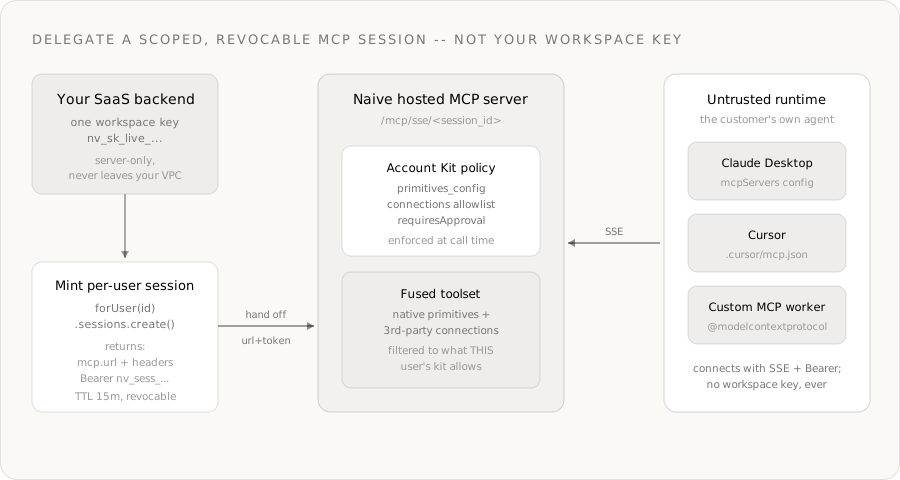
- ›Letting customers connect their own AI agent to your product is a security problem: an untrusted runtime (their Claude Desktop, their Cursor, their script) cannot hold your workspace key
- ›
Naïve's Sessions primitive mints a short-lived, revocable per-user MCP endpoint— you hand off an mcp.url plus a Bearer nv_sess_… token, never your nv_sk_… key - ›
The session's tool list is the fused native + third-party toolset, filtered by that customer's Account Kit— so two customers hitting the same endpoint see two different tool lists - ›Disabled primitives never appear in listTools(); sensitive calls (cards, browser signup) resolve to a pending_approval the agent must relay to a human
- ›Default TTL is 15 minutes (max 24h), the bearer lives in the Authorization header and never the URL, and a single sessions.revoke() drops the connection immediately
- ›
Every call is scoped with naive.forUser(customerId) and gated server-side at execution time— there is no path for one customer's agent to touch another's data
You want to let your customers point their own AI agent at your product. Their Claude Desktop. Their Cursor workspace. A LangGraph worker they wrote. The agent should be able to act on their account — read the apps they connected, use your platform's primitives — and nothing else.
The model is the easy part. The hard part is the credential:
- An untrusted runtime (code you don't control, running on a machine you don't own) cannot hold your workspace key. That key is your entire company — every tenant, every connection, no expiry.
- The agent must be scoped to exactly one customer, and bounded to exactly what that customer is allowed to do.
- When the customer disconnects, access has to stop now — not at the next token refresh.
Without a platform you'd build a per-user token mint, an MCP server that re-derives permissions on every call, a revocation list, and an audit trail before you write any product. That plumbing is the product — and Naïve ships it as the Sessions primitive.
This is a developer tutorial. Every code block runs against the current @usenaive-sdk/server, with signatures pulled straight from the docs. By the end you'll mint a short-lived, revocable MCP session, connect to it with a real MCP client, watch the customer's Account Kit filter the tool list, see a sensitive call freeze for approval, and revoke it mid-flight.
What we're building
- A backend endpoint (
POST /agent-session) that, for the signed-in customer, mints a Naïve MCP session and returns the connection details. - Two Account Kits — Member (read/draft, a narrow connection allowlist) and Admin (can spend, with approval) — that define what each customer's agent may do.
- A demonstration that the same MCP endpoint yields a different tool list per customer, because the kit is the filter.
- A sensitive call that resolves to
pending_approval, approved from the control plane. - Instant revocation — a revoked session's next request is rejected.
The primitives in play, all from the docs:
| Primitive | Role in the platform | Docs |
|---|---|---|
| Users | One tenant user per customer — the isolation boundary | naive.users |
| Account Kits | The policy: which primitives are enabled, which apps connectable, what needs approval | naive.accountKits |
| Sessions | A TTL'd, revocable per-user MCP credential | forUser(id).sessions |
| MCP Server | The hosted SSE endpoint the customer's agent connects to | /mcp/sse/<session_id> |
| Approvals | Human-in-the-loop for sensitive tool calls | forUser(id).approvals |
Step 0: Install and authenticate
You need a Naïve workspace key (nv_sk_...) from the dashboard → Settings → API keys. The SDK is server-only — the key is a server secret that never reaches the browser, and crucially, never reaches the customer's agent.
npm install @usenaive-sdk/serverimport { Naive } from "@usenaive-sdk/server";
const naive = new Naive({ apiKey: process.env.NAIVE_API_KEY! });naive.*(the root client) exposes the control plane:naive.users,naive.accountKits, and per-user session management.naive.forUser(id).*returns the data-plane surface bound to a specific customer — includingsessions,approvals, andlogs.
That forUser scoping is the whole game. Read it as: "act as this customer, under this customer's policy." A session is just that scoping, frozen into a credential you can hand to someone else.
Step 1: Define the policy as Account Kits
An Account Kit is a reusable policy template. It controls two things: which native primitives are enabled, and which third-party apps a user may connect. This is the boundary every session inherits.
Define a Member kit — can send email, query its own logs, and connect only Gmail and Linear. Cards and browser are off:
const memberKit = await naive.accountKits.create({
  name: "BYO Agent — Member",
  primitives_config: {
    email: { enabled: true },
    cards: { enabled: false },
    browser: { enabled: false },
  },
  connections_config: {
    mode: "allowlist",
    toolkits: ["gmail", "linear"],
  },
});
Now an Admin kit — same surface plus the ability to issue a virtual card and drive an autonomous browser signup, both behind approval, with the full connection catalog:
const adminKit = await naive.accountKits.create({
  name: "BYO Agent — Admin",
  primitives_config: {
    email: { enabled: true },
    cards: { enabled: true, requiresApproval: true },
    browser: { enabled: true, requiresApproval: true },
  },
  connections_config: {
    mode: "open",
  },
});
mode: "allowlist"means only the listedtoolkitsare connectable;mode: "open"is the full catalog. There's alsoblocklist.requiresApproval: truefreezes a sensitive call as a pending approval (HTTP 202) until a human approves it.cards,domains,verification,formation, andconnections.connectdefault to requiring approval already.- This is execution-time policy: it is enforced server-side, at the moment the agent calls the tool — not by trusting the agent's prompt.
Step 2: Provision a customer and assign a kit
When your app signs up a customer, create a tenant user. Pass your own DB id as external_id so you can map back later, and assign the kit in the same call:
const acme = await naive.users.create({
  external_id: "acme_db_uuid",
  email: "ops@acme.com",
  label: "Acme Corp",
  account_kit_id: memberKit.id,
});
Tenant users are not auth subjects — they never sign into Naïve. Your customer signs into your product; you manage their Naïve identity entirely through the API. To move a customer between tiers later, reassign the kit:
// Upgrade Acme to the Admin tier
await naive.accountKits.assignUser(adminKit.id, acme.id);
// (equivalently: naive.users.update(acme.id, { account_kit_id: adminKit.id }))
Every session this user mints from now on inherits the assigned kit. Change the kit, and the next session is bounded differently — no token surgery required.
Step 3: Mint a session — the credential you hand off
This is the moat. Instead of sharing your nv_sk_... key, you mint a per-user session. It returns an MCP URL plus a short-lived nv_sess_... bearer:
const client = naive.forUser(acme.id);

const session = await client.sessions.create({ ttlMs: 15 * 60 * 1000 });
// naive.session() is sugar for the default user.

console.log(session);
// {
//   id: "8db5b930-12cb-4563-8e40-5aebb100f28f",
//   expires_at: "2026-06-28T11:15:07Z",
//   mcp: {
//     url: "https://api.usenaive.ai/mcp/sse/8db5b930-12cb-4563-8e40-5aebb100f28f",
//     headers: { Authorization: "Bearer nv_sess_…" },
//     expires_at: "2026-06-28T11:15:07Z"
//   }
// }
The security properties, straight from Architecture → Sessions:
- The bearer lives in the
Authorizationheader, never the URL. The path carries only the non-secret session id. - Default TTL is 15 minutes, configurable up to 24h via
ttlMs. - Revocable immediately. Logged by session id only — the bearer is never written to any log.
In your product, this becomes a thin endpoint. The customer's client calls it (authenticated as your user, in your app), and you hand back exactly what an MCP client needs:
// POST /agent-session  (authenticated in YOUR app)
app.post("/agent-session", async (req, res) => {
  const customerId = req.session.naiveUserId; // your mapping to the tenant user
  const session = await naive.forUser(customerId).sessions.create({
    ttlMs: 15 * 60 * 1000,
  });
  // Return ONLY the session connection details — never your nv_sk_ key.
  res.json({ url: session.mcp.url, headers: session.mcp.headers, expiresAt: session.expires_at });
});
Step 4: Connect the customer's agent
The customer now has everything an MCP client needs. Two ways to use it.
Option A — a desktop MCP client (Claude Desktop, Cursor)
Drop the session URL and header into the client's MCP config. For Claude Desktop (claude_desktop_config.json) or Cursor (.cursor/mcp.json):
{
  "mcpServers": {
    "my-product": {
      "url": "https://api.usenaive.ai/mcp/sse/8db5b930-12cb-4563-8e40-5aebb100f28f",
      "headers": {
        "Authorization": "Bearer nv_sess_…"
      }
    }
  }
}
The customer's own agent now has a scoped toolset for their account. When the session expires, the connection stops working and they fetch a fresh one from your /agent-session endpoint.
Option B — a custom MCP worker
If the customer (or you) runs a programmatic agent, connect with the official Model Context Protocol SDK. The transport is SSE, with the session's headers passed verbatim:
npm install @modelcontextprotocol/sdkimport { Client } from "@modelcontextprotocol/sdk/client/index.js";
import { SSEClientTransport } from "@modelcontextprotocol/sdk/client/sse.js";
// `session` came from POST /agent-session above
const transport = new SSEClientTransport(new URL(session.mcp.url), {
requestInit: { headers: session.mcp.headers },
});
const mcp = new Client({ name: "acme-agent", version: "1.0.0" });
await mcp.connect(transport);
const { tools } = await mcp.listTools();
console.log(tools.map((t) => t.name));No workspace key anywhere in that snippet. The worker authenticates entirely with the short-lived session bearer.
Step 5: Watch the kit filter the tool list
Here's the moat, shown not told. listTools() over a Member session and an Admin session returns different lists — because the session's tool list is filtered by the user's Account Kit.
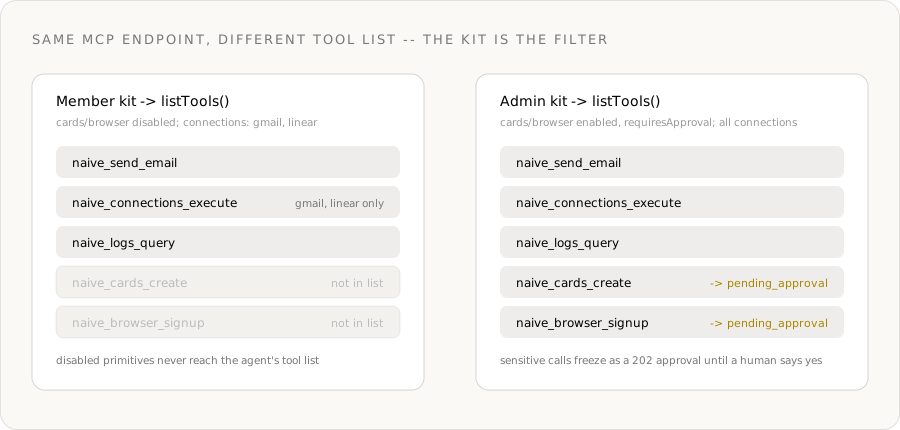
For the Member kit (cards/browser disabled), those tools are simply absent:
// Member session tool names (abridged)
[
  "naive_send_email",
  "naive_connections_execute",   // gmail + linear only — kit allowlist
  "naive_logs_query",
  // naive_cards_create        -> NOT in the list (primitive disabled)
  // naive_browser_signup      -> NOT in the list (primitive disabled)
]
For the Admin kit, the same endpoint surfaces the sensitive tools, marked approval-gated:
// Admin session tool names (abridged)
[
  "naive_send_email",
  "naive_connections_execute",   // full catalog — kit is "open"
  "naive_logs_query",
  "naive_cards_create",          // present, but approval-gated
  "naive_browser_signup",        // present, but approval-gated
]
The customer's agent literally cannot call a tool that isn't in its list. There is no prompt to jailbreak, no client-side flag to flip — the surface itself is bounded server-side. As the MCP tools reference puts it: "Tool availability and execution are gated by the resolved user's AccountKit."
Connections are bounded the same way. A Member-session agent can call naive_connections_execute, but only for gmail and linear; anything else returns forbidden with a reason of toolkit_not_allowed — at execution time:
// Over a Member session, the agent tries to act on Slack (not in the allowlist):
await mcp.callTool({
  name: "naive_connections_execute",
  arguments: { toolkit: "slack", tool: "SLACK_SEND_MESSAGE", arguments: { /* … */ } },
});
// -> { error: "forbidden", reason: "toolkit_not_allowed" }  — surface, don't retry
Step 6: A sensitive call freezes for approval
Now upgrade Acme to the Admin kit (Step 2) and mint a fresh session. The agent can see naive_cards_create, but the kit marked cards with requiresApproval. Managed virtual cards also require a cardholder once per company (Cards docs); prepaid gift cards cap at $150 without one. So when the agent calls the tool, the action doesn't execute — it freezes as a pending approval (HTTP 202) and the tool result reports a pending status with an approval_id:
const result = await mcp.callTool({
  name: "naive_cards_create",
  arguments: { name: "Acme Ads", spending_limit_cents: 15000, provider: "managed_virtual" },
});
// The tool result reports a pending approval, e.g. { status: "pending_approval", approval_id: "apr_…" }
// The agent should relay this to the human — it cannot approve its own request.
A human resolves it from your control plane (your dashboard, your Slack bot — wherever your operators live), using the workspace key the agent never sees:
// In your backend — list what's waiting, then approve or deny
const { approvals } = await naive.forUser(acme.id).approvals.list({ status: "pending" });

await naive.forUser(acme.id).approvals.approve(approvals[0].id);
// approve() replays the frozen action — the card is created now.
// Or: approvals.deny(id, { reason: "over budget" })
This is the second layer of execution-time enforcement, stacked on the first:
- Tool-list filtering decides what the agent can attempt.
- Approval gating decides what executes without a human — for the tools it can attempt.
Both live in the API, bound to the kit. Neither is something the customer's untrusted runtime can talk its way around.
Step 7: Revoke — access stops now
A customer disconnects, a token leaks, a contract ends. You revoke the session, and the next MCP request on it is rejected immediately — auth is validated against the session at request time, so there's no propagation delay:
const client = naive.forUser(acme.id);

await client.sessions.list();        // [{ id, status: "active" | "expired" | "revoked", … }]
await client.sessions.revoke(session.id);

// The customer's MCP client now gets `unauthorized` on its next call.
// Tokens are never returned by sessions.list — only ids and status.
You don't even have to revoke explicitly — every session expires on its own TTL. Revocation is for when "soon" isn't soon enough. And because everything is logged by session id, you keep a clean per-user audit trail without ever recording the bearer:
const { events } = await naive.forUser(acme.id).logs.query({ limit: 50 });
// Per-user activity — which tools the agent invoked, scoped to this customer.
Why this can't exist without the moat
Strip Naïve out and rebuild "let a customer's agent act on their account, safely." You would have to ship, before any product:
- A per-user token mint with TTLs and a revocation list.
- An MCP server that re-derives, on every single call, which tools this token may see and run.
- A policy layer (per-user enabled primitives + per-app allowlists + which actions need a human) enforced at execution time, not in the prompt.
- A human-in-the-loop queue that can freeze and replay a frozen action.
- A per-user audit trail that never logs the secret.
That is the entire bring-your-own-agent platform — and it's the part you'd build before writing a line of your actual product. Naïve collapses it into forUser(id).sessions.create() plus an Account Kit. The agent runs anywhere; the boundary stays server-side.
What Naïve handles for you
| What | How it works | Cost |
|---|---|---|
| Per-customer isolation | One tenant user per customer; every session scoped to that user | Free |
| Scoped credential | sessions.create mints a TTL'd nv_sess_… bearer — never your workspace key | Free |
| Tool-list filtering | The kit removes disabled primitives + non-allowlisted apps from listTools() | Free |
| Execution-time approval | requiresApproval freezes sensitive calls as a 202 pending approval | Free |
| Instant revocation | sessions.revoke rejects the next request immediately | Free |
| Audit trail | logs.query per user; bearer never logged | Free |
| Tool execution | The agent's actual tool calls (send email, run a capability, etc.) | Per primitive — see credits |
Costs
- Sessions, kits, revocation, tool-list filtering, approvals, and audit logs: free — they're the policy plane, not metered actions.
- The tools the agent actually runs bill at their normal rate (e.g. an email send is 0.016 credits;
llmcalls bill at OpenRouter cost converted at $0.05 = 1 credit). A rejected (forbidden) or frozen (pending_approval) call executes nothing and charges nothing. - See usenaive.ai/docs/getting-started/credits for current rates.
Get started
- Get a key at dashboard.usenaive.ai → Settings → API keys
- Author your kits —
naive.accountKits.createwithprimitives_config+connections_config - Provision customers —
naive.users.create({ account_kit_id }) - Mint sessions on demand —
forUser(id).sessions.create({ ttlMs })behind an authenticated endpoint - Hand off
mcp.url+mcp.headers— to Claude Desktop, Cursor, or a@modelcontextprotocol/sdkworker - Gate and revoke — approve sensitive calls from your control plane;
sessions.revoketo cut access
The customer's agent runs on their machine, in their runtime, with their own model. Your policy still wins — at execution time, server-side, on every call. You hand out a capability, never a key.
- Sessions: usenaive.ai/docs/getting-started/sessions
- Architecture → Sessions: usenaive.ai/docs/architecture/sessions
- MCP server + connection: usenaive.ai/docs/mcp/overview
- Account Kits: usenaive.ai/docs/getting-started/account-kits
- Approvals: usenaive.ai/docs/getting-started/approvals
- Full documentation: usenaive.ai/docs
Why can't I just give a customer's agent my API key?+
What exactly does a session let the agent do?+
How is this different from running the agent loop on my own backend?+
What happens when the agent calls a sensitive tool?+
How do I revoke access?+
Do my customers need a Naïve account?+
Building the autonomous company infrastructure.
Per-user MCP sessions give AI agents delegated, revocable access — short-lived, kit-scoped credentials instead of your workspace key. Here's the pattern.
Hosted vs bring-your-own runtime for AI agents: Naïve is runtime-agnostic — governance applies at the tool-call boundary either way. Compare both paths.
Launch the Naïve Agent SDK: one interface for agent identity, 40+ primitives, scoped cards, and real-world standing — multi-tenant, with audit logs, spend limits, and per-user MCP sessions.
The vault primitive: per-user encrypted storage for the secrets your agents hold — API keys, cookies, tokens — envelope-encrypted with a managed KMS.