> ## Documentation Index
> Fetch the complete documentation index at: https://vetta.sh/docs/llms.txt
> Use this file to discover all available pages before exploring further.
# Social data
> Read public posts, profiles, comments, followers, hashtags and trends on about 21 social networks — from an agent, the dashboard, the API, the SDK or the CLI. No connected account; priced per run.
Social data is a catalogue of read-only tools for **public** social media data: posts, profiles, comments, followers, hashtags and trends on X, Instagram, TikTok, YouTube, Reddit, LinkedIn, Facebook, Threads, Telegram, Snapchat, Lemon8, and Douyin, Xiaohongshu, Weibo, Bilibili, Zhihu, Kuaishou, WeChat, Toutiao, Xigua and Pipixia. Hundreds of tools are ready today and the catalogue grows on its own.
Social data is the [Data](/docs/capabilities/data) catalogue's `social` domain, under its own names.
It needs **no connected account**. That is the difference from [Social](/docs/identity/social), which publishes as a persona's own accounts and reads their metrics: social data reads what anyone can see, on any account.
Every surface does the same three things:
1. **Search** the catalogue with a short phrase — `"tiktok video comments"`, `"instagram profile"` — optionally on one network. Free.
2. **Describe** a tool to read its input schema (`path`, `query` and `body` parameters), its price and its notes. Free.
3. **Run** it with those parameters and get the data back as JSON. Priced per run.
## From an agent
An agent reads social data with the [Data](/docs/capabilities/data#from-an-agent) tools — `data_search` (with `domain: "social"`), `data_describe` and `data_run`. Ask in plain words — *"what are the top comments on @nasa's latest Instagram post?"* — and the agent searches, reads the tool's schema, and runs it. Search and describe are read-only and stay available in [plan mode](/docs/concepts/policies); a run is a priced call that asks first by default. The `social_data` names below are for the API, SDK and CLI.
## From the dashboard
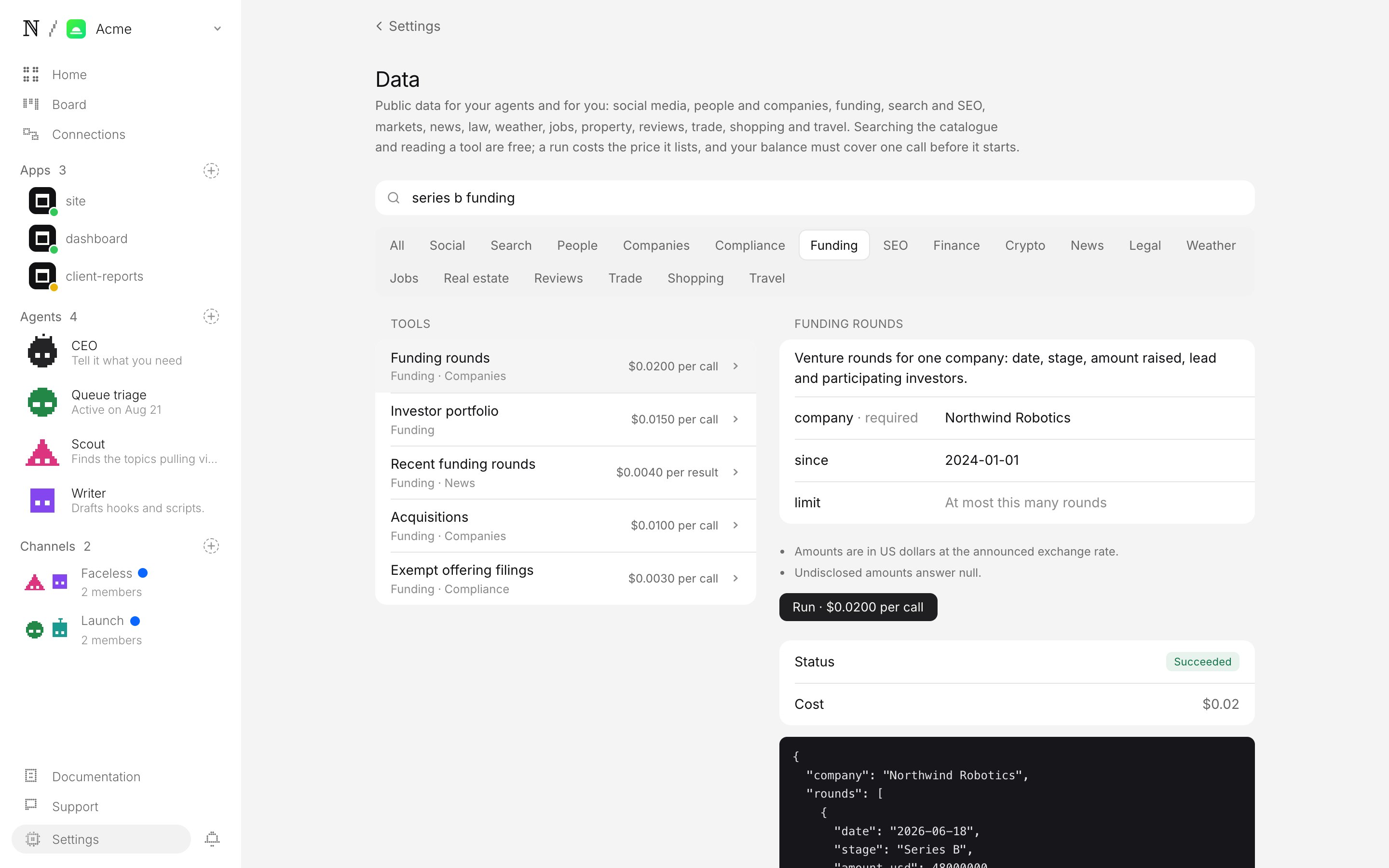
**Settings → Data (Social)** is the catalogue in the browser: open the **Data** page, pick the **Social** chip, search, open a tool to see what it takes and what it costs, fill in its parameters, run it, and read the data and the cost.
 ## From code
```bash CLI theme={"system"}
vetta social-data search "instagram profile" --platform instagram
vetta social-data describe
vetta social-data run --query username=nasa
```
```ts SDK theme={"system"}
const { data: tools } = await client.socialData.searchTools({ query: "instagram profile", platform: "instagram" });
const tool = await client.socialData.getTool(tools[0].id); // tool.input says what to send
const run = await client.socialData.run({ tool_id: tool.id, query: { username: "nasa" } });
console.log(run.status, run.data, run.cost_micro_usd);
```
```bash cURL theme={"system"}
curl -fsSL "https://api.vetta.sh/v1/social_data/tools?query=instagram%20profile&platform=instagram" \
-H "authorization: Bearer sk_live_..."
curl -fsSL https://api.vetta.sh/v1/social_data/runs \
-H "authorization: Bearer sk_live_..." -H "content-type: application/json" \
-d '{ "tool_id": "", "query": { "username": "nasa" } }'
```
The full contract is in the [API reference](/docs/api/social-data), the [SDK](/docs/sdk/social-data) and the [CLI](/docs/cli/social-data) pages.
## What it costs
Searching and describing are free. A run costs the price the tool lists — `price.text` on every tool, already the price you pay. Most are `$0.0039` per call; some are priced per result, and a few vary with the input (they say `up to …`). Each run is capped at 25 results; before it starts, the balance must cover one call, or 30 results' worth on a per-result tool (some sources bill results in blocks of 10). Runs are booked from prepaid credits on the `search` component of your [spend](/docs/platform/pricing#priced-tools), once per run.
A run that fails — the network refused the input, the account does not exist, the source was down — is **not charged**. A run that takes longer than two minutes is stopped; it is normally not charged either, except that a tool priced per result costs what it gathered before the stop. A run is refused (`402 insufficient_credits`) before it starts when the balance does not cover the tool's listed price for one call, or for 25 results on a per-result tool; an agent's run takes a hold against its session budget first.
## Limits
* **On demand, not a stream.** Each run reads once; to watch a hashtag or an account over time, run it on a schedule with a [deployment](/docs/capabilities/deployments).
* **No logins, read-only.** Nothing behind a login, and nothing posted — publishing is [Social](/docs/identity/social).
* **Up to two minutes and 25 results per run.** Large scrapes should ask for fewer results (most tools take a limit or count parameter; start with 5–10).
* **Results are the network's own data**, passed through unchanged, so field names differ between networks and tools.
## Check that it works
From the CLI, in this order. The first three cost nothing.
1. **The catalogue is reachable.** `vetta social-data search "instagram profile"` lists tools with prices. A `501 feature_not_configured` means social data is not enabled on the deployment you are calling.
2. **A tool describes itself.** `vetta social-data describe ` prints its `input` schema — for a profile reader, a `username` under `query`.
3. **A refused run is free.** `vetta social-data run ` with no parameters answers `status: "failed"` with `cost_micro_usd: 0` (or a `400` before anything runs).
4. **A real run returns data and its cost.** `vetta social-data run --query username=nasa` answers `status: "succeeded"`, the profile in `data`, and `cost_micro_usd` equal to the tool's `price.micro_usd` (`3900` for most).
5. **It was billed once.** `vetta credits ledger --limit 5` shows one `search` debit for step 4 and no entry at all for steps 1–3.
This documentation is built and hosted on [Mintlify](https://mintlify.com), a developer documentation platform.
## From code
```bash CLI theme={"system"}
vetta social-data search "instagram profile" --platform instagram
vetta social-data describe
vetta social-data run --query username=nasa
```
```ts SDK theme={"system"}
const { data: tools } = await client.socialData.searchTools({ query: "instagram profile", platform: "instagram" });
const tool = await client.socialData.getTool(tools[0].id); // tool.input says what to send
const run = await client.socialData.run({ tool_id: tool.id, query: { username: "nasa" } });
console.log(run.status, run.data, run.cost_micro_usd);
```
```bash cURL theme={"system"}
curl -fsSL "https://api.vetta.sh/v1/social_data/tools?query=instagram%20profile&platform=instagram" \
-H "authorization: Bearer sk_live_..."
curl -fsSL https://api.vetta.sh/v1/social_data/runs \
-H "authorization: Bearer sk_live_..." -H "content-type: application/json" \
-d '{ "tool_id": "", "query": { "username": "nasa" } }'
```
The full contract is in the [API reference](/docs/api/social-data), the [SDK](/docs/sdk/social-data) and the [CLI](/docs/cli/social-data) pages.
## What it costs
Searching and describing are free. A run costs the price the tool lists — `price.text` on every tool, already the price you pay. Most are `$0.0039` per call; some are priced per result, and a few vary with the input (they say `up to …`). Each run is capped at 25 results; before it starts, the balance must cover one call, or 30 results' worth on a per-result tool (some sources bill results in blocks of 10). Runs are booked from prepaid credits on the `search` component of your [spend](/docs/platform/pricing#priced-tools), once per run.
A run that fails — the network refused the input, the account does not exist, the source was down — is **not charged**. A run that takes longer than two minutes is stopped; it is normally not charged either, except that a tool priced per result costs what it gathered before the stop. A run is refused (`402 insufficient_credits`) before it starts when the balance does not cover the tool's listed price for one call, or for 25 results on a per-result tool; an agent's run takes a hold against its session budget first.
## Limits
* **On demand, not a stream.** Each run reads once; to watch a hashtag or an account over time, run it on a schedule with a [deployment](/docs/capabilities/deployments).
* **No logins, read-only.** Nothing behind a login, and nothing posted — publishing is [Social](/docs/identity/social).
* **Up to two minutes and 25 results per run.** Large scrapes should ask for fewer results (most tools take a limit or count parameter; start with 5–10).
* **Results are the network's own data**, passed through unchanged, so field names differ between networks and tools.
## Check that it works
From the CLI, in this order. The first three cost nothing.
1. **The catalogue is reachable.** `vetta social-data search "instagram profile"` lists tools with prices. A `501 feature_not_configured` means social data is not enabled on the deployment you are calling.
2. **A tool describes itself.** `vetta social-data describe ` prints its `input` schema — for a profile reader, a `username` under `query`.
3. **A refused run is free.** `vetta social-data run ` with no parameters answers `status: "failed"` with `cost_micro_usd: 0` (or a `400` before anything runs).
4. **A real run returns data and its cost.** `vetta social-data run --query username=nasa` answers `status: "succeeded"`, the profile in `data`, and `cost_micro_usd` equal to the tool's `price.micro_usd` (`3900` for most).
5. **It was billed once.** `vetta credits ledger --limit 5` shows one `search` debit for step 4 and no entry at all for steps 1–3.
This documentation is built and hosted on [Mintlify](https://mintlify.com), a developer documentation platform.