- ›A data-pipeline platform has to run agent-generated code. The moment you let an LLM spin up containers and shell into them, one bad prompt can exfiltrate a tenant's data, burn compute, or reach your cloud account.
- ›
Naïve ships the hard part as primitives: compute runs agent-owned Docker workloads on managed cloud where Naïve holds the credentials, and queue gives you durable per-tenant work queues— your agents never hold a cloud key. - ›Creating a workload and opening a shell (exec/ssh) are sensitive: for a real tenant user they return 202 pending_approval instead of running, and a human replays them on approval.
- ›
Each tenant is a user under an Account Kit that gates compute, queue, and llm at execution time. Every container, queue, secret, and log is scoped to one tenant— no shared state, no cross-tenant reach. - ›The LLM primitive is a full OpenRouter wrapper: naive.forUser(id).llm.chat() routes plain English to a runnable transform across 300+ models, billed in credits, with the same per-tenant kit gating.
- ›
You write the pipeline UX. Naïve enforces who can run compute, where it runs, what needs a human first, and that one tenant's job should not be able to touch another's— server-side, at execution time.
Most agent demos that touch data stop right before the risky part. The agent can read a schema, describe a join, even draft the SQL — then it hands you a snippet and says run this. The autonomous part ends exactly where code execution begins.
A data-pipeline platform can't stop there. Running the code is the job:
- Ingest — pull a CSV, hit an API, read a tenant's warehouse.
- Transform — reshape, filter, aggregate, join — in code the LLM just wrote.
- Run it on real compute — repeatedly, on a schedule, for many tenants at once.
So the agent has to execute untrusted, machine-written code, and that is exactly where a naive build falls apart. The moment you have more than one tenant, letting an LLM spin up containers on shared infrastructure means:
- One prompt-injected or misaligned job can read another tenant's data or reach your cloud account.
- Your agent needs cloud credentials it should never hold — an AWS key in an env var is one leak away from your whole account.
- A runaway loop can spin up unbounded compute before anyone notices.
That plumbing — per-tenant sandboxes, managed cloud credentials the agent never sees, execution-time gates on spinning up compute — is the product. It is also exactly what Naïve ships as primitives: compute and queue. This is a developer tutorial: every code block runs against the current @usenaive-sdk/server, with signatures pulled straight from the docs.
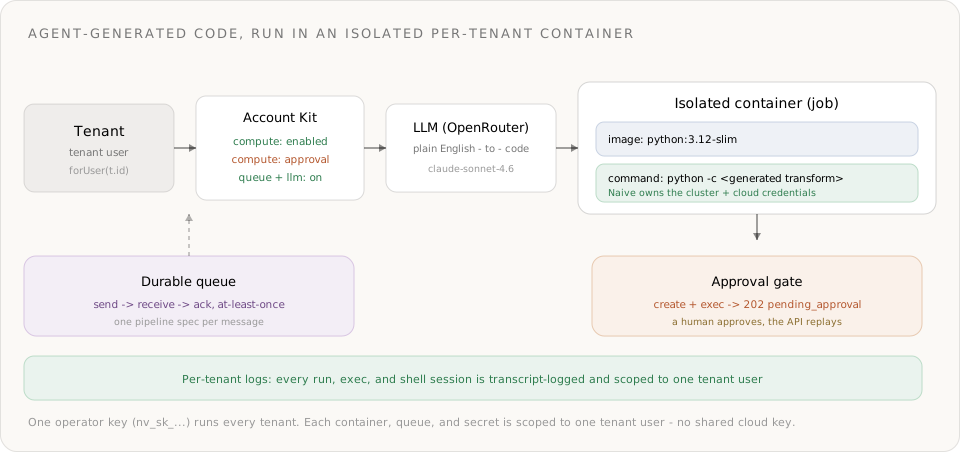
What we're building
- A multi-tenant backend where each tenant can describe a pipeline in plain English and the platform writes the transform, runs it in an isolated container, and returns the result.
- Generate — the LLM (an OpenRouter wrapper) turns the spec into a runnable Python transform, per tenant, under the tenant's kit.
- Run — the agent creates a container job; for a real tenant user, creation is approval-gated, so a human signs off before any code executes. On approval the API replays the create and the job runs.
- Isolate & prove — the container runs on cloud Naïve owns and scopes to that one tenant; the agent never holds a cloud key, and every run is logged per tenant.
- The moat lever is execution-time run authority: a kit gate on the
computeprimitive, managed cloud credentials the agent never sees, an approval freeze on create/exec/shell, and per-tenant isolation of every container, queue, and secret.
The primitives in play, all from the docs:
| Primitive | Role in the platform | Docs |
|---|---|---|
| Users | One tenant user per customer — the isolation boundary | naive.users |
| Account Kits | The plan: is compute/queue/llm enabled, and what needs approval | naive.accountKits |
| LLM | OpenRouter-backed — plain English to a runnable transform | forUser(id).llm |
| Compute | Agent-owned Docker workloads on managed cloud, no cloud key | forUser(id).compute |
| Queue | Durable per-tenant work queue for the pipeline | forUser(id).queue |
| Approvals | Human-in-the-loop on running compute and opening shells | forUser(id).approvals |
| Logs | Per-tenant audit trail of every run and shell | forUser(id).logs |
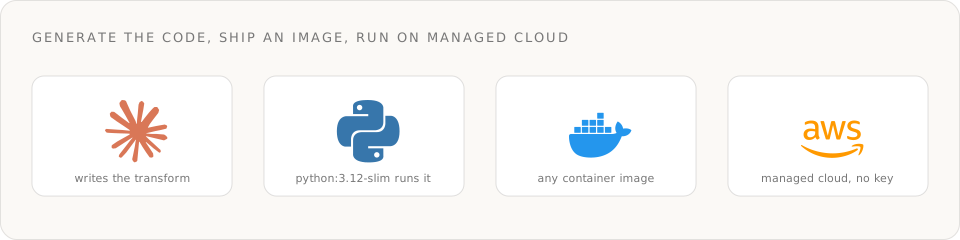
The stack under the hood: the model writes the code, you ship it as a container image, and it runs on managed cloud you never key into.
Step 0: Install and authenticate
You need a Naïve workspace key (nv_sk_...) from Studio → Settings → API keys. The SDK is server-only — keys are server secrets, never shipped to the browser.
npm install @usenaive-sdk/serverimport { Naive, NaiveError, isPendingApproval } from "@usenaive-sdk/server";
const naive = new Naive({ apiKey: process.env.NAIVE_API_KEY! });Two surfaces matter, and the split is the whole design:
naive.*(the root client) is the control plane —naive.users,naive.accountKits.naive.forUser(id).*is the data plane (llm,compute,queue,approvals,logs) bound to one tenant.
Read naive.forUser(tenantId) as: "generate and run this pipeline, as this tenant, under this tenant's plan." Acme's pipeline is naive.forUser(acmeId); it has no path to Globex's containers.
Step 1: The plan — an Account Kit that gates execution
An Account Kit is a reusable policy template. It decides which primitives a tenant's agent can use at all — and which ones freeze for a human first.
// The pipeline plan: LLM + queue on; compute on but every run/shell freezes for a human.
const pipelineKit = await naive.accountKits.create({
  name: "Pipeline",
  primitives_config: {
    llm: { enabled: true },
    queue: { enabled: true },
    compute: { enabled: true, requiresApproval: true }, // create + exec + shell freeze
  },
});
POST /v1/compute (create) and the exec/shell endpoints are approval-gated by default (docs); setting requiresApproval: true makes that policy explicit on the kit. Calls on the account's own default agent profile still execute without approval — it is agent actions on real tenant users that freeze.
Step 2: Provision a tenant
Each customer is a tenant user. Tenant users never sign into Naïve — you manage them entirely through the SDK.
const acme = await naive.users.create({
  external_id: "tenant_acme",     // your stable id for the customer
  email: "data@acme.example",
  label: "Acme Inc",
  account_kit_id: pipelineKit.id,
});

const acmeClient = naive.forUser(acme.id);
Everything from here runs as acmeClient, so every container, queue, secret, and log is scoped to Acme and only Acme.
Step 3: Turn plain English into a runnable transform
The llm primitive is a full wrapper over OpenRouter: one OpenAI-compatible chat-completions endpoint across 300+ models. The request and response bodies are OpenRouter's, forwarded through — so chat() returns choices[0].message.content plus a credits_used field, and you get OpenRouter's models fallback chain and provider routing for free.
const spec =
  "Download the CSV at INPUT_URL. Keep rows where status == 'active', " +
  "sum amount_cents grouped by region, and print the totals as JSON.";

const gen = await acmeClient.llm.chat({
  model: "anthropic/claude-sonnet-4.6",
  models: ["anthropic/claude-sonnet-4.6", "openai/gpt-5.2"], // OpenRouter fallback chain
  provider: { sort: "throughput" },                          // OpenRouter routing, passed through
  messages: [
    {
      role: "system",
      content:
        "You write a single self-contained Python 3 script using ONLY the standard " +
        "library (urllib, csv, json, os). Read the source URL from os.environ['INPUT_URL']. " +
        "Print only the JSON result to stdout. Output the code with no fences, no prose.",
    },
    { role: "user", content: spec },
  ],
});

const transformCode = gen.choices[0].message.content;
console.log("generated in", gen.credits_used, "credits");
The typed forUser(id).llm route is Account-Kit gated per tenant — the same governance as every other primitive. (The raw /v1/proxy/openrouter passthrough is not kit-gated; use the typed route when you want per-tenant enforcement, docs.)
A representative script the model returns for that spec:
import os, csv, io, json, urllib.request
from collections import defaultdict

raw = urllib.request.urlopen(os.environ["INPUT_URL"]).read().decode("utf-8")
totals = defaultdict(int)
for row in csv.DictReader(io.StringIO(raw)):
    if row.get("status") == "active":
        totals[row["region"]] += int(row["amount_cents"])
print(json.dumps(totals))
Standard library only, so it runs in a stock python:3.12-slim image with no build step.
Step 4: Run it in an isolated container — behind an approval
Now the high-consequence moment: executing code the model wrote. The agent asks compute to run a job — a container that runs to completion once. Under our kit, compute.create is approval-gated, so it returns either the workload or a PendingApproval (HTTP 202); it does not throw (errors).
const created = await acmeClient.compute.create({
  name: `etl-${Date.now()}`,
  type: "job",
  image: "python:3.12-slim",
  command: ["python", "-c", transformCode],
  env: { INPUT_URL: "https://acme.example/exports/q3.csv" },
});

let workload = created;
if (isPendingApproval(created)) {
  // Frozen for a human. Approving replays the create and provisions the job.
  await acmeClient.approvals.approve(created.approval_id);
  const resolved = await acmeClient.approvals.get(created.approval_id);
  workload = resolved.result; // status: "executed" + the created workload
}
That freeze is the point: no code the model wrote runs until a human signs off. The pending payload carries an approval_id you surface in your dashboard; a reviewer sees the tenant, the image, and the command before approving.
With the job provisioned, trigger a run and read the output. Triggering a run and reading logs are not gated — only create, exec, and shell are:
await acmeClient.compute.run(workload.id);        // trigger the job now
const runs = await acmeClient.compute.runs(workload.id); // status, exit code, credits
const logs = await acmeClient.compute.logs(workload.id, { limit: 200 });

// logs holds the job's stdout — the JSON your transform printed.
Compute is billed by running time (vCPU-seconds + GB-seconds) in credits; a job that finishes stops billing. When you're done, tear it down — destroy stops in-flight runs and removes the workload:
await acmeClient.compute.destroy(workload.id);Step 5: Make it a durable pipeline with a queue
One job is a demo; a platform runs a stream of them. The queue primitive gives each tenant a durable work queue — Naïve owns the underlying cloud credentials and scopes the queue to that tenant's task role, so again your agents never hold a cloud key.
const q = await acmeClient.queue.create({ name: "pipelines" });

// Producer: enqueue a spec whenever the tenant submits one (at-least-once delivery).
await acmeClient.queue.send(
  q.id,
  JSON.stringify({ runId: "r_8842", spec }),
);
A consumer long-polls, processes each message through Steps 3-4, then acks it. Unacknowledged messages reappear after the visibility timeout, so a crash mid-run just retries:
const { messages } = await acmeClient.queue.receive(q.id, { max: 5, wait: 20 });

for (const m of messages) {
  const { runId, spec } = JSON.parse(m.body);
  await runPipeline(acmeClient, spec); // Step 3 (generate) + Step 4 (run + approve)
  await acmeClient.queue.ack(q.id, m.receipt_handle); // done → remove from the queue
}
For production, the documented pairing is a compute service that long-polls the queue and scales to zero when idle — queue depth drives a cheap autoscaling worker, and the same approval gate still applies to any container it spins up (docs).
Step 6: Feed secrets in without ever showing the agent
Real pipelines read a tenant's warehouse, not a public CSV. The credential must reach the container without landing in the LLM prompt, the generated code, or a workload definition the agent can read back. compute.setSecret stores an encrypted env var Naïve injects at task start:
// Encrypted at rest, injected into the job's tasks, auto-redeploys the workload.
await acmeClient.compute.setSecret(workload.id, "DATABASE_URL", acmeWarehouseUrl);

// listSecrets returns key names only — never the values.
const keys = await acmeClient.compute.listSecrets(workload.id);
The generated transform reads os.environ["DATABASE_URL"] at runtime; the agent that requested the job never sees the value. If you need to poke at a running task, exec and shell exist — and both are approval-gated and transcript-logged, so an interactive session is a deliberate, reviewed act:
// exec is sensitive → for a tenant user this returns pending_approval, not output.
const probe = await acmeClient.compute.exec(workload.id, "df -h");
if (isPendingApproval(probe)) {
  await acmeClient.approvals.approve(probe.approval_id);
}
Step 7: The four walls around agent-run compute
Here is the part you can't get from "a container in your own cloud." Four independent controls bound every job, and they run inside Naïve, at execution time — not as a check you remembered to write.
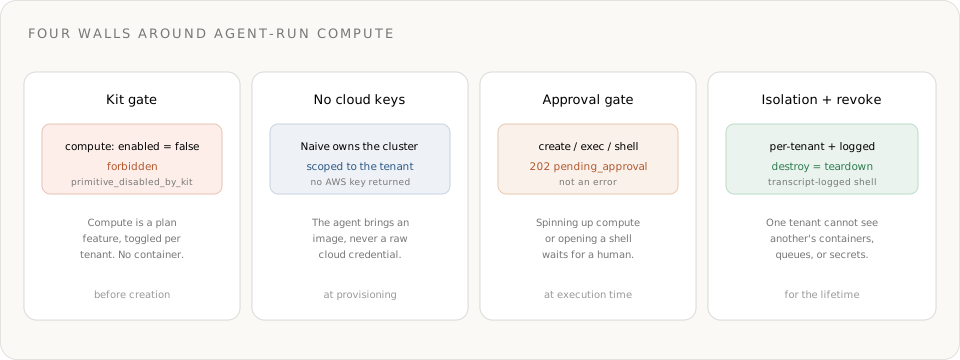
Wall 1 — the kit gate. Compute is a plan feature. Put a tenant on a kit with compute disabled and every compute call fails server-side, before a container is ever created:
const suspendedKit = await naive.accountKits.create({
  name: "Suspended",
  primitives_config: { compute: { enabled: false } },
});
await naive.accountKits.assignUser(suspendedKit.id, acme.id);

try {
  await acmeClient.compute.create({ name: "blocked", type: "job", image: "python:3.12-slim" });
} catch (err) {
  if (err instanceof NaiveError && err.code === "forbidden") {
    console.log(err.hint); // primitive disabled by the kit
  }
}
Wall 2 — no cloud keys. Naïve owns the compute cluster and the underlying cloud credentials, and scopes every workload to your tenant. The agent brings an image; it never receives an AWS key. A leaked prompt can't leak a credential the agent was never given.
Wall 3 — the approval gate. Creating a workload and opening a shell (exec/shell) return 202 { status: "pending_approval", approval_id } for agent calls on real tenant users — the frozen action runs only after approvals.approve replays it. Spinning up compute or getting a shell is always a human decision.
Wall 4 — isolation + revoke. Every container, queue, and secret is scoped to one tenant user; one tenant should not be able to see another's workloads, queue messages, or secret keys. destroy tears a workload down and stops in-flight runs immediately, and every run and shell is transcript-logged.
The four compose:
- Kit gate → run authority toggled per tenant with one config edit, applied on the next call.
- No cloud keys → the credential the agent could leak doesn't exist in its context.
- Approval gate → creating compute and opening shells wait for a human.
- Isolation + revoke → blast radius is one tenant, and teardown is instant.
Step 8: Prove it — the per-tenant audit trail
Every primitive call emits an activity event scoped to the tenant user. Pull one tenant's pipeline history — there is no way to accidentally read another tenant's events (docs):
const { events } = await acmeClient.logs.query({ limit: 50 });
// Acme's generations, workload creates, approvals, runs, and shells only.
That is the reconciliation and compliance trail — which jobs ran, what was approved, which shells were opened — that you would otherwise build a logging pipeline to get.
What you didn't build
Count the infrastructure you skipped — the part that is normally the whole product:
- A per-tenant sandbox for running untrusted, machine-written code, on cloud you never key into. (Compute.)
- Managed cloud credentials the agent never holds — no AWS key in an env var. (Compute owns the cluster.)
- An execution-time gate on spinning up compute and opening shells, replayed on human approval. (Approvals.)
- A durable per-tenant work queue with at-least-once delivery and retries. (Queue.)
- Encrypted secret injection so a tenant's warehouse URL never hits the prompt. (
compute.setSecret.) - A per-tenant audit log of every run and shell, ready for compliance. (Logs.)
You wrote the pipeline UX and the prompt. Naïve enforced who can run compute, where it runs, what needs a human first, and that one tenant's job should not be able to touch another's — at execution time, server-side, per tenant.
Ship it
- Model your customers as tenant users and give them a Pipeline Account Kit with
llm+queueenabled andcomputeon withrequiresApproval. - Use
forUser(id).llm.chat(the OpenRouter wrapper) to turn a plain-English spec into a runnable transform. - Run it as a compute job on a stock image; approve the create, trigger the run, read the logs, then
destroy. - Put a queue in front for a durable pipeline, inject credentials with
setSecret, and trust the kit gate and approval freeze to bound execution — not your prompt.
Start from the Compute guide, the Queue guide, the LLM guide, and the Approvals guide. Get a workspace key in Naïve Studio and give your agents compute they can't misuse.
Why not just run agent-generated code in my own container?+
What actually stops the agent from running compute it shouldn't?+
How does the LLM turn plain English into a runnable transform?+
How are tenants isolated from each other?+
Do heavy pipelines need a custom image?+
How do secrets like a tenant's database URL get into the container safely?+
What do I get for an audit trail?+
Building the autonomous company infrastructure.
Building multi-tenant AI agents into your SaaS means giving each customer an isolated, governed agent. Here's the full architecture and how to ship it.
A governed agent profile is an AI agent with identity, spend limits, approvals, audit, and instant revoke — enforced on every action. Here's the full lifecycle.
Spin up agent-owned Docker workloads on managed cloud compute — long-running services with public URLs, run-to-completion batch jobs, and scheduled (cron-for-code) jobs — metered by the second, isolated per tenant, with an interactive shell. No AWS account, no cluster, no DevOps.
Durable message queues for your agents — managed Amazon SQS (standard & FIFO, with dead-letter queues) for producer/consumer fan-out, buffering, and retries. The natural pairing for compute workers. No AWS account, one bearer token.