- ›Brand-protection is the textbook case for execution-time permissions: an agent that watches for lookalike domains is useful, but an agent that can silently spend money registering domains is a liability
- ›This build wires a per-tenant domain-defense agent on Naïve: detect lookalikes for free, investigate live impersonation with OpenRouter web search, and register defensive domains only through an approval gate
- ›
The moat: every `domains.purchase` call is frozen at HTTP 202 (pending_approval) until a human approves— the agent proposes, it never spends autonomously - ›Capability tiers are enforced at execution time by the AccountKit, not by prompt: a 'Monitoring' kit with `domains` disabled returns `forbidden` for the exact same agent code that runs on a 'Defense' kit
- ›OpenRouter's web-search runs as the `openrouter:web_search` server tool (the old `plugins`/`:online` forms are deprecated) and is forwarded verbatim through `naive.llm.chat` with a strict JSON-schema verdict
- ›
Each client brand is an isolated tenant— separate identity, separate kit, separate approval queue; one agent's code base, thousands of governed brands
Domain impersonation is one of the oldest attacks on the internet and still one of the most effective. A customer sees northwindledqer.com in a well-crafted email, clicks, and hands over their password to a pixel-perfect clone. The defense is unglamorous and never-ending: enumerate the lookalikes, watch which ones go live, and register the dangerous-but-still-available ones before a squatter does.
It is exactly the kind of tedious, high-volume work you want an agent to run continuously — and exactly the kind of work you should be terrified to fully automate. An agent that watches domains is a monitoring tool. An agent that can register domains is an agent with your credit card. The moment it can spend money on its own, one bad input or one confidently-wrong classification turns into a bill.
This tutorial builds a multi-tenant brand-protection agent on Naïve where that gap is closed by construction:
For policy enforcement at execution time, see AI agent permissions and The Governed Agent Profile.
- Detection is free and autonomous — the agent generates lookalikes and checks availability without touching anything sensitive.
- Investigation is grounded — the agent uses OpenRouter's web-search server tool, forwarded through Naïve's
/llmprimitive, to check whether a lookalike is actually hosting an impersonation site. - Registration is gated at execution time — every
domains.purchasecall is frozen as a pending approval. The agent proposes; a human spends. This is enforced by the tenant's AccountKit, not by a line in the prompt.
You could write the FLUX of this — permutations, a whois-style lookup, an LLM call — in an afternoon. The hard part is the part that makes it safe to point at real money across thousands of client brands: per-tenant identity, isolated approval queues, and capability tiers that hold at execution time. That is the part Naïve gives you as primitives.
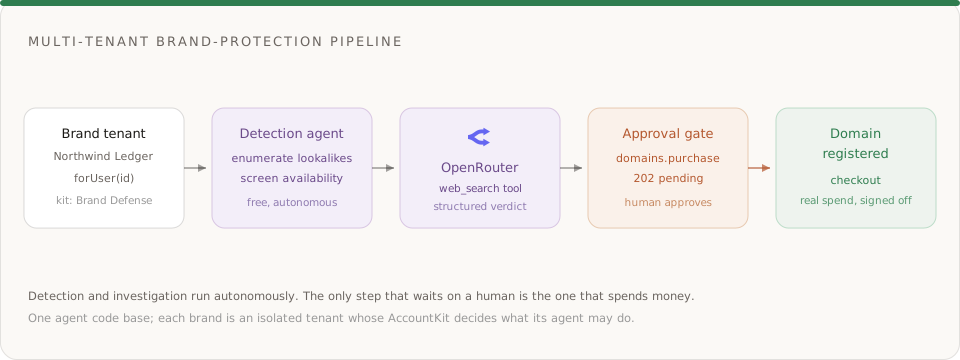
What you'll build
A domain-defense platform that an agency or a security team can point at many brands at once. For each brand (a tenant), the agent runs a loop:
- Enumerate lookalike domains — typosquats, homoglyphs, combosquats, and TLD swaps of the brand's real domain.
- Screen each candidate for availability via
/v1/domains/search. - Investigate the taken lookalikes with OpenRouter web search to decide if they impersonate the brand.
- Recommend an action per domain: ignore, monitor, register defensively, or initiate takedown.
- Register the high-risk available lookalikes — but only through the approval gate.
Primitives used, all straight from the docs:
| Primitive | Role in the build | Docs |
|---|---|---|
/users + /account-kits | Per-tenant identity and capability tiers | Account Kits |
/domains | Search availability, purchase (gated), wire email | Domain Management |
/llm | OpenRouter wrapper — web-search server tool + structured verdict | LLM |
/approvals | The human-in-the-loop gate on every purchase | Approvals |
/email | Abuse inbox on registered defensive domains |
Step 0: Install and authenticate
The build runs entirely on the Naïve server SDK.
npm install @usenaive-sdk/serverimport { Naive, NaiveError, isPendingApproval } from "@usenaive-sdk/server";
const naive = new Naive({ apiKey: process.env.NAIVE_API_KEY! });Naiveis the client. Root-level calls (naive.domains,naive.llm) act as your own default agent.naive.forUser(id)scopes every call to a tenant — this is how one code base governs thousands of brands.isPendingApproval(res)andNaiveErrorare the two things you need to handle the moat correctly; both are exported from the package.
Step 1: Define capability tiers as AccountKits
The most important design decision happens before any agent code runs: what is each tenant's agent allowed to do? On Naïve that is an AccountKit — a policy template you assign to a user. Define two tiers.
// DEFENSE tier: the agent can register domains, but every purchase is
// frozen for a human. `domains` defaults to requiresApproval; we make it explicit.
const defenseKit = await naive.accountKits.create({
  name: "Brand Defense",
  primitives_config: {
    llm:     { enabled: true },
    domains: { enabled: true, requiresApproval: true },
    email:   { enabled: true },
  },
});

// MONITORING tier: detect only. Registration is impossible — not discouraged,
// impossible. The same agent code will get `forbidden` at execution time.
const monitorKit = await naive.accountKits.create({
  name: "Monitoring Only",
  primitives_config: {
    llm:     { enabled: true },
    domains: { enabled: false },
    email:   { enabled: true },
  },
});domains,cards,verification,formation, andconnections.connectdefault to requiring approval for agent calls — see Account Kits → Governance. SettingrequiresApproval: truehere is belt-and-suspenders and self-documenting.- The difference between the two tiers is a single boolean (
domains.enabled). That boolean is checked on the server, on every call. There is no prompt a compromised or confused agent can write to talk its way past it.
Now create a tenant and put it on the Defense tier:
const northwind = await naive.users.create({
  external_id: "northwind-ledger",
  email: "security@northwindledger.com",
  label: "Northwind Ledger",
});
await naive.accountKits.assignUser(defenseKit.id, northwind.id);

// Everything the agent does for this brand goes through `client`.
const client = naive.forUser(northwind.id);
Step 2: Enumerate lookalike domains
Lookalike generation is deterministic — it should be code, not a model guess, so it is exhaustive and free. Cover the four families attackers actually use.
const HOMOGLYPHS: Record<string, string[]> = {
  o: ["0"], l: ["i", "1"], i: ["l", "1"], m: ["rn"], w: ["vv"], e: ["3"],
};
const ALT_TLDS = ["co", "net", "org", "app", "io", "cc"];
const PREFIXES = ["get-", "my-", "secure-", "login-", "app-"];
const SUFFIXES = ["-login", "-secure", "-support", "-verify", "-pay"];

function lookalikes(domain: string): string[] {
  const [name, tld] = domain.split(/\.(?=[^.]+$)/); // ["northwindledger", "com"]
  const out = new Set<string>();

  // TLD swaps: northwindledger.co, .net, ...
  for (const t of ALT_TLDS) out.add(`${name}.${t}`);

  // Adjacent-character transposition typos: norhtwindledger.com
  for (let i = 0; i < name.length - 1; i++) {
    const t = name.slice(0, i) + name[i + 1] + name[i] + name.slice(i + 2);
    out.add(`${t}.${tld}`);
  }

  // Homoglyph substitutions: n0rthwindledger.com, northwindiedger.com
  for (let i = 0; i < name.length; i++) {
    for (const sub of HOMOGLYPHS[name[i]] ?? []) {
      out.add(`${name.slice(0, i)}${sub}${name.slice(i + 1)}.${tld}`);
    }
  }

  // Combosquats: get-northwindledger.com, northwindledger-login.com
  for (const p of PREFIXES) out.add(`${p}${name}.${tld}`);
  for (const s of SUFFIXES) out.add(`${name}${s}.${tld}`);

  return [...out];
}

const candidates = lookalikes("northwindledger.com");- No API, no credits, no risk — just a set of strings.
- A real deployment adds more families (missing-dot, doubled letters, keyboard-adjacent typos), but this already produces the domains that matter.
Step 3: Screen for availability
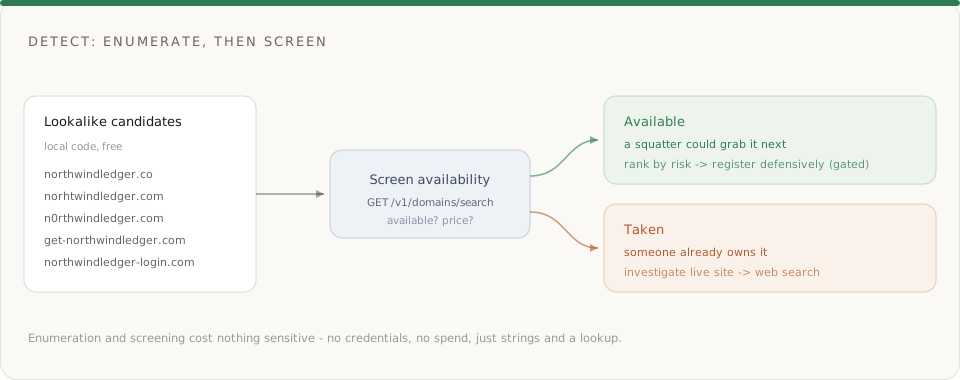
For each candidate, ask Naïve whether it is available and what it would cost. This maps to the documented GET /v1/domains/search endpoint.
async function checkAvailability(domain: string) {
  const res = await fetch(
    `https://api.usenaive.ai/v1/domains/search?domain=${encodeURIComponent(domain)}`,
    { headers: { Authorization: `Bearer ${process.env.NAIVE_API_KEY}` } },
  );
  return res.json() as Promise<{ domain: string; available: boolean; price: number }>;
}

const screened = [];
for (const domain of candidates) {
  const { available, price } = await checkAvailability(domain);
  screened.push({ domain, available, price });
}
The result splits your candidate set into two piles, and each pile has a different response:
| Availability | What it means | Agent's job |
|---|---|---|
| Available | No one has registered this lookalike yet | Rank by risk; register the dangerous ones defensively before a squatter does |
| Taken | Someone already owns it | Investigate whether it is a live impersonation — this is where web search earns its keep |
Step 4: Investigate taken lookalikes with OpenRouter web search
A taken lookalike might be a parked page, an unrelated business, or an active phishing clone. You cannot tell from the name — you have to look at what is live right now. That is a real-time question, so it needs real-time grounding: OpenRouter's web-search server tool.
Naïve's /llm primitive is a full wrapper over OpenRouter and forwards the request body verbatim — so anything OpenRouter accepts in a chat-completions call works through naive.llm.chat, including server tools and structured outputs.
Use the server tool, not the plugin. OpenRouter's older
plugins: [{ id: "web" }]andmodel:onlineforms are deprecated. The current form is theopenrouter:web_searchserver tool insidetools. The model decides when (and how many times) to search; OpenRouter resolves the searches server-side and returns citations, and the final message still honors yourresponse_format.
async function investigate(brand: string, brandDomain: string, suspect: string) {
  const res = await client.llm.chat({
    model: "openai/gpt-5.2",
    // Forwarded straight to OpenRouter: the model may call web search 0..N times.
    tools: [
      { type: "openrouter:web_search", parameters: { max_results: 5 } },
    ],
    // Strict JSON schema: the final answer is a machine-readable verdict.
    response_format: {
      type: "json_schema",
      json_schema: {
        name: "domain_risk",
        strict: true,
        schema: {
          type: "object",
          additionalProperties: false,
          properties: {
            domain: { type: "string" },
            live: { type: "boolean" },
            impersonation: { type: "boolean" },
            risk: { type: "string", enum: ["low", "medium", "high", "critical"] },
            evidence: { type: "array", items: { type: "string" } },
            recommendation: {
              type: "string",
              enum: ["ignore", "monitor", "register_defensively", "initiate_takedown"],
            },
          },
          required: ["domain", "live", "impersonation", "risk", "evidence", "recommendation"],
        },
      },
    },
    messages: [
      {
        role: "system",
        content:
          "You are a brand-protection analyst. Investigate whether a domain impersonates a brand. " +
          "Search the web to check for a live site, cloned branding, login or checkout forms, and phishing signals. " +
          "Cite what you find in `evidence`. Return only the structured verdict.",
      },
      {
        role: "user",
        content:
          `Brand: ${brand} (${brandDomain}). Suspect lookalike: "${suspect}". ` +
          `Is it live? Does it impersonate ${brand}? Classify the risk and recommend an action.`,
      },
    ],
  });

  const verdict = JSON.parse(res.choices[0].message.content);
  console.log(verdict, "credits:", res.credits_used);
  return verdict;
}

const report = await investigate("Northwind Ledger", "northwindledger.com", "northwindledqer.com");- The call is per-tenant:
client.llm.chatruns under Northwind's kit and bills Northwind's credits. Readres.credits_usedfor the exact cost — the model tokens plus the search engine's per-search rate, at OpenRouter's reported price. - If a tenant's kit had
llm: { enabled: false }, this exact call would returnforbidden— capability tiers apply to every primitive, not just the expensive ones. - A typical
criticalverdict looks like:
{
  "domain": "northwindledqer.com",
  "live": true,
  "impersonation": true,
  "risk": "critical",
  "evidence": [
    "Serves a near-exact visual clone of the Northwind Ledger login page",
    "Registered 3 days ago via a privacy-shielded registrar",
    "Collects username + password and POSTs to an unrelated host"
  ],
  "recommendation": "initiate_takedown"
}
Step 5: The moat — register defensively, but never spend without approval
This is the whole point. The agent has decided that an available lookalike is high-risk and should be registered before a squatter grabs it. On a naïve script, this is where it charges a card. On Naïve, it is where it hits a wall it cannot climb.
async function defensivelyRegister(domain: string) {
  const res = await client.domains.purchase(domain);

  if (isPendingApproval(res)) {
    // No money moved. No domain registered. A human must decide.
    console.log(`Registration of ${domain} is frozen for review:`, res.approval_id);
    return { status: "pending", approvalId: res.approval_id };
  }

  return { status: "purchased", res };
}

const pending = await defensivelyRegister("northwindledger-login.com");
Because northwind is on the Brand Defense kit and domains requires approval, client.domains.purchase(...) does not register anything. It returns a PendingApproval — HTTP 202 is a success, not an error — carrying an approval_id. The agent's job ends here; it has proposed a purchase.
A human on the brand team reviews the queue and decides. Approving replays the exact frozen action:
// A reviewer's tooling (or the Naïve dashboard) lists what's waiting:
const queue = await client.approvals.list({ status: "pending" });

// Approve → the purchase runs and returns the checkout URL to complete registration.
const result = await client.approvals.approve(pending.approvalId);
// result carries the executed purchase: { checkout_url, domain_id, ... }

// Or deny → nothing is ever spent.
// await client.approvals.deny(pending.approvalId, { reason: "low risk, monitor instead" });- The agent never holds the registrar credential or the payment method. It cannot register a domain by any path other than proposing it and having a human approve.
approvals.approve/deny/get/list/waitare the full queue API — approve programmatically, from a reviewer UI, or from the Naïve dashboard.
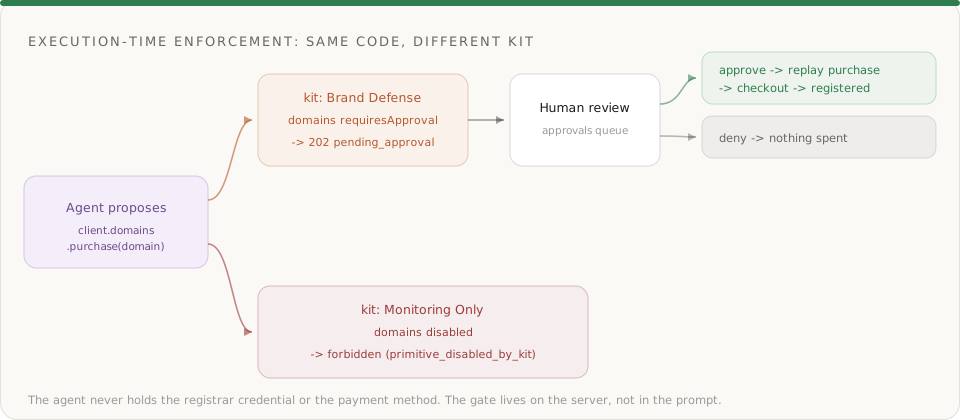
The tier is enforced, not suggested
Prove it. Put a second user on the Monitoring kit and run the same code:
const analyst = await naive.users.create({ external_id: "northwind-analyst" });
await naive.accountKits.assignUser(monitorKit.id, analyst.id);

try {
  await naive.forUser(analyst.id).domains.purchase("northwindledger-login.com");
} catch (err) {
  if (err instanceof NaiveError) {
    console.log(err.code, "-", err.hint);
    // forbidden - the `domains` primitive is disabled by this user's AccountKit
  }
}- Same agent, same method, same arguments — different kit, different outcome.
- The Defense tenant got a
202 pending_approval(a spend it could make, with sign-off). The Monitoring tenant gets a thrownforbidden(a spend it can never make). Neither result depends on what the agent's prompt says. - This is the difference between "we told the agent not to" and "the agent cannot." Only the second one survives a jailbreak, a bad tool call, or a hallucinated recommendation.
Isolation across tenants
Every call through naive.forUser(tenantId) is scoped to that tenant. Northwind's agent sees Northwind's domains, approval queue, and credit spend — and nothing else. A domain or approval id from another tenant resolves to not_found. You run one agent code base; each brand gets its own isolated, governed identity.
Step 6: Close the loop — wire an abuse inbox
Registered a defensive domain, or brought one you already own via connect (BYOD)? Give it a job. A defensive registration is most useful when it can receive — takedown correspondence, abuse reports, and forwarded phishing samples all need a home. The /email primitive runs on the same domain identity:
// Once a defensive/BYOD domain is active, stand up an abuse inbox on it.
await client.email.createInbox({ local_part: "abuse", domain_id: "dom-uuid" });
// abuse@<your-defensive-domain> is now live and per-tenant isolated.- Domains, email, and DNS are one identity surface on Naïve — see
/domainfor the full connect → verify → send flow. - Note the current 3 purchased domains per company cap: brand defense is deliberate, not a spray. Rank threats, register the few that matter, and bring the rest via
connect.
Step 7: Put it on a schedule
Detection should run continuously, not once. Register a recurring sweep with the CLI so the loop runs on its own and only ever pages a human when it wants to spend:
npm install -g @usenaive-sdk/cli

naive cron create "0 6 * * *" \
  "Enumerate lookalikes of northwindledger.com, screen availability, investigate taken lookalikes with web search, and propose defensive registrations for anything scoring high or critical. Never register without approval." \
--name "Northwind daily domain sweep"- The sweep runs unattended. Detection and investigation happen autonomously; the only thing that ever waits on a human is a purchase.
- Scale to a portfolio by running the same sweep under each tenant. The kit each tenant carries decides whether a sweep can propose registrations at all.
What Naïve handles for you
| Concern | How Naïve handles it | Cost |
|---|---|---|
| Per-tenant identity | naive.users.create + naive.forUser(id) scope every call to one brand | Free |
| Capability tiers | AccountKit primitives_config — enabled/disabled + requiresApproval, checked server-side | Free |
| Availability lookups | GET /v1/domains/search — availability + price | Lightweight |
| Grounded investigation | OpenRouter web-search server tool, forwarded through /llm, with strict JSON verdicts | OpenRouter cost → credits_used |
| Spend gate | domains.purchase returns 202 pending_approval; humans replay via /approvals | Free to gate |
| Domain registration | Purchase completes through checkout; auto-configured for email | ~$14.99/yr per .com |
| Abuse handling | /email inbox on the same domain identity | See email pricing |
| Automation | naive cron create runs the sweep unattended | Free to set up |
Why this can't exist without the moat
Strip Naïve out and picture the alternative: a cron job with a registrar API key and a saved card. It works right up until the model classifies a legitimate partner domain as a threat, or an attacker feeds it a prompt, or a bug loops the purchase call — and now you are explaining a registrar bill and a batch of unwanted domains.
The three primitives that make this safe are the three the prompt cannot override:
- Identity — the agent acts as a tenant, not as a god-mode key.
naive.forUser(id)is the boundary. - Accounts — the agent never holds the registrar credential or the payment rails. Naïve does, and injects them only when an action is authorized.
- Execution-time permissions — the AccountKit decides, on every call, whether an action runs, freezes for approval, or is forbidden. That decision lives on the server, not in the prompt.
Detection you can build anywhere. An autonomous agent you can safely point at money, across thousands of brands, is what the primitives are for.
Get started
- Install the SDK:
npm install @usenaive-sdk/server - Create a tenant with
naive.users.createand a Brand Defense AccountKit that gatesdomainsbehind approval - Run the loop — enumerate lookalikes, screen availability, investigate with OpenRouter web search, propose registrations
- Approve the ones that matter from the Approvals queue or the dashboard
- Schedule it with
naive cron createand repeat per brand
- Domains: usenaive.ai/docs/getting-started/domains
- LLM (OpenRouter wrapper): usenaive.ai/docs/getting-started/llm
- Account Kits: usenaive.ai/docs/getting-started/account-kits
- Approvals: usenaive.ai/docs/getting-started/approvals
- Full documentation: usenaive.ai/docs
What is an AI brand-protection agent?+
Why can't this just be a script with a registrar API key?+
How does the approval gate work?+
How is OpenRouter web search called through Naïve?+
What makes this multi-tenant?+
How many defensive domains can the agent register?+
What does this cost to run?+
How do I get started?+
Building the autonomous company infrastructure.
AI agent permissions should be enforced server-side at execution time, not prompted. Here's how policy templates gate primitives, apps, and approvals.
A governed agent profile is an AI agent with identity, spend limits, approvals, audit, and instant revoke — enforced on every action. Here's the full lifecycle.
Connect, verify, purchase, and manage domains for a Company — including DNS on the live zone and email-provider records — per the published Domain Management guide.
Human-in-the-loop approvals that freeze sensitive actions until you say yes, a per-user audit trail of everything an agent did, short-lived scoped MCP sessions, and unified async job tracking — the controls that make an autonomous fleet safe to run.